


Google is putting Nest Hub smart displays in some hotel rooms, and that's totally fine


I consider myself to be rather privacy conscious, but I am not overly paranoid. Do I want Google having microphones in my home? Not really, but the convenience of being able to summon the Google Assistant with my voice outweighs my concerns. And so, I have a few Google Nest devices in my home -- including a Nest Hub smart display in my bedroom. Ultimately, consumers need to weigh the pros and cons before putting, say, an Amazon Echo or Nest Mini in their homes.
Now, Google is partnering with some hotels to put Nest Hub smart displays in their rooms. In other words, when guests enter their room, they will be confronted by the smart device. While some privacy pundits will decry this partnership, I welcome it. First of all, the functionality does not require the guest to login -- it will work without that. While the Nest Hub smart display has a microphone, it can be totally disabled via a hardware switch. Best of all, Nest Hub has no camera, so there is no risk of it recording video of your... adult activities. The search giant promises no audio recordings are stored either. Seems all good to me!
Plugable launches elegant USB-C 7-in-1 Hub for Windows, macOS, and Chromebooks
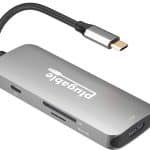
If you buy a new laptop nowadays, there is a good chance it will only have USB-C ports. If you still have older USB-A devices, what are you to do? Yeah, you can buy a USB-C to USB-A dongle, but with multi-port hubs being so affordable, you are better getting one of those. After all, they often have much more value, by offering things like video output and card readers too.
Today, popular company Plugable launches its latest portable USB-C hub (it can also be used at home too, of course). The 7-in-1 hub provides all the things you would expect, like USB-A ports, 4K HDMI, SD card readers, and pass through charging. While it lacks Ethernet, that won't really matter to those that only use Wi-Fi anyway. Best of all, it is extremely affordable -- you can get it right now for less than $25...
Apple donating money to National Park Foundation

President Theodore Roosevelt is largely responsible for kick-starting the national parks movement in America, and we should all be thankful for his thoughtfulness and focus on conservationism. Sadly, these parks are often under attack, most recently by the Trump Administration. Of course, it shouldn't be surprising that a real estate mogul would be a threat to protected land. Hell, if Trump had his way, the national parks would probably be filled with tacky condominiums!
If you want to help protect these parks, all you have to do is buy an Apple product! You see, starting on 8/24 (today) and running through 8/30, the iPhone-maker will donate $10 to the National Park Foundation for every purchase made using Apple Pay at a physical Apple Store, on Apple.com, or with the official Apple Store app. Yeah, depending on how you look at it, they are essentially donating your money and taking the credit. This is to celebrate the 104th birthday of the USA's national parks, which occurs on 8/25. Money aside, the company is also helping people learn more about these national treasures.
Synology launches DiskStation DS1520+
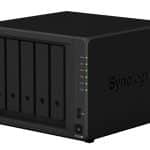
How to handle storage is a very tricky business. Some people prefer storing files locally, while others like the convenience of the cloud. Thankfully, you don't necessarily have to choose between the two -- you can sort of get both simultaneously. In other words, you can set up a network attached storage (NAS) device to store your files locally but also access them on the go -- a self-hosted cloud, if you will.
Synology is one of the most trusted names in network storage, and for good reason. Its storage/server devices are very robust -- high-quality and chock full of features. I have personally been testing one recently, and find it a great way to backup files and access media files (Plex server FTW). Today, Synology launches its latest such product. Called "DiskStation DS1520+," it has an impressive five bays. It also has two NVMe PCIe SSD slots for cache.
WD My Passport SSD is a fast, beautiful, and durable USB-C NVMe solid state drive
I still remember getting my first-ever solid state drive -- a SATA model with a small capacity by today's standards. It was mind-blowing to see how fast Windows could boot from it. Also great? No longer being forced to hear the sound of a mechanical hard drive seeking for data. All things considered, the transition from HDD to SSD was one of the most significant upgrades of my entire computing life. And you know what? I am sure many consumers would say the same.
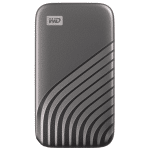
With all of that said, solid state drives aren't just great inside computers -- they work wonderfully outside of them too. What do I mean by that? I am referring to portable storage. Thanks to NVMe drives, external storage devices can be faster and tinier than ever. Not to mention, with USB-C, you never have to worry about plugging in the connector the wrong way either. Today, Western Digital launches such a drive and it is absolutely gorgeous. Called "WD My Passport SSD," it features an internal NVMe drive, USB-C connectivity, and a beautiful metal exterior that oozes elegance.
System76 Bonobo WS Linux laptop returns with Core i9 and GeForce RTX 2080 Super
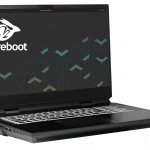
Fans of computer maker and seller System76 will undoubtedly remember the Bonobo WS. This was a desktop-class laptop that provided insane power. Of course, calling it a "laptop" is only true in form factor -- it isn't likely that many will use the hulking beast on their laps. Instead, it is intended to make high performance portable -- and then be used on a desk or table.
Today, System76 brings the Bonobo WS Linux laptop back with very modern specifications. In fact, on the top-end, it can be configured with a 10th generation Intel Core i9 and NVIDIA GeForce RTX 2080 Super. All of this power is cooled by an impressive number of heat-pipes and dual-fans.It is absolutely loaded with useful I/O, including ports on the rear. For an operating system, you can choose between Ubuntu and System76's own Ubuntu-based Pop!_OS. Best of all, it comes with Coreboot plus System76's own Open Firmware and Embedded Controller Firmware.
ADATA announces a pair of fast-charging USB power banks with a lot of juice

Electricity is something we all take for granted -- you flip a switch and you instantly have light. It is like magic, if you think about it. When there is a blackout, however, we all quickly realize how dependent we are on electricity. Just recently, in the Northeastern USA, Tropical Storm Isaias wreaked major havoc. Here on Long Island (where I live) many folks were left without power for days. Not only did many families lose all of their refrigerated and frozen groceries, but they couldn't charge their smartphones either.
This is why it is essential that everyone own at least one USB power bank for emergencies -- during a blackout, you will be glad when you can charge your phone. ADATA recently launched two new USB battery packs with digital displays that should fit the bill. Called "P20000QCD" and "P10000QCD," the former offers a 20,000mAh battery, while the latter has 10,000mAh. They both have two USB-A ports, but P20000QCD also has two USB Type-C ports. The P10000QCD only has a single USB-C.
Plugable launches UD-3900PDZ Triple HDMI Display USB-C Docking Station
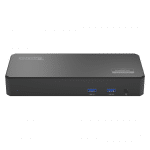
USB-C docking stations are rather common these days. In fact, sites like Amazon are littered with countless makes and models. Of course, not all of them are good, nor are they all the same. Features can vary from dock to dock, such as the number of USB ports or video outputs.
Speaking of video output, most USB-C docks have either one or two such ports. Today, however, Plugable launches a docking station with three HDMI ports, and yes, they can all be used simultaneously for a triple monitor configuration. Despite having so many video outputs, it doesn't skimp on other useful ports.
Debian-based MX Linux 19.2 KDE Edition now available for download

A couple months ago, MX Linux 19.2 was released. It's a really solid operating system that has been growing in popularity lately. The problem is, it uses Xfce for its desktop environment. While Xfce isn't bad, it isn't the most attractive DE -- it is designed with a bigger emphasis on being lightweight as opposed to having a lot of eye candy. For users with meager hardware, that is absolutely fine. However, for those with more powerful computers, there could be a feeling of disappointment by the ho-hum visuals.
Well, for those that love MX Linux 19.2 but want a more beautiful user interface, I have great news -- a KDE Edition of the operating system is now available for download. The distro uses KDE Plasma 5.14.5 and the Debian (AHS) 5.6 kernel. MX Linux 19.2 KDE comes with plenty of excellent software pre-installed too, such as GIMP 2.10.12, Mozilla Firefox 79, LibreOffice 6.1.5, VLC 3.0.11, and more.
Microsoft Translator now supports Odia (ଓଡ଼ିଆ)

Throughout the history of humanity, there have been countless spoken and written languages. Some are still actively used today, while others are no longer common. Sadly, some languages have even been lost forever.
Thanks to translation services, such as Google Translate and Microsoft Translator, it’s possible to converse with someone that speaks a language you don’t understand. Regarding the latter service, it now has support for the written Odia language. While you may not have heard of this language (I hadn’t), it is apparently spoken by millions of people globally.
Ubuntu-based Linspire 9.0 is a Linux distro that costs money -- don't buy it

There are many great things about Linux-based operating systems. Not only are they often lightweight and good for older hardware, but they can be customized too thanks to the various available desktop environments. Unlike Windows, which only has one user interface, Linux distros can have several. Of course, one of the biggest benefits of Linux is that it is free. There are countless great operating systems based on the open source kernel that cost nothing, such as Ubuntu and Fedora.
The thing is, Linux-based operating systems don't have to be free. In fact, just because the Linux kernel is open source, that does not mean that a Linux distribution can't incorporate closed source code. This brings us to Linspire -- one of the rare Linux-based operating systems that costs actual money. Believe it or not, it isn't even cheaper than Windows 10 Pro! Version 9.0 was recently released, but you probably shouldn't buy it.
Google makes it easier to vote in the 2020 US Election

The stage is set for the 2020 US Election. We finally know the makeups of both tickets -- Trump and Pence (Republican) against Biden and Harris (Democrat). It is largely expected that the Democrats will win given Donald Trump’s horrible performance as president, but hey, you never know. In 2016, Hillary Clinton was considered the front runner, and we know how that turned out.
That’s why, if you want Joe Biden to be your next president, it is very important that you vote this year -- don’t become indifferent because you assume he is going to win. If you are a first-time voter or just someone intimidated by the voting process, I have good news. Google is making it very simple to learn how to register to vote and what is required to actually cast your ballot.
5 reasons you should NOT buy Microsoft's Surface Duo

Microsoft is a wildly successful company, and when it comes to desktop computing, no one comes close to competing. Whether a computer is for home, education, or business, Windows is probably powering the experience. And yet, when it comes to mobile, Microsoft is a huge failure. The company got a head-start with Windows Mobile pre-dating the iPhone, but it squandered that lead with terrible products such as Kin, Windows Phone, and Windows 10 Mobile.
Microsoft finally admitted defeat by killing Windows 10 Mobile. Ultimately, the company embraced Android by bringing its own launcher to Google's Linux-based operating system. Today, Microsoft launches its first-ever Android device. Called Surface Duo, it copies the dual-screen concept pioneered by LG. Sadly, the smartphone appears to be a train wreck. Here are just five reasons why you should not buy it.
1Password finally comes to Linux -- Ubuntu, Debian, Fedora, and more!
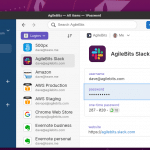
If you aren't using a password manager to both create and store your various online passwords, you are doing yourself a great disservice. True, storing your passwords in the cloud seems counter-intuitive, but in reality, it is far more secure than re-using passwords or writing them down. Make sure you are also using Two-Factor Authentication (2FA) whenever possible too.
On the desktop, there are many password managers for Windows and Mac, but on Linux, things are far more limited. For instance, 1Password is arguably the best password manager in the world, yet despite a decade of requests for it to come to Linux, it never did. Sure, Linux users could use the 1Password X browser plugin, but there was no native Linux version. Well, folks, this is no longer true -- as of this month, developer Agilebits has finally brought 1Password to Linux as a development preview!
Dell launches Latitude 7410 Chromebook Enterprise laptop and 2-in-1
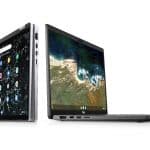
When it comes to business, Chromebooks are still largely unproven. Look, I get it, it is hard to break dependence on Microsoft Windows and Office after so many decades. The thing is, as more workers move to web browser-based applications and cloud-based storage, Windows is becoming unnecessary for some businesses. Hell, because of malware and maintenance costs, Windows can be seen by some as a liability. With that said, in addition to Linux programs and Android apps, Chromebooks will soon be able to access Windows software too.
And so, it is looking like Chromebooks will eventually have a significant role in the enterprise. To highlight this emerging business-computing sea change, Dell (a major Windows partner) launches two new business-class Chrome OS computers today -- the Latitude 7410 Chromebook Enterprise laptop and 2-in-1. One is a traditional clam shell notebook, while the other also serves as a tablet.
Brian's Bio
Staff Journalist
Ethics Statement© 1998-2026 BetaNews, Inc. All Rights Reserved. Privacy Policy - Cookie Policy.