

0patch comes to the rescue with free micropatches for Windows PrintNightmare vulnerability

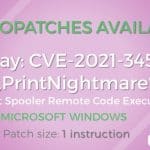
Micropatching specialist 0patch has stepped into help out with a fix for the PrintNightmare vulnerability that was recently accidentally leaked by security researchers.
While Microsoft has acknowledged that there is a security flaw in Windows Print Spooler that could lead to remotely compromised systems, the company has only offered workarounds rather than a patch. And so 0patch -- no stranger to helping out in such situations -- has stepped up to the plate and issued free micropatches of its own.
Microsoft suggests workarounds for critical, unpatched PrintNightmare exploit

When security researchers inadvertently published technical details of a remote execution vulnerability in Windows Print Spooler thinking (wrongly) that it had been patched, there was concern about the implications.
And rightly so. Microsoft has confirmed people's worst fears, saying that the PrintNightmare security flaw is already being exploited. There is a little good news, however. The company also suggests some workarounds that can be used to protect systems until a patch is produced.
Microsoft pushes out yet another PowerToys update with important fixes and changes

As if the arrival of an entirely new utility was not enough, Microsoft developers have now released yet another build of PowerToys.
In addition to making important changes to the new Awake tool, PowerToys v0.41.4 is the third release from the PowerToys team in less than a week. It also addresses a number of other key problems and includes a handful of changes.
Windows 11 could spell the end of the Blue Screen of Death

The Blue Screen of Death is iconic among Windows users -- although not necessarily in a good way. Indicative of something having gone terribly wrong, a BSoD (as it is often called) is not something you particularly want to see when you're using your computer.
And with the arrival of Windows 11, the Blue Screen of Death may indeed be no more. But before you get too excited, this is not quite the good news you're hoping for. Sadly, Microsoft has not found a way to stop Windows crashing.
Windows 11 Home will need a Microsoft account, but Pro won't
The release of Windows 11 is still a number of months away, and we're still learning a lot about Microsoft's latest operating system update. In addition to the confusion about hardware requirements, there have been questions about other necessities.
According to sources close to Microsoft, anyone opting for Windows 11 Home will be required to have a Microsoft account. The same is not true for Windows 11 Pro; users will be able to use local accounts if they want.
Parallels will do 'everything that's possible' to bring Windows 11 to macOS

There are many people who prefer to use a Mac, but need to use Windows. Thankfully, to eliminate the need for two systems, there are ways to run Windows in macOS, including using virtualization software.
Following Apple's shift to using its own silicon in Macs and Microsoft's announcement about the upcoming launch of Windows 10's successor -- complete with complex hardware requirements -- there have been questions about whether it will be possible to run Windows 11 on macOS. If Parallels has anything to do with it, Mac users will indeed be able to enjoy Microsoft's newest operating system, including in macOS Monterey.
Windows 11 is making important changes to the way system updates work
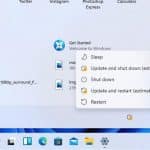
When Microsoft announced Windows 11, the company made a few references to the process of updating the operating system. Windows Updates will work in much the same way as for Windows 10, but steps have been taken to not only reduce the size of downloads to helps speed things up, but also to ensure they will cause less disruption thanks to background installation.
But this does not mean that you'll never need to restart Windows 11 after downloading an update, but Microsoft has made an important change that will help you to decide whether to restart immediately or save the reboot for later.
Security researchers accidentally leak PrintNightmare remote execution vulnerability in Windows print spooler

Security researchers have inadvertently leaked details of a critical Windows print spooler vulnerability, dubbed PrintNightmare, along with a proof-of-concept. The flaw -- said be a Stuxnet-style zero-day -- can be exploited to completely compromise a Windows system.
Microsoft issued a patch for CVE-2021-1675, described as a "Windows Print Spooler Elevation of Privilege Vulnerability" last Patch Tuesday, and this is when things went wrong. Having seen that this patch had been published, security researchers then released technical details of what they thought was the same vulnerability, along with a proof-of-concept. But they had in fact released information about a different -- albeit similar -- vulnerability.
The Windows 11 release date is almost certainly in October
Microsoft may have announced Windows 11, and even released the first preview build, but the company has been somewhat vague about the release date. So far, all that has been said officially is that the operating system will be released in time for the holiday season -- although it seems that this is only for new systems, and upgrades from Windows 10 are due next year.
But hints, rumors and leaks suggest that the launch date for Windows 11 will be in October this year, specifically October 20. Of course, Microsoft has not yet confirmed this, but all evidence is pointing towards this date being correct.
Check whether your computer can be upgraded to Windows 11 using Win11SysCheck

Is your computer up to the task of running Windows 11? To help you to find out, Microsoft released the PC Health Check app, updated it to make it more useful, but then pulled it for not being useful enough.
So how can you check your system's compatibility with Windows 11 -- especially the TPM requirement? We've already written about WhyNotWin11 which does a great job, but you can also try Win11SysCheck, a great open source utility that gives you a straight yes or no, along with helpful information if the answer is negative.
Move quickly to grab this PDF editor for Windows for free!
People with iPhones or Android handsets are used to the idea of discounted apps in their respective app stores. While the same concept exists in the Microsoft Store for Windows 10 apps, it is something that tends to get rather less attention.
But at the moment, there is an interesting PDF tool available completely free of charge. You will have to move quickly if you want to get PDF Manager for free though; this special offer is over in just a few days.
Microsoft releases KB5004760 update to fix PDF problems in Windows 10
Microsoft has released an out-of-band update for Windows 10 that remedies a PDF opening issue.
Available for Windows 10 version 2004, 20H2 and 21H1, the KB5004760 update may not seem like particularly important one, but Microsoft deemed it of enough import to release it off schedule. You will, however, have to go out of your way to find it if you need it.
Microsoft releases PowerToys v0.41.3 with lots of improvements and a new utility

Microsoft has pushed out two new PowerToys builds in very quick succession, fixing lots of issues, making numerous improvements, and adding a brand new utility.
The bulk of the changes came in PowerToys v0.41.2, but this was followed mere hours later by PowerToys v0.41.3 because of a compatibility issue with BitDefender. The latest build is interesting not just because of the number of changes it includes, but also the arrival of the new tool called Awake.
Does Windows 11 really need TPM? Perhaps not...
While there was undoubted excitement at the announcement of Windows 11's impending launch, there was also a great deal of confusion about system requirements. Concern built up around not only Microsoft setting the bar fairly high in terms of CPU generations, making many processors that are far from old essentially obsolete, but also TPM requirements.
Communication about Windows 11's reliance on Trusted Platform Module (TPM) has been poor. Is it TPM 1.2 that's needed, or TPM 2.0? It depends on who you listen to, and which documentations you read -- even official Microsoft documentation. But it turns out that TPM may not be required at all... only in certain circumstances though.
You're not going to get a Windows 11 upgrade until next year
You've probably noticed that there has been an absolute glut of Windows 11 news in recent days. After Microsoft officially announced the upcoming version of its operating system, there has been excitement, analysis, disappointment, leaks, and much more.
And today, Microsoft has delivered some bad news. While Windows 11 is being released later this year, if you're currently running Windows 10, you're going to have to wait until 2022 to get your free upgrade.
Sofia Elizabella's Bio
Sofia Wyciślik-Wilson is a queer, transgender journalist based in Poland. She has been writing about technology for more than two decades, and after years working for magazines, her writing moved online. She is fueled by literature, music, nature, and vegetables. You can find her on Bluesky and Mastodon. If you like what you read, you can Buy her a Coffee!
© 1998-2026 BetaNews, Inc. All Rights Reserved. Privacy Policy - Cookie Policy.