

WindowBlinds 7.4 supports more programs, transparent scrollbars

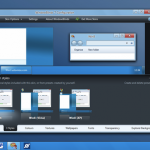
Anyone with more than a passing interest in tweaking the look and feel of Windows is likely to be aware of the existence of WindowBlinds. This highly impressive customization tool from Stardock has been updated with added support for transparent scrollbars in Explorer windows in Windows 7 as well as updates to the Start button and changes to higher DPI settings. WindowBlinds 7.4 also includes a number of fixes for bugs and problems that have been discovered.
Support for a number of specific programs has been improved so if you have noticed issues with Yahoo Messenger, you’ll be pleased to find that the correct theme is now used on frames while a problem with black menu bars in Total Commander has also been addressed. Other program-specific changes that have been made include a number of fixes for Internet Explorer 9 related problems such as better styling for groupboxes and scrollbars.
Want to code your own Android, Flash or iOS game? Try Stencyl 2.0 beta

Coding a game may be something you like the idea of but, much like putting together a website, without the right tools to work with it can seem like an incredibly daunting task. There is no piece of software that is going to create a game for you, but Stencyl is an incredibly intuitive game creation engine that can be used by anyone with the right idea -- it does not matter if you are able to code by hand or not.Stencyl 2.0 beta is the latest release of the software and it packs some serious impressive features.
Version 2 of the program, which is available not only for Window and OSX, but also Linux, picks up from where previous releases have left off, proving you with a set of tools that enable you to do everything from designing in-game graphics to using drag-and drop-action building to determine how different elements will interact with each other. This is an interesting approach to game production, and this is a tool that can be used to make Flash games as well as games for iOS and Android.
Keep out prying eyes with Wise Folder Hider

You don’t need something to hide to have something to hide. Whether you share your computer with others, or your machine is situated somewhere that other people may be able to access it, there’s a high chance that it has files stored on it that you would like to keep private. Documents relating to personal and financial issues are the sorts of files that should be kept away from unauthorized eyes, and Wise Folder Hider Beta is a free tool that makes it easy to do just that.
There are various ways in which you can make sensitive files more difficult to access, but this handy security tool helps to make things as simple as possible. Protecting the files you would rather other people were not able to see take little more than signing into the program account you have created and then dragging and dropping the relevant files and folders onto the program interface -- this can be done on an individual basis, or you can choose to hide a whole bunch in one go.
Geekbench 2.3.0 supports Ivy Bridge, dumps Power Mac
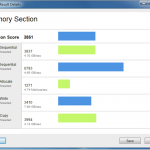
For anyone that is interested benchmarking the performance of their computer, be it a Mac, PC, Linux machine or a mobile device, Geekbench is a simple, low-cost tool that provides you with all of the tools you need. Benchmarking tools are often used by fans of overclocking and tweaking to see what difference can be made to performance, but they can also be helpful for revealing helpful information about the hardware in mobile phones and tablets.
If you are interested in benchmarking performance, it is likely that you are running recent hardware. As such, it is little surprise to find that the latest version of Geekbench drops support for PowerPC Macs. The fact that this is hardware that is no longer supported by Apple and the ever dwindling numbers of remaining users mean that this was really inevitability, and the day has now finally come.
Chrome 19 beta syncs tabs everywhere -- get it now!
Most of us now use at least two devices to connect to the Internet and while this freedom of connectivity is great in many respects, there are also problems associated with it. One of the most infuriating aspects of moving from browsing the web on one computer to using another device is that you will lose the web sites you were looking at. This is something that is addressed in the latest beta version of Google Chrome 19, which features the synchronization of tabs between devices. The feature extends to other devices a capability available with Chrome for Android Beta.
If you are working on your computer at work and then head home, there is no longer any need to send yourself an email with links to the websites you have been looking at during the day. Instead, assuming that you have the beta version of Google web browser installed on both machines and you are signed into your account, when you get home you need look no further than the ‘Other devices’ menu on the new tab page.
Start April right, with one of these 17 downloads

We now find ourselves well into Spring, so what better excuse is needed to start spring cleaning your computer? You can set about doing this manually, but it’s easier if you turn to a dedicated tool to take care of system maintenance.
iolo System Mechanic Free 10.8.3.51 is a free tool that can be used to delete unnecessary files, defrag your hard drive, clean out the registry and much more. If you’re someone that takes a keen interest in the smooth running of your computer, you probably have some form of application monitoring software installed, and Bad Application 1.0 is a simple little utility that will enable you to test these out, checking what happens with crashed and hung applications.
Keep your PC fit with these April software bargains

Looking to save some money on your software purchases? Look no further than the Downloadcrew Software Store this April, where you’ll find all manner of bargains on everything from security tools to audio and video editing programs.
Genie Timeline Professional 2012 is an exciting new release that simplifies and automates the backup of your computer and you can save a massive 50-percent off the MSRP when you buy this invaluable tool for just $29.95. In the store there are also a number of tools suitable for anyone looking to get creative with audio and video files. A top deal is available for CyberLink PowerDirector 10 Ultra, a powerful video editing application that brings professional level tools to the home user -- you can save 30 percent when you buy the program for just $69.96.
Taposé gives iPad split personality
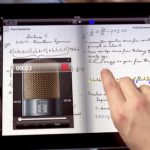
Much has been made of Taposé in recent days, with a great detail of attention being focused on the new iPad app being based on the failed Microsoft Courier project. But it is important to look at this as a piece of software in its own right.
Taken at face value, this is an app that could easily been seen as trying to be all things to all people, but the simple fact: it is a fully-featured tool. Packing notes, maps, word processor, web browser, drawing tools and much more, this is an app that can turn its hand to many tasks.
Keep your hard drive in shipshape with Uniblue MaxiDisk

Taking care of your computer can easily turn into a full time job, so it makes sense to delegate at least some of the responsibility to a third party tool. Uniblue PowerSuite is an impressive collection of maintenance tools that can be used to manage the registry, keep drivers up to date, clean out junk files and much more. The latest addition to the suite is MaxiDisk, a defrag tool that makes it simple to keep your hard drive shipshape -- and there are a few extra options to investigate as well.
At its heart, MaxiDisk is a fairly basic defragmentation tool, but if all you have used in the past is the one that is built into Windows, it is a great leap forward. The analysis process is completed faster than Windows’ defragmenter and you are provided with basic information about the layout of the data on your drive, along with an indication of whether or not defragging is required. The re-organization of files on your disk is something that unavoidably takes time, but it is something that is well worth doing.
Want Windows 8 Metro without the upgrade? Skin it!
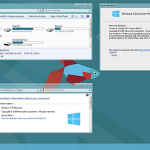
Fancy the idea of using the Windows 8 UI but don’t feel like going as far as installing the consumer preview version of the OS? Look no further than a transformation pack to give your operating system a makeover and a completely new look. If you’re working with Windows 7 you can use Windows 8 UX Pack 4.0, while Windows 8 Transformation Pack 4.0 can be used in everything from Windows XP and up. Both apps bring the look and feel of Windows 8 to your desktop with no need for complex tweaking.
The two skinning app’s version numbers have been brought in line with each other, and there are a number of changes to investigate. Windows 8 UX Pack 4.0 now better mimics the look of Windows 8 thanks to the switch to using the Segoe UI font and inclusion of all of the desktop wallpapers from the Windows 8 Consumer Preview.
37 downloads you shouldn't miss this week

Another week -- month, actually --- is behind us and a huge number of software releases to keep track of. If you feel like you may have missed out on some of the biggest releases, this roundup is here to get you back up to speed.
iolo System Mechanic Free 10.8.3.51 is a great free tool for optimizing your system, but if you’re more concerned about protecting your privacy by securely deleting files, take a look at Disk Wipe 1.5. Auslogics Disk Defrag 3.4.1.0 is a free utility to replace Windows’ defragmentation tool which now offers better stability and performance. There’s also a Pro version of the program available –Auslogics Disk Defrag Pro 4.0.1.50. Infamous system cleaner CCleaner 3.17.1689 and CCleaner Portable 3.17.1689 feature improved cookie options, better support for Chrome and a host of other fixes and enhancements.
Protect your deleted data with Disk Wipe

Whether you’re concerned that files you have stored on a USB drive might be recovered by someone else after they have been deleted, or you are selling your computer and want to ensure that none of your personal documents can be accessed, almost everyone has a need to securely delete data at some point. Simply deleting files is not enough as there are all manner of tool in existence that can be used to restore them, but Disk Wipe is a free, easy to use app that helps to ensure that when a drive is formatted, none of its data is recoverable.
It is not just hard drives that the app can be used to secure. If you have stored private documents on a USB drive or have photos or other files stored on a memory card, the same app can be used to completely format any FAT, FAT32 or NTFS drive that can be accessed from within Windows. In addition to the secure file wiping, Disk Wipe also provides you with a good deal of information about the drives it detects, such as the number of sectors, the manufacturer and serial number.
Undo tweets with Windows 8-inspired MetroTwit
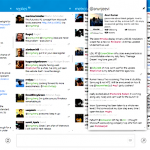
Inspired by the look of Windows Metro, MetroTwit is a unique-looking, clean Twitter client that oozes style and simplicity. The app has just hit version 1.0, having already proved itself to be worthy of note in the beta stages. The official release sees the addition of a number of important new features including highly configurable filtering that helps you to ensure that your stream is not cluttered up with tweets you are not interested in.
In a similar vein to TweetDeck, the MetroTwit interface includes multiple columns that can be used to display different aspects of your Twitter account, and there is great integration with Windows 7 that sees notification area popups revealing direct messages and other interactions.
New Avira security tools come to Android and OS X

When it comes to security, it is fair to say that there is no shortage of apps to choose from. This is especially true for PC users, but anyone with a Mac or Android device now has new tools to add to the list of choices -- thanks to the most recent releases from security experts Avira. Both Avira Free Android Security and Avira Free Mac Security are, as you’ve no doubt determined, available free of charge, and both apps tackle security in different ways.
Avira Free Mac Security is very much what you would expect, offering protection against viruses and malware. This is an app that prides itself on the minimum of interaction that is needed from the user -- for the most part it will sit quietly in the background fending off threats as and when necessary. Definitions updates are made available frequently and the app does its job well. It is sign of a great piece of software when it is not necessary to think about the fact that it is installed.
Yell 'Wahoo' and download 64-bit Opera 12 alpha right now!

The development of Opera continues apace and for anyone wanting to try out the very latest features of the browser, there's a new version to install. The latest build of Wahoo (the codename for Opera 12) is available for the first time as a 64-bit release for both Mac and Windows users and the latest snaps shot also features improved support for HTML 5 and CSS3. As with previous builds of Opera 12, it is possible to install this alongside your current stable version of the browser so you can try it out while maintaining the version you have become used to.
Opera changed the way plugins are handled, to make the move to 64-bits. Plugins now run in a separate process to the browser itself, known as OOPP or Out of Process Plugins, which also not only help to improve overall stability, but the security of Opera as well.
Sofia Elizabella's Bio
Sofia Wyciślik-Wilson is a queer, transgender journalist based in Poland. She has been writing about technology for more than two decades, and after years working for magazines, her writing moved online. She is fueled by literature, music, nature, and vegetables. You can find her on Bluesky and Mastodon. If you like what you read, you can Buy her a Coffee!
© 1998-2026 BetaNews, Inc. All Rights Reserved. Privacy Policy - Cookie Policy.