

Imitate Windows 8 with Mosaic Desktop

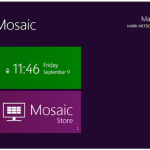
As the launch of Windows 8 draws closer and closer, and increasingly tantalising details creep out about the operating system, the number of tools that enable you to mimic the look or copy the features of the next version of Windows also increases. One such tool is Mosaic Desktop. which enables you to bring the look of the redesign to your Windows 7 computer.
The tiled interface can be used to display a range of information -- from the date and time to the state of your inbox. There are a number of tiles that can be added to the interface, some of which show information about your computer, while other pull in information from the Internet. In order to add new tiles to the basic set that is included by default, you need to pay a visit to the Mosaic ‘store’.
Wi-Fi Finder for Android and iOS hunts down hotspots

If you have an iPhone or an Android phone, the chances are that you frequently connect to the internet using a 3G connection. The same is true for some iPad users, although there are more WiFi-only Apple tablets in circulation. Whether you are working with a device that only offer WiFi connectivity, you are out of range of a 3G signal or you just need faster Internet access, there are numerous reasons you might want to find a wireless Internet connection when you are out and about, and this is something that Wi-Fi Finder can help with.
The app is available for iPhone, iPad and Android, and native versions have been released for each type of device. If you do have a 3G connection, you can use the app online and check in the area for the availability of wireless networks. The database of hotspots includes both free and paid-for networks and you can use filtering to track down particular types of establishment offering WiFi -- you might want to avoid hotels, for instance.
iOS Calendar shoot-out: Calvetica vs Weave

The simple fact that iPhone, iPod and iPads have been designed specifically with portability in mind, they are perfectly suited for use as task management tools. As you are likely to have your iOS device with you at all times, it makes sense to store details of upcoming appointments, information about the projects you are working on, and to keep track of everyday data such as income and expenditure. Two of the most well received iOS apps in this category are Weave and Calvetica. We decided to put them head to head to see which comes out on top.
From the offset Weave is at a major advantage by virtue of being free. This gives the app instant appeal, and the fact that trial versions of iOS app do not exist, save for so-called ‘lite’ versions of apps, it is more likely to be installed by someone browsing the App Store.
Facebook 3.5 for iOS adds privacy controls but no dedicated iPad app

The good news: Facebook 3.5 for iOS is available, packing some new privacy controls. The bad news: There's still no dedicated iPad app. For now we’ll have to content ourselves with a less major updates. The v3.5 app reflects some of the privacy changes that have been made to the Facebook website, as well as bringing in tagging and location options.
New privacy settings are in place that can be configured to control who will be able to see and comment on the posts you make. You can choose to make posts public, limit them to your friends list or a particular group you have already set up. The settings you choose for a particular post remain in place until you change them for a future post, so be sure to check before making more status updates.
IObit Uninstaller 2 nukes pesky toolbars and anything else you don't want
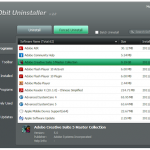
Hard drives are larger and cheaper than ever before, meaning there is less of a need to reclaim disk space for reasons of capacity. But there is still a market for disk cleanup and uninstaller software. It's a perception thing: switching from the idea of looking at such tools as freeing up megabytes to instead regarding them as clearing up the mess left behind by other programs; it’s then easy to see their worth. One such utility is IObit Uninstaller 2.0, which comes with the added benefit of having being free.
Windows includes a dedicated section of the Control Panel to help make it easier to remove software you have decided that you no longer need, and used in conjunction with an application’s own uninstaller things generally go smoothly. But can you really be sure that all traces of the program you just nuked has been completely wiped out? The obvious program folder may have disappeared, but what about entries that may have been added to the registry, or files that have been added to system folders?
Move over GarageBand and make room for MAGIX Music Maker MX

Music creation software has something of a poor reputation, with many people regarding it as being expensive to buy and complicated to use. This is a reputation that MAGIX is trying to change with its Music Maker program, and the latest version, MAGIX Music Maker MX goes a long way to achieving this aim. While the program is incredibly simple to use, the music creation you produce using the software can be made as basic or as complex and involved as you like.
Used at its most basic, MAGIX Music Maker MX provides you with 64 audio tracks onto which you can arrange a series of samples to create the skeleton of a musical composition. If you want, you can leave things as they are, but even the least musically minded of people could not resist tinkering with special effects, dropping in a few loops here and there, and then there is the drum machine to play with. Before you know it, you have become fully engrossed in the process of putting together a piece of music -- and it does not matter that you’ve never picked up an instrument in your life.
Want something other than Mobile Safari? Try Dolphin Browser

The choice of browsers for iOS is hardly overwhelming, so any new additions are always welcome. Dolphin Browser is the latest contender to vie for mobile Internet users’ attention and it has a number of unique features that make it well worth a look. The headline feature is support for gestures, but there is also desktop style tabbed browsing, an impressive smart address bar and space-saving sidebars that can be used to access bookmarks and app options.
There are already a handful of Safari replacements available, including the iOS version of Opera, so Dolphin is going to have its work cut out for it to stand out from the competition. The fact that the app is available free of charge certainly works in its favor, but it is the way the interface has been implemented, particularly the way in which you interact with it, and the intelligent use of available screen space that makes Dolphin Browser interesting.
Use these tools to get the Windows 8 look now

Windows 8 is just around the corner and it seems that almost every week there details emerge about just what can be expected from the latest version of Microsoft’s operating system. With every new Windows that is announced, there follows a rush to mimic the look and features long before the software hits the shelves, and things are no different with Windows 8.
There are a number of skins and customization packs available that can be used to get the Windows 8 look, including Omnimo for Rainmeter, but if you prefer the idea of getting a little more hands on, there are a range of tools you can use to mimic the elements of Windows 8 you most like the look of.
Finally, Adobe offers PDF creation app for iOS
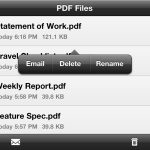
Adobe has been a little slow venturing into the world of iOS software, but the release of Adobe CreatePDF sees it further branching out onto the platform with one of its most well-known services -- the creation of PDF files. iOS is not a platform you would naturally associated with a task such as creating PDFs, but Adobe feels that there is sufficient demand to justify a dedicated app; and quite a pricey one at that.
For $9.99 Adobe CreatePDF offers to create PDF files of the same standard as Adobe Acrobat. This sounds great in theory, even if the price tag is somewhat eye-watering, but there are some issues that need to be borne in mind. Firstly, as the name subtly suggests, this is an app concerned solely with the creation of PDFs. If you are looking to view PDF files you have created or downloaded, you’ll have to look elsewhere.
Infected PC won't boot? Try Dr Web LiveCD
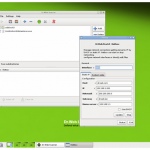
Antivirus and anti-malware software are essential for any computer users, but there are times when your defenses are down. You may have reinstalled your operating system or had to disable your security software for some reason. If you find that for these or other reasons your computer has become seriously infected with malware, perhaps to the point that it will not boot, Dr Web LiveCD is on hand to help you to get things back in order.
As the name suggests, this is a live CD that can be used to boot an otherwise inaccessible computer with a view to retrieving files and fixing problems. Dr Web LiveCD downloads as a disc image that needs to be burned to CD and once this disc has been created it can be used to boot into a Linux environment that can be used to remedy a range of computer problems.
Take Control of Mac OS X Lion with Deeper
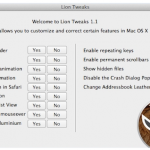
Now that OS X Lion has been out in the wild for a little while, and even updated, it is time for the tweaking tools to be unleashed. Not long ago we took a look at Lion Tweaks which did very much what the name suggests. Another tool well worth taking a look at is Deeper, an impressive Lion customization utility from Titanium Software.
Whether you are a new convert to the world of Macs and find the way some of the Lion’s features work to be a little strange, or if you would prefer it if things were a little more like in Snow Leopard, Deeper is on hand to help you to customise your Mac’s operating system to your liking.
Annotate your photos with Skitch for Android, iOS
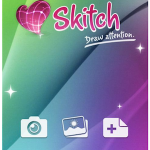
It has been a busy few days for Evernote recently. Less than a week ago the company acquired the Mac application Skitch, and this was quickly followed by a big update to the Evernote iOS app. Just as the main Evernote notetaking app is available on a range of platforms, so Skitch is available not only for Mac but also for Android, making it possible to add annotations and doodles to the photos you take.
Skitch enables you to use a number of text and drawing tools to add information to photographs you have taken. This could take the form of useful notes about a snap you took on holiday, such as the name of a restaurant or attraction you liked, or it could be notes to help someone else understand what is visible in an image.
Need More from Windows 7? Try Explorer Toolbar Editor
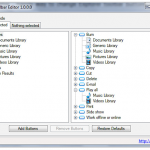
As you browse the contents of your hard drive in Windows Explorer, you will no doubt have noticed that depending on the type of folder you have selected, different buttons are displayed in the toolbar. While Windows generally does a pretty good job of determining what you might want to do with a particular type of file, it is not always right. Explorer Toolbar Editor enables you to choose which buttons you would like to have on display and when.
For example, when you are browsing through folders containing music, or performing searches of these folders, it is likely that you will either want to listen to these files or burn them to a disc so it makes sense to have the relevant buttons on display in the toolbar. However, if you would prefer different buttons to be displayed, or you would like these buttons to be displayed for other folder types, Explorer Toolbar Editor enables you to makes the necessary changes without having to edit the registry.
Did you miss these 26 software downloads last week? Get them now
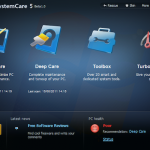
It was such a busy week -- what with Google planning to buy Motorola Mobility and HP killing TouchPad -- you could easily have overlooked a momentous number of new software releases. As the new week begins, we look back on what you might have missed during the last one.
The major release last week was more about the migration of Mozilla Firefox 7 from Aurora to the Beta channel, rather than the recent announcement that Firefox 6 is now stable. Firefox 7 is a bigger update, with much improved memory management and a host of similar features. Read through the blog announcement for more information. In addition to Firefox 6 going stable and Firefox 7 entering beta, Firefox 8a2 hit the Aurora channel, whilst the first preview of Firefox 9a1 hit Nightly. None of the planned UI enhancements have been implemented in this first alpha of Firefox 9 and, for OS X Lion users, these recent Firefox updates may leave you disappointed. The full screen mode does not place Firefox on a separate space and the scrollbars do not mimic the new bars introduced in the new operating system.
Viber vies for Skype's free-calling crown

There is no shortage of VoIP apps available for both Android and iOS platforms, but most of them fall down in one of several ways. The first sticking point that can mar an otherwise perfect app is the presence of advertisements. If these are not present it is likely that you will need to purchase credits in order to make call or send messages. Add to this the possibility for an app to just be bad, and any VoIP app vying for attention has to be something pretty special to avoid criticism. Viber falls into this latter category, being as it is, free, well designed, free from advertisements and lacking the requirement to purchase credits.
As a VoIP app, Viber is pretty much what you would expect. It enables you to send text messages and make phone calls using a WiFi or data connection. If you have the app installed on a phone, you can use it to keep in touch with people without racking up a huge bill and without eating into your monthly call and text allowance; if you have it installed on a non-Phone device, you can add phone functionality free of charge.
Sofia Elizabella's Bio
Sofia Wyciślik-Wilson is a queer, transgender journalist based in Poland. She has been writing about technology for more than two decades, and after years working for magazines, her writing moved online. She is fueled by literature, music, nature, and vegetables. You can find her on Bluesky and Mastodon. If you like what you read, you can Buy her a Coffee!
© 1998-2026 BetaNews, Inc. All Rights Reserved. Privacy Policy - Cookie Policy.