


Is it worth having the Start Menu alongside the Windows 8 Start Screen? [video]

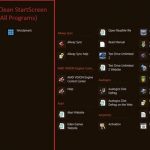
The simple answer here is yes.
There has been much debate about the merits of the traditional Start Menu versus Metro's Start Screen since Windows 8 Developer Preview released last year. Microsoft did away with the Start Button in Windows 8, replacing it and the supporting menu with the Start Screen, which is primed for touch. Supporters, and that includes Microsoft, say it's better. But the argument that the "Start Screen can do everything the Start Menu can is the biggest BS to date.
Do I really need anti-malware?

In the realm of security, there are a number of discussions that never seem to be completely resolved and crop up again from time to time. One of these is the age old question: “Is antivirus really necessary”?
To the average PC user, the idea that antivirus (or more accurately, anti-malware) isn’t necessary may seem as crazy and dangerous as suggesting we get rid of seatbelts in cars (let alone keep airbags, antilock brakes and other safety features). For years, PC users have been told to “protect your PC” by running antivirus and keeping it and the system constantly up-to-date. Microsoft made these steps the foundation for its guidance to customers in the wake of the Slammer and Blaster worms in 2003 and that advice took root, helping to better protect PC users since then.
I traded iPhone 4 for Lumia 900
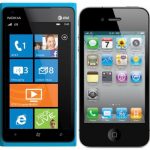
I recently purchased the much-hyped Nokia Lumia 900 and no longer have cellular service on my iPhone 4 and this is my story. (VH-1’s "Behind the Music" dramatic sound effects here).
Reason for switching: My 8 year old accidentally dripped water on my iPhone 4, and the Apple geniuses said there was nothing I could do to fix it. Everything worked but the volume -- wouldn’t ring and Netflix just isn’t the same without any sound. Of course I never have to tell my kids to turn down the weird sounds coming from Angry Birds as they hurl to their impending doom.
Instagram is worth $1B to Facebook

Yesterday, Facebook announced that it acquired Instagram for $1 Billion. The company is less than two years old, has no revenue, and about a dozen employees. Remember, acquisitions are about what the acquirer can do with the company in the future, not some multiple of revenues or profits today. Why is Instagram worth $1 billion?
Facebook acquired Instagram for about $30 per user, or $1B. ($30/user X 33M users = $1 billion) Facebook is valued at about $100 per user or $80 billion ($100/user X 800M users = $80 billion). Other popular social apps are valued around $20 to $50 per user. The monetization models need to work out about the same to justify the valuations.
Mobile app developers, don't forget about privacy and security

User experience is important when developing any mobile app but in an enterprise context, what about security? For example, if you are developing an app that stores personal information there are regulations that ask where this information resides. Depending on the industry, mobile app developers may be completely accountable if any security issues happen on an app that they develop.
To ensure that you are in full compliance to any privacy, security or regulatory questions, it is recommended that apps be developed in-house or through a partner. So do mobile app developers need to consider regulatory, security or privacy concerns in advance of mobile app development projects?
Consolidate your life with Windows 8 [video]

Microsoft’s image of the future makes Windows 8, supported by cloud services, the hub integrating all devices and personalization in the user’s life. The key is the new log-in method, which requires Windows Live ID. Metro application, user settings, Start Screen layout, desktop icons and user files follow the user wherever he or she signs in with Windows Live ID. Microsoft plans one consistent experience across devices. Apple and Google use similar identity mechanisms for iOS and Android devices and syncing content among them.
The problem, and perhaps it's one of those beta things, the process doesn't work so well. Then there's this: everything has to be stored within the Microsoft cloud -- that's Windows Live and SkyDrive, with the optional integration of DropBox. This is all nice if you don’t mind storing you information on someone else's server, with an unknown location and, even worse, risk some unknown people snooping inside your stuff. Do you really trust your files in someone else's hands? Even Microsoft's? There is another way to achieve this lifestyle.
Switching from Android to iOS

Google’s Android and Apple’s iOS dominate the smartphone market with hoards of fans willing to fight tooth and nail for their platform of choice. What is it really like moving from one to the other? I found out.
I made the move from Android to an iPhone 4S over the weekend and reactions have, as expected, been mixed ranging from the disparaging “a downgrade” to “welcome to the club, you won’t regret it”.
Tame the Windows 8 Start Screen [video]
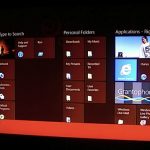
The Start Menu is a powerful tool. Users click the Start button in the bottom left corner of the Windows desktop, pull out the Programs menu and begin tweaking and modifying. Users can right click to add new folders or shortcuts and move shortcuts from one subfolder to another. Deleting folders and shortcuts is just as simple and straightforward. If you've been stumbling around Windows 8 wondering why you can't find the Start button, there's a reason: It's gone.
In Windows 8, all that easy tweaking is, well, not so easy. Users are not able to directly change, add, or delete subfolders and shortcuts in the Start Screen All Programs view. Don’t worry. I've got you covered. Before you know it, that wildcat Start Screen will be a tamed house feline.
Windows 8 mouse and keyboard meet Metro [video review]

I conducted my initial Windows 8 Consumer Preview tips, tricks and review on an Acer Iconia Tab w500. It's time to experience the OS with a mouse and keyboard. So get ready. This is going to be a very bumpy ride. Right?
It's surprisingly easy to navigate around the desktop and then to the Metro Start Screen. As you'll see in the video, it's also possible to mix the desktop and Metro Start Menu. I can safely say that the new Metro UI and elements within the desktop are very easy to use with a traditional mouse-and-keyboard setup.
SalesCrunch to Cisco: We'll acquire WebEx, if you pay us

Today, SalesCrunch publicly disclosed its unsolicited -- what some would call outrageous, low-ball -- offer for WebEx. The online communications platform startup would pay Cisco Systems one dollar plus a 15-percent stake. Essentially, SalesCrunch offers nothing for WebEx, and really asks the tech giant to pay for the privilege of unloading the online-collaboration suite.
Cisco acquired WebEx for $3.2 billion in 2007. A single dollar might as well be nothing. But it's more than that. SalesCrunch wants WebEx assets to build out its own platform, and, of course, the customers. Cisco's involvement could instill confidence, and the bold play for WebEx demonstrate SalesCrunch's hunger to succeed by thinking outside the box. The 15-percent stake could assist the startup winning new rounds of funding or enticing new investors -- hence the concept asking the communications giant to pay SalesCrunch to take on the business.
Windows 8 Consumer Preview Video Review

Windows 8 marks the biggest changes to the operating system's user interface in about two decades. Windows 1.0 and 2.0 retained much from MS-DOS, while v3 brought a totally redesigned graphical UI. Microsoft took the world by storm with Windows 95, further refining the look and feel and introducing the Start menu. The following years and new Windows releases didn’t see major GUI changes.
Sure, Windows XP brought the slipstreamed taskbar and Start menu. Windows Vista added a few new menus, meaningful search box and desktop gadgets. Other changes included Aero Peek, and Previews on running applications. Windows 7 replaced the taskbar with the superbar, providing users more control over and visibility into open applications. For the most part the Start menu is the same as Windows Vista with no changes whatsoever. Windows 8's new tile-like UI Metro does away with it all and where the desktop motif remains for legacy apps, the Start menu is gone. Why fix something that is not broke? After all it only took over a decade to finally get the desktop prefect.
How good are Windows 8 accessibility features for the blind?
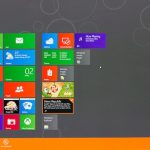
You can find many reviews about Windows 8 Consumer Preview. This one is different because I set out to understand how Windows 8 performs for a blind person who must use keyboard shortcuts to navigate. I am sighted but tested the operating system thinking about my blind nephew.
My review focuses on navigation of the new OS using keyboard shortcuts and no mouse. It is not aimed at partially-sighted or low-vision people who use a mouse and may actually benefit from the larger icons. Neither do I evaluate how screen readers such as JAWS will read the screen contents once the correct location is reached. I suspect that the makers of JAWS and other screen reader software will have lots work to do before their programs will work well with Windows 8. I hope that isn't the case. But my guess is that it will be.
5 ways businesses embrace the Social Revolution

Over the past year, we've witnessed a convergence of social, mobile and cloud computing prompting organizations around the globe to evaluate how they embrace the growing social business market. "Social" has become essential for organizations that want to remain competitive.
Reflecting on the clients I've met across 66 countries, five things surprised me about companies embarking on the social business journey.
Try Auslogics Disk Defrag Pro 4 for free

If you’ve ever tried Auslogics free Disk Defrag tool then you’ll know it’s a quick and easy way to optimize your hard drive, if a little basic: like most of the free defrag tools, the program offers the bare essentials and very little else.
But it’s a very different story with the newly released commercial version, Auslogics Disk Defrag Pro, which is absolutely stuffed with essential features -- and the results are very impressive.
Big Data approach pinpoints malware that other solutions miss

Last month, in preparation for a panel, I was asked to put together a list of pros and cons with respect to using Big Data techniques in the context of information security technologies. While Big Data has benefits that span many security disciplines, it’s important to look at this from the perspective of what we call Advanced Malware Protection, which is the ability to discover, analyze and block advanced malware.
With that context in mind, let’s look at the "pros" of Big Data.
© 1998-2026 BetaNews, Inc. All Rights Reserved. Privacy Policy - Cookie Policy.