


Now you can send the Office ribbon to join Clippy

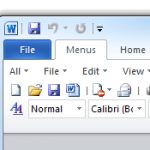
Microsoft's decision to ditch the menus in Office 2007 didn't exactly meet with universal approval. To put it politely. Some users loved the new "ribbon," but others were annoyed about the loss of a familiar interface, and even today it's still an issue for many.
If you're less than happy with the Office ribbon, though, you don't have to live with it. Install a free (for personal use) alternative like UBitMenu or Classic Menu and you'll immediately gain access to the traditional menus and toolbars, in at least some Office applications: it's like 2003 all over again.
Sticker Shock: Software Assurance's fourth deadly sin
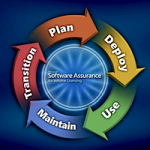
Fifth in a series. Using Software Assurance, Microsoft has crafted a program that promises savings, while often costing businesses even more for software. Sometimes the higher prices are obvious, and that can hurt Microsoft's sales. Other times, it's not so obvious, such as the way Microsoft uses crazy math and a concealed license switch to raise the price on Software Assurance license renewals for larger customers.
What Assurance of Savings?
BitDefender Total Security 2012 enters public beta

Last month Symantec gave us a first look at their Internet Security 2012 technologies, and now it's BitDefender's turn, as today it has released the first public beta of the company's extremely comprehensive Total Security 2012.
We do mean comprehensive. So the lengthy feature list doesn't only include the standard modules: antivirus, antiphishing, antispam, a firewall, and so on. You also get file encryption, a secure file shredder, chat encryption, parental controls, an online backup tool, file syncing, vulnerability detection, privacy options, a tune-up tool to clean up redundant files and Registry keys and a remote management tool that will help you manage these features across your entire network.
Use your Windows PC as an AirPlay receiver

Apple's AirPlay feature makes it easy to share and stream your iTunes library to iOS devices, but it lacks the option to stream media in the opposite direction. Shairport4w is a free application that makes it possible to transform your Windows based computer into an AirPort receiver so you can stream media from one machine to another.
The application can be used in conjunction with any computer or device that includes a version of iTunes or iOS that supports AirPlay, and the process of configuring your computer to be a media access point can be completed in just a moment.
Software Assurance math adds up for Microsoft, not as much for biz customers

Fourth in a series. What constitues savings when buying software upgrades? For Microsoft customers there are but two choices: Buy extra-cost Software Assurance when purchasing a new license or pay full price later on.
It's a gamble that Microsoft will release something new during the three-year SA contract period or that the licensee will even want the product. Savings can be 13 percent over three years, but the costs are sometimes substantially higher.
Startup Disk 3.0 boosts Windows bootup time

Brisbane-based software developer r2 Studios has released a major update to its pioneering startup management application. As the name implies, Startup Delayer 3.0 allows users to delay startup applications to free up system resources and optimize the startup routine. It's also a fully featured startup manager by allowing users to disable and delete unwanted startup applications too.
Version 3.0 is virtually unrecognizable from its predecessors, sporting numerous new features, a recoded startup delay engine and a brand new user interface with drag-and-drop support. It's also now fully compatible with 64-bit versions of Windows (including Windows 7) and User Account Control.
3 ways and lots of software to protect your PC from malware

Microsoft recently revealed that 1 in every 14 downloads on the Windows platform contains malicious software. That's a scary thought, and means your security software could be working overtime in trying to prevent your PC from becoming infected.
Thankfully there are plenty of free (and safe, obviously) tools out there that can help reduce the risk of being infected by malicious software to practically zero. Read on, for our essential guide to the best free tools for helping steer you away from dangerous downloads and websites with malicious intent.
Microsoft's Software Assurance pressures businesses to buy before they're ready
Third in a Series. A decade has passed since Microsoft introduced "Software Assurance" as part of Licensing 6.0. The company rewards loyal customers by asking them to pay ahead for upgrades -- 29 percent of total desktop software price and 25 percent for server products, annually, for two or three years. Customers must make the decision to add Software Assurance when acquiring a new license. It's a one-shot option, with no assurance what the product will be or when it will be available.
Imagine that you have just purchased a new 2011-model car. You've signed the contract, figured you could afford the monthly payments and are thinking Point B looks a lot better from Point A than it ever did.
OSForensics gives up your PC's deepest, darkest secrets

Computer forensics packages are normally used by law enforcement officials, governments and big corporations to find out exactly what someone has been doing on a particular PC. But that's only part of what they can do. A good forensics tool can also help you find lost files, recover passwords, detect malware, and carry out all kinds of other interesting low-level system checks.
It's hard to test this for yourself, of course, because most forensics packages are hugely expensive. But OSForensics is a rare exception. As it's new, and in beta, you can try it out for free -- and there are plenty of reasons why you should grab a copy for yourself.
Software Assurance: How Microsoft gambles with your money

Second in a series. Microsoft makes no assurance that Software Assurance customers will get access to new products, even though they pay 29 percent of the full desktop software price, annually, over a two- or three-year period. It's 25 percent for server software. As I explained earlier today, Licensing 6.0, which Microsoft debuted 10 years ago this month, commits seven deadly sins. I present here the first of seven.
Win, Lose or Draw
Easily customize the Windows 7 startup screen

Customizing the Windows boot screen is something that Microsoft has never made easy. The fact that the images involved are hardcoded into system files is enough to put off all but the most seasoned of tweakers. Windows 7 Boot Updater is a free tool, currently in the early stages of beta, that can be used to customize the animation and text that are displayed during Windows' boot process.
The utility can be used in a few different ways, with the most basic options making it possible to simply change the default text from 'Starting Windows' and '© Microsoft Corporation' to anything of your choosing. You can also adjust the font size, color and position as well as choosing a background color other than the black default.
File Governor takes charge of pesky locked files

You've found a stray file you no longer need, and tried to delete it, only to see an error message like "Cannot delete file: Access is denied," or "The file is in use by another program or user." Annoying, isn't it? Especially if you can't figure out exactly which application might be holding on to the file.
Don't give up just yet, though -- the answer may be closer than you think. Especially if you've a copy of the (newly freeware) File Governor to hand.
ShellMenuView rids Windows context menu clutter

Have you ever noticed just how cluttered up the context menu -- the one that pops up when you click on a file or folder with the right mouse button -- gets over time? You install a new program, and it adds another option to the menu. It might be a genuinely useful option, but then again it might be completely superfluous.
Worse still, does Windows suddenly stop working when you right-click on an item? That's down to an entry that's corrupt. Question is, how do you identify that entry, never mind disable or remove it? The answer lies with a handy free tool called ShellMenuView.
Microsoft software licensing: Seven deadly sins

First in a series. Ten years ago this month, Microsoft introduced the most controversial licensing program in its history: an upgrade rights and maintenance add-on called Software Assurance (SA). The experience was so traumatic that Microsoft has undertaken no comparable licensing initiatives since then. After five major revisions to volume licensing in the decade before 2001, Microsoft has been stuck at Licensing 6.0. That's too bad. The industry is different, Microsoft is different, and it's long past time for a new look at Software Assurance.
A Radical Change
Have it your way with Better Facebook

There's pretty good chance that you are one of the millions of people who have a Facebook account. While the social network has an undeniably huge user base, there are few who would claim that there is not room for improvement. If you've ever wished for a way to customize the appearance of your Facebook account, or would like more control over the way the site works, assuming you're using Firefox, Safari, Opera, Chrome or Greasemonkey, Better Facebook may be just what you have been looking for -- Internet Explorer users are left out in the cold, however.
Better Facebook is a browser extension that can be used to completely change the way Facebook looks and works. In all, there are more than 70 settings that can be applied in various combinations to personalize the social network to your liking. Anyone who has a fairly extensive list of friends will be all too aware that it does not take long for your Facebook news feed to run out of control. Better Facebook adds options such as tabbed news feeds and news filtering so you can concentrate on what is most important or interesting.
© 1998-2026 BetaNews, Inc. All Rights Reserved. Privacy Policy - Cookie Policy.