

What is the most popular household gadget?


Surely it's no surprise that nearly nine out of 10 American adults owns a cell phone. But would you believe that 19 percent own an ebook reader or tablet? Or that one in five dosen't use the Internet? These are among the fascinating findings from a fresh Pew Internet report "Digital Differences".
The findings are a blueprint for understanding Americans' digital lifestyles and what gadgets -- and supporting products and services -- fit in where. Major tech companies create distinct digital lifestyles people buy into, which is particularly true for Apple, Dell, Google, Microsoft, Samsung and Sony among others. Apple, Google and Microsoft are in pitched lifestyle product competition, and should look to studies like this one to understand the stunning nuances connected, so-called post-PC devices bring to consumer behavior.
FluffyApp 2.0 lifts Windows users to the Mac cloud


Richard Wang has released Beta 2 of FluffyApp 2.0, his free Windows client for accessing the CloudApp file-sharing service. CloudApp allows Mac users to quickly and easily share files via free and paid-for cloud-based storage, and FluffyApp brings this functionality to Windows users.
Version 2.0’s main improvement is in its user interface, introducing a flyout for displaying drop history as well as providing tabs for uploading files and publishing text and shortened links. Other changes include a consolidated area for options and Hotkeys using the standard Windows mechanism.
Don't cry for me, iPhone

Mark April 16th on your calendars as a day to remember -- and not because your taxes are due tomorrow, Americans. The weeks ahead promise cool ways to spend your refunds (assuming the tax man giveth back to you). Some of the best smartphones will arrive this week, with a blockbuster announcement coming in 17 days -- from Nokia and Samsung and another Samsung but with a big dash of Google sprinkled in. And Apple? Aaaaaahnt! Sound the game show buzzer. LTE iPhone is nowhere to be seen.
Coming April 22nd are not one, but two tasty 4G treats. As previously announced, Nokia Lumia 900 Windows Phone comes to AT&T all decked out in white -- yours for 100 bucks. Meanwhile, announced today, for an extra C Note, Sprint subscribers can get Galaxy Nexus along with fat $50 credit to put in their Google Wallet; the only real Google phone comes to the only national carrier with unlimited data. Looking ahead, Samsung today dispatched invites for a splashy May 3rd launch event -- it's the next Galaxy phone, baby. Don't cry for me, iPhone!
Get more from open windows with eXtra Buttons

As standard, Windows gives you very little control over windows that you may have open. The title bar is usually home to just three buttons to close, maximize and minimize the current window. You can have more -- eXtra Buttons is a great, free tool that can be used to add a host more controls. This affords you a far greater level of power when it comes to managing your windows and enables you to perform a number of handy options with just a click of the mouse.
Unlike other similar tools that provide you with extra title bar buttons for programs and windows, eXtra Buttons feels like a natural part of Windows. In fact you’re likely to find that when you have used the app for a little while, moving to a computer that does not have it installed will feel like something is missing. In total there are thirteen different buttons that you can add to your title bars, and you can pick and choose which you would like to have active.
As Metro debate smolders, will it burst into flames and consume Windows 8?

On Friday, colleague Ed Oswald opined "Metro apps on Windows 7 is a bad, bad idea". I agree. Ed responded to Adrian Kingsley-Hughes' ridiculous commentary: "Bring Metro apps to Windows 7 to encourage developer growth". He usually writes good stuff, but this one is a stinker. Metro doesn't belong on Microsoft's current OS, and BetaNews commenters raise legitimate questions about how much it belongs on Windows 8.
Metro is a hotly-debated topic here, and on other sites where Windows enthusiasts gather. There's general consensus that Metro works for touch, albeit with too much scrolling to the left once there are many apps, but controversy about its functionality with mouse and keyboard and position as primary user interface is fierce. Some readers here also question whether or not touch should be the future Microsoft bets on. Windows 8's success depends on Metro -- businesses, consumers and developers embracing it. If they don't, the OS could be the biggest flop since Windows ME or Vista. Take your pick which!
As if Nokia Lumia 900 Windows Phone didn't have enough problems...

Nokia has enough Lumia 900 marketing problems, without twitter making more. The photo with this post is pretty self-explanatory and shows how nasty promoted tweets can be.
The smartphone went on sale from AT&T April 8 for $99.99 -- that's quite a good price. Then almost immediately users started complaining about Internet connectivity problems, and Nokia quickly responded by making a magnanimous offer: $100 back to the people who already bought the phone and were willing to install a software update. Anyone else: Phone replacement. Meanwhile, Lumia 900 is free to new buyers until April 22. Okay, so why is there a promoted tweet in my feed on April 15: "That's right! Starting April 8, the Nokia #Lumia900 can be yours for $99.99 exclusively at @ATT"?
Metro apps on Windows 7 is a bad, bad idea

As we move closer to the launch of Windows 8 -- and the sea change that the Metro user interface brings to the platform -- there's an ever increasing drumbeat of both skepticism, concern, and apprehension depending on who you talk to.
End users are skeptical of Metro because they do not see its value. The interface completely changes how we interact with Windows, and in some cases will confuse us. I point you to this video of tech pundit Chris Pirillo's father attempting to use Windows 8 for the first time without instruction as an example. Microsoft may have unintentionally added an extra layer of complexity in an effort to simplify the OS.
NovaBACKUP 13 improves disaster recovery


NovaStor has released NovaBACKUP 13, the latest edition of its flagship backup suite. And the big news this time comes in some major additions to the program’s Disaster Recovery abilities. NovaBACKUP now supports full, incremental and differential drive imaging, for instance, which should deliver significant performance improvements for most people.
The program now allows you to access individual files and folders within an image, as well as restoring the entire backup. The Windows PE-based boot disc provides a familiar environment to recover your system, should disaster strike. The program can now recover a disc image to another PC with different hardware.
Apple defends ebook price-fixing by calling Amazon a monopoly

Apple shot back at critics and the Justice Department late Thursday, denying claims that it colluded with publishers to keep the price of ebooks artificially high. Even more interesting? The Cupertino, Calif. company took a veiled shot at Amazon, saying its actions were necessary to break up the retailer's monopolistic grip on the industry.
These claims are interesting considering the same argument can be made against many of Apple's own key businesses. The Cupertino, Calif. company controls 70 percent of media downloads according to Nielsen, while Gartner says Apple's iPad holds 61 percent of the tablet market. The App Store makes a dollar for every 23 cents generated by Google Play, according to mobile advertising firm Flurry. By what measure is monopoly then?
Got the Flashback Trojan? OS X update removes it

I'd clap my hands and slap Apple on the back, but yesterday's Flashback fix took too long -- and lots of negative publicity with it -- coming. There shouldn't have to be an uproar, or massive Mac botnet, for Apple to get an urgent security fix out there. Technically, a fix released last week. This one goes further and does what many Mac users will need most: Malware removal.
Criticism aside, there is reason for praise. The update disables Java applets from running. If the user flips on the switch but no applets run for awhile, the capability is disabled again. Smart. Apple already takes a heavy hand to Adobe Flash in Safari. Disable all plug-ins by default, I say. Let people use them only if needed, and when not used for awhile bugger them.
Mistakenly type LIKE THIS? Try CapsUnlocker

It’s a common keyboard annoyance: you’ve pressed the Caps Lock key, either not realized or just forgotten about it, and then typed a whole line of text IN THE WRONG CASE, or maybe wondered why a website password hasn’t been recognized, before you’ve noticed. Sounds familiar? Then you might be interested in CapsUnlocker, a new tool that can help in a variety of ways.
At its simplest you can use the program as a Caps Lock status indicator, handy if you don’t have one already. (It’s surprisingly configurable, too -- you can choose the icon to display when the key is on or off.) You might disable Caps Lock entirely by choosing the relevant right-click option from CapsUnlocker’s system tray icon.
Google is evil

In the Biblical story, the serpent tempted Eve by offering something she desired -- to be like God. It's appropriate metaphor for every shyster that followed. Evildoers follow a consistent pattern of offering something tempting that masks something else. It's the art of misdirection that assures them power or profit -- often both. If there is a definition of evil, it's taking advantage of others for personal gain. The more people, the more evil. Greater the trickery, eviler still.
That sums up my assessment of Google's non-voting split revealed yesterday concurrently with first-quarter earnings. Stock-split seemingly gives investors twice as many shares as they have now. But half will be non-voting ones, diluting shareholders' say in Google's doings. Essentially, the company seeks to have it both ways -- be private while having the benefits of public investment. The most disruptive company of the 21st century is at it again. The implications are seemingly astounding.
WindowBlinds 7.4 supports more programs, transparent scrollbars
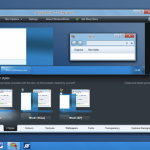
Anyone with more than a passing interest in tweaking the look and feel of Windows is likely to be aware of the existence of WindowBlinds. This highly impressive customization tool from Stardock has been updated with added support for transparent scrollbars in Explorer windows in Windows 7 as well as updates to the Start button and changes to higher DPI settings. WindowBlinds 7.4 also includes a number of fixes for bugs and problems that have been discovered.
Support for a number of specific programs has been improved so if you have noticed issues with Yahoo Messenger, you’ll be pleased to find that the correct theme is now used on frames while a problem with black menu bars in Total Commander has also been addressed. Other program-specific changes that have been made include a number of fixes for Internet Explorer 9 related problems such as better styling for groupboxes and scrollbars.
Want to code your own Android, Flash or iOS game? Try Stencyl 2.0 beta

Coding a game may be something you like the idea of but, much like putting together a website, without the right tools to work with it can seem like an incredibly daunting task. There is no piece of software that is going to create a game for you, but Stencyl is an incredibly intuitive game creation engine that can be used by anyone with the right idea -- it does not matter if you are able to code by hand or not.Stencyl 2.0 beta is the latest release of the software and it packs some serious impressive features.
Version 2 of the program, which is available not only for Window and OSX, but also Linux, picks up from where previous releases have left off, proving you with a set of tools that enable you to do everything from designing in-game graphics to using drag-and drop-action building to determine how different elements will interact with each other. This is an interesting approach to game production, and this is a tool that can be used to make Flash games as well as games for iOS and Android.
If my language is as foreign as Klingon, try TranslateClient 6.0.618

The language barrier isn’t quite the impenetrable wall it used to be. These days you can often muddle through when confronted by what appears to be a stream of gibberish in some random foreign language, but if you find yourself regularly dealing with another tongue, it helps to arm yourself with the right software.
One desktop tool for Windows users worth checking out is TranslateClient 6.0.618, which gives you translation services from within any open application, including your web browser. The free version provides services from Microsoft Translator, while a paid-for Pro version adds Google Translator as well as a number of other additional options.
© 1998-2026 BetaNews, Inc. All Rights Reserved. Privacy Policy - Cookie Policy.