

First-impressions review: ExoPC 'Microsoft Signature Series' tablet

From all the buzz about iPad, or Android tablets, you'd never know that Windows slates are available and that they offer many unique benefits. I recently bought the ExoPC from Microsoft Store. It is a Microsoft Signature Series PC selling for $399 and running Windows 7 Home Edition.
The company says this about Signature Series PC: "Microsoft engineers carefully tune your PC to help it achieve maximum performance, and include software that really makes it fly. Add world-class antivirus security software with no renewal fees along with 90 days of technical support directly from Microsoft. That gives you a PC that's the best it can be, made that way with Microsoft Signature". The computer, or in this case tablet, isn't loaded up with performance-sapping, third-party software.
Facebook for iOS 4.1 mini-review


Facebook for iOS has been something of a staple installation for iPad and iPhone owners. The app has undergone various developments over the years, including finally getting a dedicated iPad app. As the Facebook website has evolved, so the app has changed to reflect new features and now, as the app hits version 4.1, it seems to have come of age. The most recent addition to the Facebook website is the new timeline component and this is just one of the latest features of Facebook for iOS 4.1.
Strangely, at time of writing, the timeline feature is not yet supported on iPad, but it is something that iPod and iPhone users can already take advantage of. If you have already activated your own timeline, you will need to use version 4.1 of the app in order to see it and the timelines of other people who have activated it -- you can go here to get your timeline in place before the fullscale rollout.
Use JetClean to improve your PC's health


As we mentioned yesterday, utilities developer BlueSprig has just released JetBoost 1.0, a free PC speedup tool designed to optimize your PC by closing down unnecessary processes. If this doesn’t have enough optimization power for your needs, though, you could alternatively try the company’s new JetClean, a suite of tools with many more cleaning and repair options.
There’s a module to clean your Registry, for instance. A “Windows Clean” tool helps to free up hard drive space by locating and deleting leftover temporary files; an “Apps Clean” tool maintains your privacy by deleting your online, Windows and application histories; and the Shortcuts Clean module finds and deletes broken shortcuts.
Mozilla releases Firefox 9 -- get it now!


It has been a momentous year for Mozilla and its Firefox and Thunderbird products. Last March, Mozilla released Firefox 4 as part of a new rapid-release cycle, adding Thunderbird to the same cycle shortly thereafter, which ensured a brand new version number would appear every six weeks or so.
Consequently, it will come as little surprise, that practically six weeks to the day since Firefox 8 made an appearance, Mozilla released Firefox 9 Final . Those looking for a slew of new features will be disappointed, but it does contain one major performance fillip that makes upgrading worthwhile.
The AT&T T-Mobile merger is dead


AT&T ended its nine month bid to acquire T-Mobile on Monday, but not before taking parting shots at both the Federal Communications Commission and Department of Justice in a tersely worded statement. Those agencies' actions "do not change the realities of the US wireless industry", the company says, and do not address the biggest issue facing all carriers -- spectrum -- a problem that must be addressed "immediately".
The deal hit its first major roadblock in August, when the Justice Department said it was suing to block the merger. The FCC added fuel to the fire in November with chairman Julius Genachowski proposing hearings on the deal, and an unnamed official leaking a comment to the media saying a combined entity "would result in a massive loss of US jobs and investment".
Google Nexus tablet in six months is a year too late


Google Executive Chairman Eric Schmidt has told an Italian newspaper that the company would release a Nexus tablet within six months. Google's sudden turnabout on releasing a signature Android tablet may reflect his confidence that regulators will approve the Motorola acquisition and concern about Amazon coming to dominate the Android tablet market.
Six months is way late in a market overrun by tablets -- more than 100 -- but with just a handful pulling meaningful sales. Apple's iPad 2 is the market leader by huge margin, according to IDC. In second quarter, iPad media tablet share, based on shipments, was 61.5 percent. Second-ranked Samsung: 5.6 percent. There's no question Google should have released a tablet -- that's past tense -- as in six months ago instead of six months from now. Year ago would have been even better.
The best two tech ads this holiday are from Apple and Google

Unsurprisingly, they promote smartphones -- iPhone 4S and Google Nexus.
Yeah, I know, this is a bit fluffy stuff, but I'm flu-stricken today and barely able to sit up to type. Besides, these are both really great ads that stand out for creativity and how well they demonstrate product benefits. Good marketing is often about great storytelling and, with smartphones like these, communicating a single benefit watchers will remember. You'll remember both these commercials, surely.
Protect your personal info with Identity Finder

User names, passwords, credit card numbers, personal details: your PC may contain all kinds of personal data, easily accessible to malware or anyone with physical access to the system. You know this already, of course, which is why you probably protect your system with a firewall, antivirus package, maybe an encryption tool and more.
But what you maybe don’t know for sure is exactly how much data might be exposed on your system, should an attacker actually be able to penetrate your defences. And that’s where Identity Finder comes in. Tell the free version of the program to scan your system and it will immediately identify any passwords that might be stored by your browsers, for instance. You can then selectively delete all or just the most sensitive of these, and perhaps turn off password storage entirely if it seems too risky.
Make Windows run faster with JetBoost

Utilities developer BlueSprig has released the first full version of JetBoost, its free PC speedup tool, which aims to optimize system performance by temporarily closing down unnecessary processes. And while this kind of application can get a little complicated, JetBoost’s emphasis is on simplicity, with the program doing its job in just a click or two (although if you’d like to take control, then you can get more involved in exactly how JetBoost works).
At its most basic, then, you can use the program just by choosing whether you’d like to optimize your system for a work-related application, or a game, before clicking the “Start to boost” button. JetBoost will then close down surplus Windows services, clear the clipboard, activate the High Performance power plan and apply a few other tricks to free up system resources. You can run your game (or whatever) to take advantage of this, clicking the “Stop” button when you’re done to restore all your services and settings and carry on where you left off.
Verizon Galaxy Nexus first impressions review

This is the droid you've been looking for.
There's saying "three times is a charm" and proven axiom about one of Google's biggest rivals: Microsoft gets products right the third time. Galaxy Nexus, running Android 4.0 (aka Ice Cream Sandwich), is the third Google phone, following the Nexus One (January 2010) and Nexus S (December 2010). If you're an Android user looking for something much better or iOS user/wannabe disappointed there is no iPhone 5 LTE, Galaxy Nexus is for you. Verizon released the long-anticipated US 4G LTE model on December 15. Galaxy Nexus is fast, furious and fun. If not for the 5-megapixel camera, which delivers better photos than I expected, the Android smartphone would be perfect, and it's certainly leaps and bounds above every other handset currently available in the United States.
Join CyberLink PhotoDirector 3 beta, get MediaShow 5 free

Most companies seem to think that offering beta versions for free is sufficient reward to encourage people to try them. CyberLink, it seems, have a different view. Or maybe they’re just being seasonally generous. Whatever the reason, if you participate in the beta program for their digital photo workflow tool, PhotoDirector 3, then you could not only receive a free copy of their media manager MediaShow 5, but you’ll also have a chance to win a shiny new Nikon D3100 DSLR camera, and could even receive a copy of the finished PhotoDirector 3 on its final release.
If you’re unfamiliar with PhotoDirector, then the current version provides an easy way to manage your images in libraries, tag them, search for the shots you need and apply a range of corrective options. And PhotoDirector 3 extends the program’s repertoire further by adding a number of very useful high-end editing tools.
Did you buy Kindle Fire instead of iPad 2?
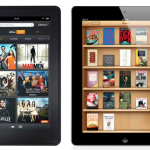
Media tablet shipments missed IDC's third-quarter shipment projections. Meanwhile iPad lost market share; IDC forecasts greater declines for Q4. The culprit: Amazon Kindle Fire (with a little help from Barnes & Noble Nook). In the battle of price, and vertically-integrated content platforms, Amazon is ready to take a bite out of Apple. That brings me to the question of the day: Did you or do you plan to buy Kindle Fire, or even Nook, when previously considering iPad 2 this holiday? Please answer in comments as well as taking our buying poll.
Kindle Fire's big advantage is price -- $300 less than the cheapest iPad 2, at $199. Amazon and Apple compete head-to-head in ebooks, music and movies and curated applications stores. Both command hugely popular brands. Kindle Fire is smaller and doesn't pack a camera, but less also means lower price -- and single one at that. iPads range from $499 to $829.
Get into the holiday spirit with one of these 15 festive downloads

Christmas is very nearly upon us, and over the past couple of weeks we have been collecting together some of the best festive offerings available. Whether you’re looking for some seasonal games to keep the kids (or yourself) entertained, a festive app for your iPhone, or something to give your desktop a more Christmassy look, there’s something here for you. In this round up we take a look at some of the software you may have missed.
For fans of simple strategy games Christmas Troubles -- Tower Defense Game 1.0 is a great way to get into the festive spirit. With fun graphics and instant appeal, this is a game that’s suitable for all ages. If you’re more of a puzzler, Christmas Puzzle 1.0 is a festive take on the classic game Bejewelled, while Christmas Crisis 1.3.9 is a vertical scroller in which the aim is help Santa deliver his presents all over the world.
Does your phone have Carrier IQ? Now you can know

I offer a hat tip to Gizmodo, which has put together a list of smartphones that have Carrier IQ. The company disclosed the information as part of a US Senate inquiry. Sprint subscribers are the most likely to have the spyware installed -- 26 million, or nearly half of them. Verizon: None. The information is also available in a statement from Sen. Al Franken (D-Minn.), just not as quickly scannable.
But not all phones where Carrier IQ is installed have it active. Android developer Trevor Eckhart uncovered Carrier IQ last month, offering detailed explanation how the rootkit-like software works. I followed his instructions to see if the software was active on my Samsung Galaxy S II Skyrocket, and it appeared not to be. Days later I installed Carrier IQ detectors from BitDefender and LookOut Labs, which found the software but didn't indicate its status. Apparently, Skyrocket is one of the phones where Carrier IQ is installed but not active. Same is true of HTC Vivid, AT&T's other LTE phone.
Windows Phone would change my life

Since its announcement, I’ve been an avid fan of Windows Phone. So much that I even created a dedicated news website when it first emerged (Winphonia.com -- no longer active). This was all without ever having held a WP7 device in my hands or even seeing one in person. One of the aspects I genuinely like about Windows Phone is the fact that you can simply glance at the home screen, or the many hubs, and see all of life’s important events with just a peek.
I personally know people who’ve call it non-functional, or too simplistic, or even archaistic. But those people have not done their research. What I see is a phone that lets me tack on all of life’s significant events and priorities in a place where I’ll see it in the forefront.
© 1998-2026 BetaNews, Inc. All Rights Reserved. Privacy Policy - Cookie Policy.