To save money on Christmas shopping, forget Black Friday -- use Microsoft Edge, Bing, and Cortana


Holy cow, it is Thanksgiving week! Somehow the holidays just crept up on me this year. For retailers, this is of huge importance, as Black Friday is almost here. While I will probably do some shopping that day, I will avoid the craziness of Best Buy, Walmart and Target and focus on non-tech Christmas shopping at stores like Kohls.
So how will I save money on tech gifts then? Uhh, the Internet. Yes, I will look for deals online while preserving my sanity and avoiding long lines. According to Microsoft, leveraging Edge, Bing, and Cortana can help you save. Will you try?
Windows 10 finally adds a new Path editor


The Path environment variable is an important setting which has been around since the days of DOS, yet for some reason Windows has always made it awkward to view and edit.
Fortunately that’s changed with Windows 10’s November update (1511), which finally offers an interface you might actually want to use.
Windows 10 set to be the most widely installed version of Windows ever


Windows 10’s growth might have slowed quite dramatically in recent months, but never underestimate the power of free.
According to the latest prediction from Gartner, the new operating system is set to enjoy not only the fastest growth of any version of Windows, but is poised to become the most widely installed Microsoft OS ever, quickly overtaking both XP and Windows 7.
Microsoft pulls the Windows 10 November Update [Updated]

Here’s an interesting story for the weekend -- it seems as if Microsoft has pulled the recently released November Update (aka Threshold 2) from both the Media Creation Tool and Windows Update.
That means if you don’t currently have the update on your Windows 10 device, you won’t be able to download it directly now.
Microsoft shoots itself in the foot using AppComparison to lure Android users to Windows 10 Mobile


After the slightly disappointing launch of Windows 10 -- at least in terms of reception, if not in terms of numbers (well, it was free) -- Microsoft is now switching its focus to Windows 10 Mobile. The aim now is to try to capture Android and iPhone users, convincing them that a Windows-based smartphone is a smart move.
But there's the problem of apps. It's something that crops up time and time again. Microsoft simply doesn't have the support of mobile developers in the same way that other platforms do. Not that Microsoft would admit this of course. To try to convince people that the 'app gap' no longer exists, the company has released AppComparison for Android to show off how many of the apps you use are available for Windows 10 Mobile. The problem is, there are still lots that simply don't exist.
Speed up Windows 10 boot up with this simple tweak

Because I have a super-fast PC with a large SSD as the system drive, Windows 10 boots up really quickly for me. The days of waiting 5 minutes or so for Windows to get to a usable state -- as was sometimes the case in the past -- are long gone, thankfully.
But if you find Windows 10 is taking too long to boot up for you, there’s a setting you can apply which can speed things up significantly. Even if you have no complaints with how quickly Windows 10 loads, it’s still worth applying this (if it isn't on already) because it will make a difference.
Windows 10's privacy invading features aren't gone in Threshold 2

Since the launch of Windows 10, there have been various concerns relating to privacy. Some would dismiss this as little more than paranoia, but a lack of transparency about what was happening in the background broke a lot of people's trust. Many hoped that the release of the Threshold 2 update this month would address this, but in lots of cases it was actually a backward step.
In the RTM release of Windows 10, there was a service running in the background called Diagnostics Tracking Service (also known as DiagTrack), and people concerned about privacy -- who were in the know -- disabled it. In Threshold 2, this service is gone. A cause for celebration you might think; but think again. The service is still there, just under a different guise.
Happy 30th birthday Windows! What's your earliest memory of Microsoft's revolutionary operating system?
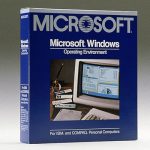
I first started using Windows back in 1992, shortly after the release of Windows 3.1, and I’ve used every iteration since, including both the good (Windows XP, Windows 7) and the bad (Vista, Windows 8). Every time a new version was released, I upgraded pretty much immediately. I might own various Apple devices, and dip into Linux products from time to time, but for me there will only ever be one desktop operating system of worth, and that’s Windows.
Today is a huge milestone for the operating system that popularized home computing, and changed the world in so many ways. Microsoft Windows 1.0 was released on 20th November 1985, two years after it was first announced, and for the first time PC owners were able to control things using a mouse, rather than just typing in commands in DOS.
Microsoft announces its Cyber Defense Operations Center for a mobile-first, cloud-first world

Microsoft invests more than a $1 billion every year on security, showing the company is taking one of biggest digital problems of today quite seriously. The information was unveiled on the Microsoft blog, where the company’s Chief Information Security Officer, Bret Arsenault, reported on CEO Satya Nadella’s keynote in Washington, D.C.
According to the blog post, not only does Microsoft invest large sums of money into security, it is also announcing the Cyber Defense Operations Center, a new state-of-the-art facility which will bring together security response experts from across the company to help protect, detect and respond to threats in real-time.
Windows 10 popular among enterprise users
Almost half (49 percent) of companies which participated in a recent survey by Forrester Research say that they plan on upgrading to Windows 10 by 2016.
The news broke out yesterday, adding that 38 percent of workers who use a computer say they want Windows 10 on their next work laptop, with 9 percent already using it on their primary work device.
Windows 10 Mobile Insider Preview Build 10586 hits the Fast ring -- it's RTM and 'really great'
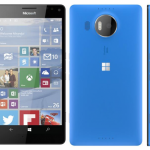
Desktop users have been rather spoiled when it comes to preview builds of Windows 10, but the same cannot be said for mobile users. After a quiet few weeks, Microsoft today releases Windows 10 Mobile Insider Preview Build 10586 to the Fast ring.
The official launch date for Windows 10 Mobile draws ever closer, this will be the final preview build Insider get to see. How do we know? This is the RTM build that comes pre-installed on new Lumia devices and Build 10586 sees Microsoft putting the final finishing touches in place. There are no new features this time around, but bugs have been squashed -- there are just a few things to watch out for.
How cloud strategies differ between Microsoft and Google software sellers


Google Apps for Work and Microsoft Office 365 are the two big beasts stalking the cloud software world, but there are differences in approach between independent software vendors (ISVs) for the two.
This summer the Cloud Technology Alliance surveyed 39 independent software vendors (ISVs) and channel partners about their market strategies for their cloud solutions in both Google and Microsoft environments.
Windows Phone's market share goes into freefall


Windows Phone is becoming an increasingly unattractive proposition in the eyes of smartphone buyers. The tiled operating system dropped to 1.7 percent market share in the third quarter of the year, thanks to extremely weak sales of Lumia devices. Microsoft is the largest vendor of smartphones running the tiled operating system, so its performance has a strong effect on the platform's popularity.
In the third quarter of the year, Windows Phone sales reached 5.87 million units according to research firm Gartner. For the same period, Microsoft says Lumia sales were 5.8 million units, suggesting that its platform market share is close to the 100 percent mark. And things don't look great for Windows 10 Mobile devices either.
How to use File Explorer as a run box in Windows 10

Running commands and launching built-in Windows tools is very straightforward in Microsoft’s new operating system. Just click on the Start button and type whatever you’re looking for, then select the item to launch it.
There is another way to do this though, and that’s through File Explorer. This can actually prove really useful. If, as an example, you’re browsing your hard drive and suddenly decide to defragment it, you can take action without having to switch your focus.
Todoist launches Windows 10 universal app
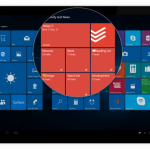
Microsoft is hoping that within the first two to three years after launch Windows 10 will run on over one billion devices. Expectations are high, but the new operating system has a few things going for it which can help it reach that milestone. One of them is universal apps.
The idea is simple: developers can build a single app that works across all types of devices that support Windows 10, including PCs, tablets and smartphones. The software giant's efforts are already starting to bear fruit, as Todoist has just launched its to-do app in Store as a universal app.
© 1998-2026 BetaNews, Inc. All Rights Reserved. Privacy Policy - Cookie Policy.