Ongoing Windows 10 bugs leave me pining for 8.1 on my Surface 3


I am not a Windows 10 "fan boy". In fact, I’ve frequently expressed my dislike for many of the UI choices Microsoft made with the new OS. I’ve also noted how unstable Windows 10 can be for some users, and I’ve extensively documented my own woes attempting to upgrade an HP Envy x2 hybrid laptop (still no resolution to that one).
So, when I knew that I’d be writing extensively about Windows 10 -- both for BetaNews and in my capacity as an Industry Analyst -- I made the decision to invest in what I thought would be the best platform on which to test the OS and its myriad features: A Microsoft Surface 3. My thinking was that, to wring the best experience out of Windows 10, you need to give it a fully-compatible hardware configuration. And what better way to ensure such a configuration than by purchasing one of the very devices Windows 10 was designed to showcase?
Microsoft working on Google Cardboard-like virtual reality headset


It seems as Microsoft is working on a virtual reality device that bears huge resemblance to Google’s Cardboard project. The Microsoft VR kit will be given to developers attending a hackaton which will take place on October 17.
The kit works the same way Google Cardboard works -- it’s a generic headset with a slot for a Lumia phone.
Accepting Microsoft's Windows 10 privacy stance at face value is sheer folly

Yesterday, Microsoft's Terry Myerson defended how the company has handled privacy in Windows 10. The level of concern about privacy in Windows 10 is unprecedented -- it even has some torrent sites spooked -- but my colleague Brian feels that Microsoft has, somehow, earned our trust. He is wrong.
Microsoft has broken the trust of many users, and Myerson's post does little to patch things up. In reality, it is an exercise in public relations, spin, and misdirection. It also raises more questions than it answers. In particular, it highlights the obnoxious disregard Microsoft appears to have for home users.
Microsoft deserves our trust with Windows 10 privacy -- the company earned it


Windows 10 is the best operating system to ever come from Microsoft. I have single-handedly installed it on many computers for myself, friends and family. I have no trepidation about using it or recommending it. With that said, I understand both consumers and pundits criticizing Microsoft over privacy setting in the newest Windows.
Can these settings be confusing for the average person? Absolutely. Should people blindly trust Microsoft? No, not blindly, but based on the company's track record, it has certainly done enough to earn our trust. If you are using a company's operating system, you have to have some level of faith in that company -- otherwise you should disconnect from the Internet or give up on computers altogether. Today, Terry Myerson, Microsoft's Executive Vice President of the Windows and Devices Group, attempts to quell privacy fears regarding Windows 10. You know what? His explanation seems honest and sincere.
Master Office 2016 with these free Quick Start Guides from Microsoft

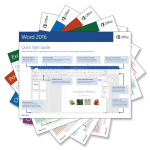
Microsoft launched the much-awaited Office 2016 last week. Available as part of Office 365, or as a standalone suite, there are new versions of the desktop apps for Windows, including Word, Excel, PowerPoint, Outlook, OneNote, Project, Visio and Access.
I’ve been using the new suite since launch, and I really like it even though it’s not massively different from its predecessor. If you’re running Office 2016 (or thinking of doing so) and want to make sure you get the most out of it, Microsoft has put together a set of handy Quick Start Guides which are available to download for free.
The Office 2016 team just killed Windows 10 Mobile

Call it a missed opportunity. Microsoft finds itself with a unique chance to leverage its full range of products and services to promote the new OS. Unfortunately, not all parts of the Redmond giant are on board with the new strategy. The Office team, in particular, has only half-heartedly embraced key Windows 10 technologies, like Universal Windows Apps and XAML. And this lack of commitment may very well prove fatal to Windows 10 Mobile.
But first, some perspective: Rewind the clock to late last year when Microsoft was touting the forthcoming Office 2016, including the much anticipated "touch-centric" version of Office (code-named "Gemini") that customers had been clamoring for. Next, fast forward a few months to when the first technical previews were released -- both Office 2016 and what would go on to be known as "Office Mobile" -- and reality set-in. Not only were the new fangled "Mobile" versions less functional than their Win32-based counterparts, they lacked much of the core integration plumbing (COM/OLE/VBA) that had made traditional Office such a powerful in-house development platform.
Surprise! Microsoft Edge ditches Bing for Baidu in China


Bing may now be the default search engine in Microsoft Edge, but that is about to change for Windows 10 users in China. Microsoft has announced that it will replace Bing with a local alternative, making its new browser a more attractive option to Windows 10 users in the country.
The new default search engine -- and homepage -- in Microsoft Edge will be Baidu, which Microsoft says has over 600 million active users. In turn, according to Microsoft, Baidu's "'Windows 10 Express' will make it easy for Chinese Internet users to download an official Windows 10 experience".
Capture, record and share your ideas with Microsoft’s Snip

Microsoft’s Garage division has released Snip, a simple tool for capturing, annotating and sharing screenshots.
There are plenty of similar tools around, and Snip doesn’t begin to compete with the best of breed freeware, but it still has a few features you might find very interesting.
Microsoft's Skype outage apology just isn't good enough for the mobile first, cloud first world

Earlier in the week there was a serious Skype outage. Users around the world found they were unable to connect, unable to communicate, throwing many people into confusion. Yesterday, Microsoft issued an apology -- but it’s simply not good enough.
The new Microsoft, under the direction of Satya Nadella, has been banging the "mobile first, cloud first world" drum, and this means being connected. The company might well be "extremely sorry for any inconvenience caused to our users", but it shouldn’t have happened in the first place.
A Windows 10 'virus' crippled my Internet connection (and I want it back!)

Ah! The joys of living on a tropical island. The sun. The sand. The surf... ing the web with high latency on a clogged Internet connection while paying through the nose for capped bandwidth. Yes, it truly is "paradise" -- unless, of course, you’re a seasoned Industry Analyst trying to get some work done over said connection. Which is why the latest bit of Windows malware to grace the PCs of my bandwidth-hungry teenagers has me absolutely livid.
Dubbed the "Massive Payload Virus" (MPV) by experts, this malicious code is designed specifically to cripple metered Internet connections by plastering any fully-activated Windows 7 or 8 system with gigabytes (over 3GB per PC, in my case) of data. The enormous download (which also appears to be code of some kind) is then spooled into a single, cleverly named folder in the PC’s root directory, where it lies dormant until triggered by an as yet undetermined external event.
Skype calls will work in Microsoft Edge without a plugin

Skype has announced that Microsoft’s new web browser, Edge, will soon support Skype voice and video calls without the need for a plugin.
This will work for new versions of both Skype for Web and Skype for Outlook.com, and should be implemented "later this year". Considering that this year has just over three months to go, it’s safe to assume it will come pretty fast.
Microsoft releases Office 2016 -- upgrade today!

If you’ve been waiting for the latest version of Microsoft Office, we have some good news for you. The newest addition to Office 365, Microsoft’s cloud-based subscription service, is available to download now.
Office 2016 delivers new versions of the desktop apps for Windows, including Word, Excel, PowerPoint, Outlook, OneNote, Project, Visio and Access. Office 365 subscribers can choose to download the new Office 2016 apps as part of their subscription (automatic updates will begin rolling out to consumers and small-businesses next month). The new suite is also available to buy for a one-off fee from today.
Giving Microsoft's Windows 10 Mobile strategy the crystal ball treatment

As the industry awaits the debut of Microsoft’s much delayed Windows 10 Mobile phone OS, many questions are circulating about which strategy the company should pursue going forward.
Some are arguing that Microsoft should abandon Windows 10 Mobile altogether and throw its lot in with CyanogenMod (or perhaps roll its own, rogue version of Android). Others are advocating a continued focus on delivering apps for Android and iOS first while leaving Windows 10 Mobile to languish as a low-priority, third option. And still others believe Microsoft should stay the course and leverage its strengths in the enterprise to reshape Windows 10 Mobile into an extension of the company’s entrenched productivity stack.
Ditch the Slow Ring! Get on the Windows 10 Fast Ring or step away from the previews

Windows 10 is a major departure from the norm for Microsoft. This is not only the first time Windows has been made available as a free upgrade, but the first time that users have been able to get actively involved in the development process. The existence of the public previews for Windows Insiders has made this one of the most transparent development programs to come out of Redmond.
Broken down into the Fast Ring and the Slow Ring, Microsoft has explained how the Windows 10 development process works, saying that the former is for those who want to be on the bleeding edge, the latter for those who want to play it safer. Ultimately, however, you should be either in or out, and this leads us to the question: what's the point of the Windows 10 Slow Ring?
Worried about Windows 10 privacy? Use Linux

Windows 10 is a wonderful operating system. Every day, I boot a computer running Microsoft's latest operating system to get work done. On the surface, everything is peachy-keen. Sadly, under the hood, there are some legitimate privacy concerns. There is a bunch of information being sent to Microsoft, and you may not even know it. This has caused programs like the wonderful O&O ShutUp10 to be created.
Luckily, Windows is not the only game in town, folks. Actually, there are many wonderful operating systems available to you at no charge. Unlike Windows 10, where it is only free with a prior licence, most Linux-based operating systems are entirely free. Period. If you want to try one of these open-source operating systems, you may be confused as to where to start. Don't worry, I am here to help. Here are the distributions and software you should use.
© 1998-2026 BetaNews, Inc. All Rights Reserved. Privacy Policy - Cookie Policy.