Save big on these holiday software deals


It’s that time of the year where it’s a great time to pick up a software bargain. Through December and the Christmas holiday season, the Downloadcrew Software Store has various software deals that are worth some consideration. Best of all, the Downloadcrew “Giveaway” site returns this Christmas, with five superb exclusive full software giveaway offers, for everyone.
You may have picked up a brand new Windows 8 computer during the festive season. If so, the first thing you’ll want to do is pick up a security suite to keep your system secure. The Downloadcrew Software Store is packed full of security offers from Bitdefender, AVG, Kaspersky, Avira and other brands.
New McAfee Mobile Security lets you lock down apps that don't demand logins


Intel-owned security software company McAfee on Monday released a major update to its McAfee Mobile Security product, featuring a new interface and a new app privacy feature called App Lock.
Though many mobile security suites focus on protecting private information from being stolen and misused, much of the information that is available within apps is left totally unprotected from prying eyes.
SmokeScreen: hide what you're doing on the PC with the wave of a mouse

There have always been programs around to hide what you’re doing on a PC, and perhaps unsurprisingly they don’t have the best of names. The assumption seems to be that they’re only ever used by people who don’t want everyone else to know they’re looking at porn, say, or playing games when they should be working. But of course the reality is a little more complicated than that.
What if you’re shopping for birthday presents and the lucky recipient-to-be comes in, say? Or maybe you don’t want a work colleague to see you’re browsing a mental health website? There are all kinds of reasons why you might want to maintain your PC privacy, and SmokeScreen is a simple free tool which promises to help.
SafeIP delivers quick and easy anonymous browsing

If you’re looking to preserve your privacy online then there are already a host of free tools and services queuing up to offer you a new IP address, so discovering yet another, in the shape of SafeIP, didn’t exactly fill us with excitement.
The program doesn’t stop there, though. It also claims to block cookies, conceal your referrer and browser agent, block ads and prevent you from accessing known dangerous sites. And all for free, no adware or similar catches. Perhaps SafeIP was worth a look, after all.
Detect wi-fi intruders with Wireless Network Watcher

If you'd like to keep your wireless network secure, turning on the best possible encryption is usually a very good place to start. There may still be room for problems, though (as I discovered, when my brother accidentally turned off his encryption entirely while trying to set up a TV), so it could be worth using NirSoft’s Wireless Network Watcher to keep a lookout for Wi-Fi intruders.
As usual with NirSoft programs, Wireless Network Watcher is compact in the extreme, a tiny download (even when unpacked it requires less than 700KB drive space) which requires no installation: just unzip it and go.
Why don’t computer users take passwords seriously?


Passwords exist to keep our personal data secure. They prevent snoopers accessing our computers, and stop hackers from getting into our Facebook or email accounts. Passwords can be a pain at times -- thinking up something secure, and remembering it whenever prompted isn't always easy -- but they’re a necessary evil.
And yet, time and again we hear stories of people being hacked because they used simple-to-guess passwords, and/or the same passwords everywhere. Signing up to multiple websites with the same login you use for your email account is just asking for trouble, but people do it. The reason I bring this up is cybersecurity company ESET has just released new data from a Harris Interactive study that once again shows how lackadaisical we are when it comes to password protection.
Wireless Network Watcher detects WiFi intruders

If you’d like to keep your wireless network secure then turning on the best possible encryption is usually a very good place to start. There may still be room for problems, though (as I discovered, when my brother accidentally turned off his encryption entirely while trying to set up a TV), so it could be worth using NirSoft’s Wireless Network Watcher to keep a lookout for WiFi intruders.
As usual with NirSoft programs, Wireless Network Watcher is compact in the extreme, a tiny download (even when unpacked it requires less than 700KB drive space) which requires no installation: just unzip it and go.
BitDefender 60-Second Virus Scanner protects from the cloud

Bitdefender has released 60-Second Virus Scanner, a cloud-based malware hunter which aims to provide an extra layer of security protection for your PC.
And at first glance this seems to work well. Installation is speedy; there were no conflicts with existing security software in our first tests; and the program really did complete its scan in only 60 seconds.
Tumblr worm automatically spreads hacker group's trolling gospel

Popular blogging site Tumblr is reportedly in the grips of a rapidly auto-reposting worm similar to the one that struck Twitter two years ago.
The worm's main symptom is a message from GNAA, a group of hackers whose exclusive purpose seems to be "annoyance warfare" and trolling. When users click on an infected Tumblr and they're logged in, the message is automatically reposted on their own page. Here is the message that hacked sites display: (WARNING: STRONG LANGUAGE)
There is no 'best browser' for blocking generic phishing attacks, says NSS
Network testing and security analysis firm NSS Labs has released the third part of its comparative browser vulnerability study, this time focusing on phishing protection. The previous installations, released last September, focused on general malware blocking and click fraud.
NSS Labs observed Safari 5, Chrome 21, IE10, and Firefox 15 for ten days and found that the general phishing URL catch rate was pretty good across the board. In fact, the group said there is so little difference in the average block rate between the different browsers that one must "consider other factors, such as socially engineered malware blocking capabilities for qualitative differences in the security effectiveness of the browsers."
Is your PC safe from malware? OPSWAT Security Score answers
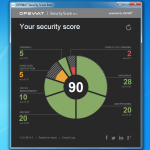
Understanding a PC’s security status normally involves considering many separate factors. Does it have an antivirus program installed, for instance? A backup tool? A firewall? Are they set up correctly, and being used on a regular basis? Evaluating every possibility could take you a very long time.
Or alternatively, you could just run OPSWAT’s Security Score, a free and portable tool that will quickly report on your target PC’s security, and give advice on how it could be improved.
Who don't you trust with your personal data?


About a month ago I posted "Whom do you trust with your personal?", containing two polls. The number of respondents is surprisingly low, so I'm back with them, using a slightly different approach. Perhaps the InterWebs will respond more to the negative trust question.
The results so far don't surprise me. Facebook is distrusted by a wide margin -- 57.42 percent of respondents. Microsoft and Google are most trusted (38.6 percent and 34.5 percent, respectively). But Google also is second-most distrusted (27.1 percent). Both polls provide just five major tech companies but opportunity for respondents to give their own answers. Nine percent trust no one.
Microsoft's Windows Store protection cracked

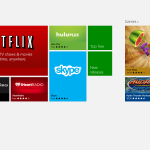
Windows Store is among the noteworthy features of Microsoft's new operating system released just a month ago. Users can install free and paid applications right from the store interface that is integrated into Windows 8's new Start screen interface. This improves security for users as store apps do get verified by Microsoft before they are made available in Windows Store.
Many paid applications in Windows Store are available as trial versions that you can try for a seven-day period before you need to make a buying decision. Developers do not have to offer their products as trial versions in the store, but they are encouraged to do so to make their apps available to a wider audience.
Let your guardian Autorun Angel find bad startup progams

When you think your PC has been infected by malware or spyware, then checking your Windows startup programs may seem like a good place to start looking for the source. But there’s a problem. Many of these will be cryptically-named executables which you won’t recognize at all, so how are you supposed to decide which ones are safe, and which require further research?
You could spend an age checking out each program manually, but life will probably be easier if you get a little help from Autorun Angel, which quickly compares your startup list against “known safe” applications and highlights whatever might be left.
Got malware? Try Ultra Virus Killer
When you think your PC has been infected by malware, but your antivirus package hasn’t raised an alert, then it’s often possible to locate and remove the threat manually. But generally you’ll need a whole library of tools to get the job done: one to view your startup programs, another to check running processes, a file unlocker maybe, and the list goes on.
If you prefer the simple life, though, you could just download a copy of Ultra Virus Killer (UVK), which provides all the malware detection, removal and cleanup tools you need, in a single, free package.
© 1998-2026 BetaNews, Inc. All Rights Reserved. Privacy Policy - Cookie Policy.