Microsoft releases Windows 10 Redstone 5 Build 17723 and Redstone 6 (19H1) Build 18204


It’s been a couple of weeks since Microsoft last rolled out a new Windows 10 Redstone 5 build to Insiders on the Fast ring, but today the wait is over. In addition to new RS5 Build 17723 the software giant also releases a new build for Insiders who have opted to join (or rejoin) the Skip Ahead ring.
Build 18204 is the first release on the 19H1 (Redstone 6) branch that will become the first feature update of 2019. Because these two builds have just split, they are largely the same -- as you might expect -- but this will change, going forward.
Microsoft opens Skip Ahead ring for Insider builds of Windows 10 Redstone 6

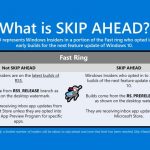
Microsoft has announced that the Skip Ahead ring has been opened for people who want to get the first look at the Windows 10 Redstone 6.
Back with the release of Windows 10 build 17713, Microsoft announced it was "doing a complete reset of Skip Ahead". This is now complete, so you can sign up for the preview ring once again. Spaces are limited, so if you want to take part you're going to have to be quick -- once the maximum number of participants has been reached, Skip Ahead will close once again.
Costco selling exclusive Microsoft Surface Go variant with free Type Cover


As someone that is constantly on the move, I am very excited about the upcoming Surface Go. Yeah, an iPad with keyboard case is doable, but really, it is a poor experience. Apple still doesn't offer mouse or track pad support in iOS, which hinders productivity. Conversely, with Surface Go, you can use any Windows compatible hardware in addition to the official Type cover -- mice, keyboards, etc.
Currently, there are two consumer variants available for pre-order. Both have the same Intel Pentium Gold 4415Y processor, but the $399 model comes with 4GB RAM and 64GB storage, while the $549 variant gives you 8GB of RAM and a 128GB SSD. Surprisingly, there is a third model currently being sold exclusively at Costco that should be quite attractive to some consumers.
Best Windows 10 apps this week

Two-hundred-and-ninety-two in a series. Welcome to this week's overview of the best apps, games and extensions released for Windows 10 on the Windows Store in the past seven days.
A new online tool was released today to download Microsoft Store applications without having to use the Store app or even using a Windows 10 device. Check out Wayne's review.
New survey conveys the challenges of the Windows 10 migration


It has been heralded as the last version of Windows you will ever need. This is great news for internal IT. Rather than large abrupt OS version updates such as the cumbrous leap between Windows 7 and 8, the Windows-as-a-Service delivery of Windows 10 will allow for regular incremental improvements and updates. The expectation is to eliminate the arduous elongated process of OS migrations that require significant planning, training and working hours. For those who need any further incentive, there is also the impending end-of-life deadline in January 2020 for Windows 7. Of course, to get to Windows 10, you have to endure one final big upgrade.
Fortunately, Microsoft has taken great strides to simplify the Windows 10 migration process. New deployment methodologies that utilize images, task sequences and provisioning packages make the deployment process far more agile today. That does not mean there aren’t challenges in the process however. The hurdles instead lie in the standardization of the user workspace. It is the details of ensuring that all those configuration settings, applications, printers and security protectants are delivered to ensure a secure productive work environment.
How to download offline copies of Windows 10 apps from the Microsoft Store [Update]

It’s very easy to install Windows apps from the Microsoft Store. You just need to go to the app’s page there, click the 'Get the app' button, and wait.
But what if you want to download a copy of the app for installing later, or on multiple systems? Well it turns out there is a way to do this.
How to install Microsoft Windows Essentials tools -- including Movie Maker -- on Windows 10

Windows Essentials (also called Windows Live Essentials) was a suite of desktop applications that included various Microsoft programs, like Messenger, Mail, Movie Maker, Photo Gallery, Writer, and OneDrive.
The last version of the suite was released in 2012, with the final update in 2014, and reached end of support on January 10, 2017. Microsoft removed the pack from its site last year, and while it is officially no longer available for download, you can still get it -- if you know how. And the good news is tools like Movie Maker work fine on Windows 10.
Make Windows 10's Timeline feature actually useful by adding support for Chrome and Firefox
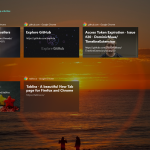
Timeline is an excellent addition to Windows 10, introduced as part of the April 2018 Update. It remembers what documents and web pages you’ve been working on recently, allowing you to quickly pick up where you left off.
As good as it is, however, it has one major flaw and that’s it only remembers web pages you’ve opened in Microsoft Edge. If you don’t use that browser -- and let’s be honest, that’s most people -- then Timeline’s usefulness is greatly reduced. Thankfully, there’s a way to get it to remember pages you’ve visited in Chrome or Firefox.
EdgeDeflector for Windows 10 forces all links to open in the default browser, not Microsoft Edge

It’s no secret that Microsoft wants you to use its Edge browser in Windows 10. It’s tried a lot of ways to persuade users to switch from Chrome, Firefox or other browsers, including advertising Edge in Windows and even recently made a change to a Redstone 5 Insider preview so that links clicked in Windows Mail opened directly in the browser.
Windows 10 users will be aware that Edge is already the default browser for certain links and actions. If you run a web search using the Cortana search box, for example, the results -- provided by Bing -- will open in Edge. But a handy program can redirect these links to whatever browser you have set up as the default.
Get $50 off Acer Alexa-enabled Windows 10 laptops on Amazon, plus a free Echo Dot

While summer has only just started, it is already time to start thinking about Back-to-School shopping. Yeah, sorry to bum you out, students. But hey, you don't want to return to school or university without a capable laptop, do you? Come on, isn't it fun convincing your parents you need a new computer for "studying and research?"
If you are looking for a good deal on a laptop, whether for school or any other purpose, Acer has a pretty sweet deal going on Amazon. All of its computers with integrated Alexa are $50 off. In addition, you will receive a free Echo Dot. How cool is that? Best of all, this offer is immediate -- you do not have to wait for Prime Day!
Best Windows 10 apps this week

Two-hundred-and-ninety-one in a series. Welcome to this week's overview of the best apps, games and extensions released for Windows 10 on the Windows Store in the past seven days.
Microsoft released two new builds of the upcoming Windows 10 Redstone 5 that it plans to rollout later this year to the stable channel.
Aquantia launches AQtion AQN-107 'Gamer Edition' 10G PCIe NIC for Windows 10 and Linux
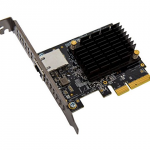
If you are a hardcore PC gamer, you are probably willing to spend almost anything to get an edge. For online multiplayer games in particular, not only is your CPU, GPU, and RAM important, but so is your networking hardware. From your modem, to your router, and ultimately your network interface card, what you have matters.
Speaking of NICs, there is an intriguing new offering from a company called Aquantia. Called "AQtion AQN-107 Gamer Edition," it is a 10G card, which yes, is total overkill. A standard gigabit card is fine for most gamers, but the thing is, this 10G card is quite affordable. Not only is the price reasonable, but it comes with specialized software for Windows that will prioritize gaming traffic and reduce lag. Maybe buying a 10G card isn't so crazy...
Microsoft releases Windows 10 Redstone 5 Build 17713, adds Fast Sign-in and Notepad improvements
Having rolled out a new Windows 10 Insider build at the end of last week, Microsoft returns with another new build for those on the Fast ring.
The software giant is doing a reset of the Skip Ahead ring starting from this build. It's focusing now on stabilizing Redstone 5 ahead of its launch in the Fall, and so Skip Ahead insiders will be automatically switched to the Fast ring for now.
Microsoft releases Windows 10 Redstone 5 Build 17711
It looks as if Microsoft is back on its weekly release schedule for Windows 10 Redstone 5 preview builds. Build 17711, for Insiders on the Fast and Skip Ahead rings, offers a number of improvements and changes.
These include Fluent Design tweaks, the usual raft of Edge additions, and improvements to display settings and the registry editor.
Best Windows 10 apps this week
Two-hundred-and-ninety in a series. Welcome to this week's overview of the best apps, games and extensions released for Windows 10 on the Windows Store in the past seven days.
Latest usage share statistics suggest that Windows 10 is still trailing behind Windows 7 and that Windows 10 may not surpass Windows 7 this year in usage share.
© 1998-2026 BetaNews, Inc. All Rights Reserved. Privacy Policy - Cookie Policy.