Windows 10 is now more successful than Windows 7, according to Microsoft -- no, really


While it was free, and being forced on to users’ computers, Windows 10 enjoyed predictably solid growth. By the end of August -- the first month in which Windows 10 was no longer free -- NetMarketShare measured the new operating system’s usage share at 22.99 percent globally. Not too shabby, but still quite some distance behind Windows 7, on 47.25 percent.
Microsoft’s own figures -- which represent market share rather than usage share -- paint a very different picture. Three months ago, the software giant caused eyebrows to be raised with its claim that in June the new OS hit 50 percent share in the US (51 percent in the UK, 39 percent globally). Its figures have just been updated again, and yes prepare to have your incredulity stretched even further.
Windows 10 suddenly killing internet connectivity for some users

Microsoft pushed out a new cumulative update to the Windows 10 release channel yesterday, and a number of users are reporting that it’s causing their internet connection to stop working, although there’s speculation that the update isn’t the cause at all.
The update, KB3201845, is designed to fix various issues with the new operating system and was first issued to Windows Insiders in November but the problem clearly wasn’t flagged up with it then, and some people are saying the problem started for them before the update was rolled out.
The most popular How To guides of 2016

In addition to news and reviews, we also regularly publish 'How to' guides here on BetaNews.
These are often very popular and cover a range of topics, software, and services. Taking a look back, as is the tradition at this time of year, I thought it would be good to revisit the most popular guides published in the past 12 months.
Best Windows 10 apps this week


Two-hundred-and-eight in a series. Welcome to this week's overview of the best apps, games and extensions released for Windows 10 on Windows Store in the past seven days.
The latest Insider Preview of Windows 10 brought along with it three new Edge extensions. Check out Ebates, Intel TrueKey and Read & Write if you run an Insider build of Windows 10.
How will ARM support impact Windows 10?


Microsoft can be surprising at times. After ditching Windows RT, the software giant has announced that it is working with Qualcomm to bring ARM support to Windows 10. In practice, that means that we will see Snapdragon-powered machines running Microsoft's latest operating system which, and this is key, can run proper x86 software.
Windows RT did not have that, as it was limited to apps available from Windows Store. And we all know how that worked out. However, x86 software on Snapdragon-powered Windows 10 devices can be seen as a game-changer as, in theory, it could pave the way to running resource-intensive programs, like Adobe Photoshop, on smartphones. And I am talking about the true Photoshop, not some dumbed-down mobile version. That could be huge, no doubt.
Microsoft aims to take 'mixed reality' mainstream in 2017

Virtual Reality arrived properly in 2016, although it has yet to really make any mainstream impact. Augmented Reality did enter our lives via Pokémon Go, but that’s been about it so far.
Microsoft is targeting 2017 as the year that mixed reality starts to become a thing, and at the Windows Hardware Engineering Community event (WinHEC) in Shenzhen, China the company shared the PC specifications (co-developed with Intel) that will power the first MR headsets from Acer, ASUS, Dell, HP and Lenovo set to arrive next year.
Windows 10 coming to ARM -- paving the way for always connected, more power-efficient PCs
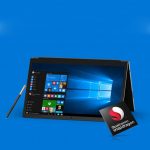
There’s a fair amount of news coming out of the Windows Hardware Engineering Community event (WinHEC) in Shenzhen, China at the moment, but potentially the most exciting announcement is that Windows 10 is coming to ARM.
A partnership with Qualcomm means that we’ll soon see a range of Snapdragon-powered Windows 10 PCs with integrated cellular connectivity that run x86 Win32 and universal Windows apps.
Microsoft and Intel’s Project Evo will 'raise the bar for what’s possible with Windows PCs'

At the Windows Hardware Engineering Community event (WinHEC) in Shenzhen, China, Microsoft made several announcements, including news that it is working with Intel on a new venture, called "Project Evo".
The aim of this, according to Microsoft, is to "deliver all-new ways for devices to light up with the latest in advanced security, artificial intelligence and Cortana, mixed reality, and gaming".
Windows 10 Insider Preview Build 14986 for PC arrives on the Fast ring, introduces many new features
New Insider Preview builds of the forthcoming Windows 10 Creators Update have been arriving on the Fast ring on a weekly basis. There was a gap over thanksgiving (naturally), and last week a blocking bug on the PC version meant that Build 14977 was only made available for Mobile.
This week it’s back to normal, with a new build for PC rolling out on the Fast ring, and the wait has definitely been worth it as Build 14986 comes packed with lots of new features and improvements. This is the most exciting new build in quite some time. Windows Insider Chief Dona Sarkar uses her Twitter account to tease new build numbers, and this week our very own Brian Fagioli provided the all important clue.
Windows 10 Creators Update will offer more advanced security features

Mostly everything that Microsoft has revealed about the forthcoming Windows 10 Creators Update to date has focused on the "creator" side of things, and 3D in particular.
Not wishing to completely alienate users with no interest in 3D and mixed reality, the company today reveals how the update will improve security and better "protect, defend and respond to threats".
How to change Windows 10's taskbar color, but leave the Start menu and Action Center untouched

Windows 10 offers a lot of personalization options. Go to Settings > Personalization and you can change the background, alter the color scheme, pick a different Lock screen background, and apply themes.
If you want Windows 10 to show a splash of color, go to the Colors section and toggle the 'Show color on Start, taskbar and Action Center' setting to On. There’s not an option to only change the taskbar’s color unfortunately, but it is possible to do this.
Best Windows 10 apps this week

Two-hundred-and-seven in a series. Welcome to this week's overview of the best apps, games and extensions released for Windows 10 on Windows Store in the past seven days.
As always, if I missed an app or game that has been released this week that you believe is particularly good, let me know in the comments below or notify me via email instead.
HP unveils rugged 'ProBook x360 11 Education Edition' Windows 10 convertible laptop


This may be a bit of a generalization, but children are not the most responsible people. Since they don't yet really understand the value of a dollar, they may not appreciate or care for belongings as well as they should. This can be especially true when things are given to them for use at school, such as textbooks, musical instruments, or computers.
HP apparently understands how destructive some kids can be, as the company has created a rugged (MIL-STD 810G) education-focused convertible laptop. The all-new 11.6-inch touch-screen (1366 x 768) ProBook x360 11 Education Edition runs Windows 10, and is designed to take a beating.
Windows 10 Insider Preview Build 14977 arrives on the Fast ring -- but it's for Mobile only
It’s been a while since we had a new Windows 10 Insider build -- Thanksgiving got in the way of Microsoft’s usual weekly schedule.
Today, the software giant releases Build 14977 to the fast ring, but it’s for Mobile only. The PC build has a blocking bug that results in broken apps on an upgrade, so we’ll have until next week for a new build for that platform.
How to reliably disable Windows 10 updates

Windows 10’s mandatory updates are designed to keep your system safe and always up to date. You do have limited control over the update process, but not as much as in Windows 7, for example.
You can stop updates in Windows 10, but it requires you to disable the Windows Update service in the Services manager, and most people won’t know how to do that. Thankfully there is an easier solution.
© 1998-2026 BetaNews, Inc. All Rights Reserved. Privacy Policy - Cookie Policy.