How to enable paths longer than 260 characters in Windows 10


In days of yore, filenames in Windows were limited to the 8.3 format -- just eight characters for the filename, and three for the extension. With the arrival of Windows 95, Microsoft stripped away this limit and allowed for much longer names.
That said, the Windows file system still imposes some restrictions such as which characters can be used in filenames, and the overall length of paths. For some time the maximum path length has been 260 characters, but in the latest Windows 10 Insider Preview, it is possible to use Group Policy or a registry hack to remove this limit.
China complains about forced upgrades to Windows 10
To say that Windows 10 has been controversial for Microsoft would be something of an understatement. The most recent cause for complaint has been a deceptive upgrade popup, described by many as a "nasty trick", which fooled users into installing the upgrade.
The company has since said that it will change the behavior of the upgrade notification, but this is not enough to silence hundreds of thousands of users in China. Microsoft stands accused of abusing its market position to force unwanted upgrades on people.
Windows 7 and 8.1 users turning off critical updates to avoid Windows 10 'malware'


When Windows 10 was first offered to users of Windows 7 and 8.1 it was via a pleasant upgrade tool that allowed users to 'reserve' their copy of the new OS. However, as time has gone by, Microsoft has employed more and more insidious methods to get people to upgrade, including tricking them into doing so.
The sneaky behavior has gotten so bad, that growing numbers of users of the older operating systems have taken to disabling critical updates in order to completely avoid Windows 10.
Acer adds two netbooks, a business laptop, and a 4K display to its Windows 10 PC portfolio

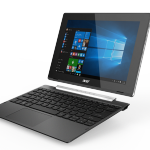
As we approach the summer, back to school shopping becomes a focus for many parents and students. True, there is plenty of time to buy a laptop for the next school session, but it is never too early to begin your research. Now is the time when manufacturers begin unveiling their upcoming machines.
Today, Acer announces three new laptops, with two of them being detachable variants. Quite frankly, those two are probably better categorized as netbooks. In addition, the company announces a beautiful new 4K display, perfect for both computing and media consumption. This 32-inch monitor could be a wise choice for dorm rooms.
Windows 10's new Limited Periodic Scanning mode will keep your PC extra safe from malware -- here's how to use it

While there’s a lot of negativity surrounding Windows 10 at the moment, thanks mostly to Microsoft’s shady upgrade tactics, it is actually a very good operating system.
The upcoming Windows 10 Anniversary Update, out at the end of July, improves the OS significantly, introducing a wealth of new features, and one of the latest inclusions to be made available for Windows Insiders to try is Limited Periodic Scanning. This sets Windows Defender to scan your PC at intervals, even if you have another anti-virus program installed.
Windows 10 Insider Preview Build 14352 includes Cortana, Ink and Feedback hub improvements
Microsoft has pushed Windows 10 Insider Preview Build 14352 to the Fast Ring. The latest build introduced a number of updates and bug fixes. One of the biggest changes is to Cortana which can now be used to control a Groove Music Catalog and set a timer.
The recently-introduced Windows Ink gains improved Sticky Notes, and the ruler now benefits from the inclusion of a compass. Gamers can now enjoy the Windows Game bar at full-screen in more games, including World of Warcraft, Counterstrike: Global Offensive, and Diablo III. Important changes have also been made to the Feedback Hub.
Microsoft stops you from using weak passwords


Having a good password can make the difference between your account being hacked and receiving a notification informing you of a failed login attempt. Even though this should be common knowledge, it seems that many folks are in the dark about this. You do not need to look hard to find evidence of this, as there are many reports that reveal passwords like "1234567890" to be very popular still.
Since it is clear that it cannot rely on its users to make the right decisions about their account security, Microsoft is taking a proactive approach by "dynamically banning commonly used passwords". So, if you think that "qwerty123" is good enough to keep all your emails private, luckily you will not have to find out whether you are right or not.
Microsoft is using Windows 10 to see just how far it can push customers before they break

If you believe what comes out of Microsoft's figurative mouth, these days the company is all about listening to feedback. That's certainly the message that has been put forward with Windows 10, with the Feedback Hub app being made available to everyone with the operating system installed. Microsoft makes much of the fact that Windows 10 is installed on around 300 million computers, but the reality is that a portion of these installations relate to people who have been hoodwinked into upgrading from Windows 7 or Windows 8.
The latest trick (tricking users in to installing Windows 10 by clicking a button that would suggest that the offer is being declined) generated such a backlash that Microsoft has been forced into an embarrassing 'u-turn'. Annoying people with Windows 10 is far from unprecedented, and these days it seems Microsoft just likes to see how much it can get away with -- with the possibility of then saving face by 'listening to feedback' and changing tack.
Microsoft to tweak its sneaky Windows 10 popup, but it's far from a u-turn

Windows 10 has been described as being like malware by a lot of people due to the way Microsoft forces it on to users’ computers without express permission. The software giant has engaged in all manner of sneaky and underhand tricks to fool users into agreeing to an upgrade they don’t want.
The latest, and possibly evillest move (to date) involves making closing an unwanted upgrade popup -- by clicking the x in the top right corner -- the same as agreeing to the upgrade.
Microsoft to ditch hundreds more workers in smartphone streamlining measures

After the sale of its feature phone business last week, Microsoft is making further structuring changes. Announcing the "additional step of streamlining our smartphone hardware business" Terry Myerson says that up to 1,850 jobs could be impacted, with the vast majority of these (1,350) being in Finland.
He also says that the company will continue "develop great new devices", no doubt fueling rumors of the highly-anticipated Surface Phone. Microsoft recognizes that its success with phones have been "limited", and Myerson's memo to employees reiterates the company’s commitment to the Windows platform, and Windows 10 in particular.
Even if you like Windows 10, you should be angry at Microsoft

As I’ve said numerous times in the past, I actually like Windows 10. It’s still rough around the edges -- and the Anniversary Update, out in July, won’t fully change that -- but what I don’t like is Microsoft’s aggressive, relentless pushing of the OS on to people who not only don’t want it but have expressly rejected it.
It’s scummy behavior, totally unbefitting of a company of Microsoft’s size and reputation. The latest trick, making closing an unwanted upgrade popup the same as agreeing to the upgrade, should have people brandishing pitchforks and flaming torches and marching on Redmond, but it doesn’t. Why? Because Microsoft’s shitty tricks are now what we expect from the company which doesn’t care in the slightest about its customers.
Microsoft will release just two major Windows 10 updates each year
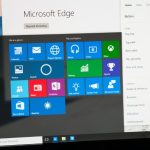
Microsoft has quietly announced plans to reduce the number of updates that will be released each year for Windows 10. The company had previously said that there would be three 'feature updates' (like the Windows 10 Anniversary Update) per year, but this has now been scaled back to two.
Unsurprisingly, Microsoft has not made a great deal of noise about the change to the majority of Windows 10 users, choosing instead to make the announcement at the WinHEC conference in Taiwan. At the event, senior program manager Chris Riggs also revealed how the update scheduling will work for consumers and businesses.
Plugable UD-CA1 USB Type-C universal 4K charging docking station now available
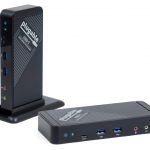
If you purchased Apple's newest MacBook, congratulations -- you own a really cool svelte machine. While a bit under-powered, for some people -- depending on their needs -- it is a solid, albeit expensive, choice. Unfortunately, while its USB Type-C port is quite modern, it is the only port on the machine (other than a 3.5mm audio jack). This is problematic, as you cannot charge the laptop while utilizing USB accessories.
The way around this limitation, however, are USB hubs which also pass-through power. Today, Plugable announces a new product that takes this concept a step further. Its new UD-CA1 is a USB Type-C universal charging docking station, capable of outputting 4K video. It is a full-fledged single-cable docking solution for not only Apple's MacBook, but Windows and Linux machines with USB Type-C too -- including Chrome OS. When combined with a display, keyboard, and mouse, the Plugable UD-CA1 will turn the laptop into a powerful desktop workstation.
Microsoft embraces Raspberry Pi makers with Windows 10 IoT Core Network 3D Printer app
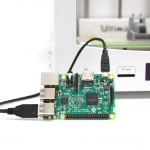
When you think of the Raspberry Pi and other SoC-style boards, one word likely comes to mind -- Linux. Yeah, Linus Torvalds' adaptable kernel does scale well to these diminutive computers, but don't forget about trusty ol' Microsoft. Its Windows 10 IoT operating system can also work some magic on the Pi and others. While lesser known and used in this space, this special version of Windows certainly has a future.
Now, Microsoft is focusing on "makers" with a new app for Windows 10 IoT. You see, the app will run on a board such as the Raspberry Pi, enabling networked 3D printing. Essentially, it is turning your board into a 3D printer server -- very cool! Believe it or not, many popular such printers are already compatible. So what are you waiting for? Will you give it a go?
Bibliovore is a stylish eBook reading app for Windows


Windows 10 has native support for PDF, but if ePub is your preferred reading format then you’ll still need to find a third-party viewer. Bibliovore is a good-looking eBook reader and manager app for Windows 8.1 and later.
The app imports individual ePub and PDF files, and can also scan and open the contents of a folder tree.
© 1998-2026 BetaNews, Inc. All Rights Reserved. Privacy Policy - Cookie Policy.