Is your 'Open with' option missing in Windows 10? Here's a fix


Windows 10 has been out for a while now and, much different from the last version of the operating system, people don't seem to dislike it. That doesn't mean there aren't problems, there's been plenty of the them, and over time fixes have been found for many of those little issues.
One that has cropped up is the disappearing "Open with" option in the right-click menu for files. There's a fairly easy fix for it though. Just follow these steps.
Everything you need to know about Windows 10: product keys, secret tools, essential hacks, and problem fixes


Windows 10 has been with us for a number of months now, and this has given us plenty of time to unearth all manner of secrets about the operating system. Since launch we have experienced love, hate and everything in between, but we've also learned a great deal. We thought it would make sense to pull together all of this info into one place so you have it available in a handy respository. So what will you find here? Everything!
In the days of Windows being a paid-for OS, people would hunt high and low for cracks and serials to bypass activation. Now that Windows is free, this clearly isn't as prevalent as it used to be, but you might still want to look up your Windows 10 product key before you reinstall. But that's just the start; read on to learn tips, tweaks, hacks, and problem fixes.
Beware! Windows Store games have serious limitations


When Windows Store launched, it featured apps and games that had a clear mobile focus. Games made available via Windows Store were casual for the most part, and it seemed unlikely that the situation would change in the future.
It changed however with the launch of the Universal Windows Platform which improved what developers could do with the framework that Microsoft provided them with, and the release of Windows 10.
I'm going to let you into a little secret about Windows 10

Wait for it... wait for it... For all of the criticism I have levelled at Microsoft, I actually rather like Windows 10. It is, of course, not without its faults, but in the main it's a solid operating system and a reasonable upgrade from Windows 8.1. I have a (well-earned) reputation for negativity, cynicism, and pessimism, so what's with the sudden burst of positivity?
In reality, nothing has changed, but I've settled into my stride. Rather than battling the bits I hate (and there are still plenty), I've learned to turn a blind eye. I've realized that I was trying to fit Windows 10, rather than making Windows 10 fit me. There's still plenty I don't like, but by simply learning not to focus on them, I've come to like the operating system much more. As with so many things in life, it's all about how you use it.
Windows 10 Insider Preview Redstone Build 14271 arrives on the Fast ring, and there's an update for Mobile too


Windows 10 Insider Preview Build 14267 arrived on the Fast ring 6 days ago and brought some very welcome improvements with it, including three additions to Microsoft Edge, although sadly still no support for extensions.
Today Microsoft rolls out another Fast ring update, Build 14271, and also an update for Mobile, Build 14267.1004. This is the first time the software giant has released new builds for PC and mobile on the same day.
How to stop Microsoft using your Windows 10 lock screen to show ads

Sometimes it can feel as though I'm just looking for things to dislike about Windows 10, but just as I'm warming to the operating system a little more (in the last week I went as far as starting to write an article about how my opinion of Windows 10 had changed for the better. It remains unfinished), something else comes along to irritate me. I know I'm not alone, and the most recent annoyance is the appearance of ads on the lock screen.
You're probably more used to the idea of the lock screen being home to either a photo of your choice, or a randomly selected image from Microsoft that changes from time to time. Recently however, some users have noticed that these images have been replaced with ads for the game Rise of the Tomb Raider. If you want to ditch the lock screen ads, here's how to do it.
How to get total control over Windows 10's automatic updates

One of the (many) things that divides opinion about Windows 10 is Microsoft’s decision to make updates mandatory. If you have Windows 10 Pro, Enterprise or Education editions you can defer updates, but you can’t reject them outright.
Windows 10 Home users don’t have this luxury and updates are installed automatically once they become available.
Huawei MateBook first-impressions review


At MWC 2016, Huawei has announced the MateBook 2-in-1 tablet, entering an ever-growing market already populated by the likes of Apple’s iPad Pro and Microsoft’s Surface Pro devices.
Aimed at business users, the Intel-powered MateBook provides the mobility of a smartphone with the power and performance of a laptop, enabling the modern mobile workforce to work anytime, anywhere.
Problems booting up Windows 10 Insider Preview Build 14267? Here's a quick fix

Microsoft has been rolling out new Windows 10 Insider Preview builds to the Fast ring at a rate of about one a week for the past month or so.
The latest build, 14267, introduced some welcome improvements, including three additions to Microsoft Edge, but it also added a fast startup bug which has stopped some users being able to boot Windows.
How to download any Windows ISO for free
Whatever version of Windows you're running, the time will probably come when you want to reinstall. You might be lucky and can have recovery media on hand, or your recovery partition may be intact. If not, what can you do? You can download ISOs for Windows 7, Windows 8 and Windows 10 direct from Microsoft.
It's always best to be prepared, so rather than waiting until you find yourself in desperate need, why not spend a few minutes grabbing the ISO (or ISOs) you need in readiness. There's no need to head off to a torrent site to download an illicit copy of Windows along with a crack, everything is available from Microsoft. Here's what you need to do.
Continuum-enabled HP Elite x3 tries to breathe life into the Windows 10 Mobile enterprise market
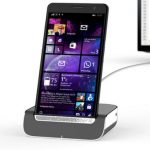
HP is aiming to ignite the enterprise market for Windows 10 Mobile phones with the newly announced HP Elite x3. The 5.96-inch phone is verging on phablet territory and includes support for Windows 10's Continuum, allowing for conversion into -- essentially -- a fully-fledged computer.
A nippy Snapdragon 820 lies under the hood, and the 4GB of LPDDR4 RAM is joined by 64GB of storage, expandable through the use of a microSD card. Other stand-out features include not only a fingerprint scanner, but an iris scanner, as well as wireless charging and a USB Type-C port. Windows 10 Mobile may yet begin to gain traction, but HP is hoping that by catering to the business and enterprise markets, it will be able to carve itself a niche.
Huawei MateBook is ready to take on Surface Book, Surface Pro 4 and iPad Pro

MWC 2016 may be barely under way, but the announcements are already pouring out thick and fast. As well as smartphones and smart car dongles, you can expect to see plenty of laptops and tablets, and one of the first to vie for your attention is the impressive-looking Huawei MateBook.
Clearly aimed as a rival to Microsoft's Surface Book and Surface Pro 4, the MateBook is a 12-inch hybrid tablet running Windows 10. Weighing in at just 640 grams, and measuring a mere 6.9mm thick, the tablet has an optional keyboard cover and stylus. Powered by an Intel Core M3, M5, or M7 processor Huawei claims 10 hours of battery life for the MateBook.
10 reasons why I don't use Microsoft Edge, and one why I do

Microsoft Edge is the default system browser on Windows 10. Microsoft ships the operating system with Internet Explorer as well, and it is easy enough to use either one of the browsers to download Firefox, Chrome, Opera or any of the other browsers available for Windows.
When Windows 10 came out, I was interested in Microsoft Edge for a number of reasons. It is a new browser by Microsoft that did away with old dependencies that held Internet Explorer back. That should make it sleeker, faster and less prone to attacks.
Gozi Banking Trojan is now fully compatible with the Edge browser in Windows 10

Banking trojans, like ransomware, have become big business today. And the people behind all of these malicious products are always moving forward, innovating with the times in an effort to keep up with technology and victims.
There is a virtual smorgasbord of malware out there just looking for ripe pickings. One is the Gozi Banking Trojan, which injects its code into the operating system via the browser. With Windows 10 being offered (pushed) for free, malware makers are scrambling to cover the adoption rate by updating their products.
Microsoft wants to make Windows 10 and Office 365 more accessible

Making its products accessible to as many people as possible is clearly in Microsoft's best interests. Today the company outlined how it plans to improve accessibility in Windows 10 and Office 365, setting out a roadmap built on three key principles.
Transparency, accountability and being inclusive will be the company's cornerstones for 2016. Microsoft wants to "to think about all of our customers and all of the ways we can empower them with technology". But what does this actually mean.
© 1998-2026 BetaNews, Inc. All Rights Reserved. Privacy Policy - Cookie Policy.