Get amazing music, games, movies, and apps for only ten cents each on Windows 10


Windows 10 is arguably a success. True, not everyone loves it, but many -- according to Microsoft -- have downloaded it. A huge benefit of having large adoption of the latest version of Microsoft's operating system, is that more people have access to the Windows Store. As a result, more and more quality apps, games, and other content should be made available in it.
To celebrate Windows 10, Microsoft is doing something incredible for its fans. Over the next ten days, the company will be selling music, games, movies, and apps for ten cents each. Yes, for a single dime, you can score some awesome stuff. Heck, you can't get much for such a little amount, nowadays.
Windows 10's privacy invading features aren't gone in Threshold 2


Since the launch of Windows 10, there have been various concerns relating to privacy. Some would dismiss this as little more than paranoia, but a lack of transparency about what was happening in the background broke a lot of people's trust. Many hoped that the release of the Threshold 2 update this month would address this, but in lots of cases it was actually a backward step.
In the RTM release of Windows 10, there was a service running in the background called Diagnostics Tracking Service (also known as DiagTrack), and people concerned about privacy -- who were in the know -- disabled it. In Threshold 2, this service is gone. A cause for celebration you might think; but think again. The service is still there, just under a different guise.
Windows 10 popular among enterprise users

Almost half (49 percent) of companies which participated in a recent survey by Forrester Research say that they plan on upgrading to Windows 10 by 2016.
The news broke out yesterday, adding that 38 percent of workers who use a computer say they want Windows 10 on their next work laptop, with 9 percent already using it on their primary work device.
Windows 10 Mobile Insider Preview Build 10586 hits the Fast ring -- it's RTM and 'really great'
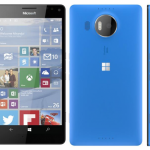
Desktop users have been rather spoiled when it comes to preview builds of Windows 10, but the same cannot be said for mobile users. After a quiet few weeks, Microsoft today releases Windows 10 Mobile Insider Preview Build 10586 to the Fast ring.
The official launch date for Windows 10 Mobile draws ever closer, this will be the final preview build Insider get to see. How do we know? This is the RTM build that comes pre-installed on new Lumia devices and Build 10586 sees Microsoft putting the final finishing touches in place. There are no new features this time around, but bugs have been squashed -- there are just a few things to watch out for.
Windows Phone's market share goes into freefall


Windows Phone is becoming an increasingly unattractive proposition in the eyes of smartphone buyers. The tiled operating system dropped to 1.7 percent market share in the third quarter of the year, thanks to extremely weak sales of Lumia devices. Microsoft is the largest vendor of smartphones running the tiled operating system, so its performance has a strong effect on the platform's popularity.
In the third quarter of the year, Windows Phone sales reached 5.87 million units according to research firm Gartner. For the same period, Microsoft says Lumia sales were 5.8 million units, suggesting that its platform market share is close to the 100 percent mark. And things don't look great for Windows 10 Mobile devices either.
How to use File Explorer as a run box in Windows 10


Running commands and launching built-in Windows tools is very straightforward in Microsoft’s new operating system. Just click on the Start button and type whatever you’re looking for, then select the item to launch it.
There is another way to do this though, and that’s through File Explorer. This can actually prove really useful. If, as an example, you’re browsing your hard drive and suddenly decide to defragment it, you can take action without having to switch your focus.
Todoist launches Windows 10 universal app
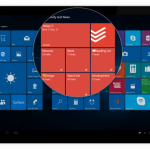
Microsoft is hoping that within the first two to three years after launch Windows 10 will run on over one billion devices. Expectations are high, but the new operating system has a few things going for it which can help it reach that milestone. One of them is universal apps.
The idea is simple: developers can build a single app that works across all types of devices that support Windows 10, including PCs, tablets and smartphones. The software giant's efforts are already starting to bear fruit, as Todoist has just launched its to-do app in Store as a universal app.
Left behind by the Windows 10 bandwagon


I consider myself a patient person. After more than 25 years in the IT industry you sort of have to be. When I bought my first real hybrid 2-in-1 PC -- an HP Envy x2 -- I learned to put up with the many quirks of the then brand-new Windows 8. And when Windows 8.1 arrived, I tolerated several weeks of display artifacts and other graphical anomalies, confident that they would all get sorted out -- eventually.
Which they did. In fact, for each case a new round of device drivers -- specifically, for the Envy x2’s Atom Z2760 chipset and associated Graphics Media Accelerator (GMA) video subsystem -- cured what ailed it. So it’s understandable that I would expect a similar scenario to play out with Windows 10. After all, Microsoft’s new OS is really just a retread of Windows 8 (which was itself a retread of Windows 7, etc.). And my trusty Envy x2 excels at running Windows 8.1.
Has Windows 10 November Update (Threshold 2) reset your privacy settings and default apps?

Windows 10 has caused greater privacy concerns than any previous version of the operating system. You may well have spent some time tweaking settings so that you are in control of your privacy and limit the tracking that Windows 10 is able to do, but if you have installed the latest big update you may well have to do it all again.
In addition to resetting their privacy settings to their defaults, many people have reported that installing Windows 10's November Update has wiped out any personalization of default apps. This is just the latest in a series of slip-ups which sees Microsoft upsetting Windows 10 users. So how do you know if your settings have been changed?
Delete the Scan With Windows Defender content menu entry from Windows 10 (Threshold 2)
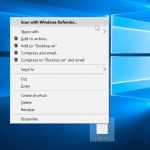
If you've installed the November Update for Windows 10 (or Threshold 2 if you prefer) there are a number of changes for the better to enjoy. But there are some changes that you might not be happy with, and the arrival of a new Scan With Windows Defender entry in context menu is something that is likely to grate with many people.
It might be that you have no intention of using Windows Defender, or your context menu may have become unwieldy and need a little trimming. Either way, a quick registry hack is all that's needed to banish the unwanted option. Here's what to do.
Microsoft launches Office Insider giving access to preview builds of Office 2016
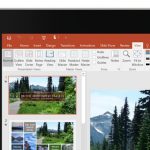
With Windows 10, Microsoft's Windows Insider program proved immensely popular. The chance to try out new features ahead of an official launch gave millions of people an insight into the development process and provided an opportunity to give feedback and influence the future of the operating system.
Today Microsoft is giving Office the same treatment. With the launch of the Office Insider program, Office 365 subscribers are being given the chance to try out upcoming releases of Office 2016.
Best Windows apps this week


One-hundred and fifty-four in a series. Welcome to this week's overview of the best apps and games released for Windows 8.x and Windows 10 in the past seven days.
Microsoft released the first major update for Windows 10 yesterday. You can check out Wayne Williams' article to find out what is new.
How to download Windows 10 with the November Update and create your own installation media

Microsoft pushed out its first major Windows 10 update earlier today, but if you’re not currently seeing it, be patient. These things take a while to make their way to all users.
If you’ve been holding off upgrading a Windows 7 or 8.x PC, waiting for the November Update (aka Threshold 2) to arrive, now is the time to take action. The easiest way to upgrade is by using Microsoft’s free media creation tool which now offers Build 10586 (which is the current version you’ll get after installing the November Update).
Box launches its official Windows 10 app

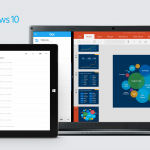
Using Microsoft's latest operating system and looking for cloud storage? There isn't a shortage of options out there and you can use whichever appeals to you. However, if you're looking for a dedicated app for Windows 10 then Box could be the direction you want to head in.
The service is announcing its app for Windows 10. It has been a partner of Microsoft for a while and claims that it sees things headed in the right direction under the new management.
Microsoft releases first major update for Windows 10 -- here's what's new (and better)

Windows 10 users have been eagerly awaiting the arrival of Threshold 2, or the November Update to give it its official name, for a while. Well, today that wait is over. Windows Insiders on the Fast and Slow rings received the update previously in the form of Build 10586, but now it's automatically being pushed to everyone.
This is a huge update, packed with new features, improvements and of course bug fixes. If updates weren't already mandatory I'd be telling you to go update your copy of Windows 10 right now (you can of course hurry things along by going to Settings > Update & Security and clicking/tapping on Check for updates.) With so much to cover, I'll keep the intro here to a minimum and crack on with talking about all the cool new stuff.
© 1998-2026 BetaNews, Inc. All Rights Reserved. Privacy Policy - Cookie Policy.