Microsoft working to bring open source VP9 HD codec support to Edge


The technology may exist that allows for ultra-fast transfer of very large files, but the efficient storage of data remains important in many circumstances. Streaming video is one area in which efficiency is particularly important, and the codec used to encode footage has a large bearing on performance.
With the launch of Windows 10, Microsoft took the opportunity to unleash a new web browser on the world -- Microsoft Edge. Today the company reveals that it is working to bring WebM/VP9 to the browser. Initially destined for Windows Insiders in Windows 10 Preview builds, VP9 support will improve Edge's ability to stream HD videos at lower bitrates.
Microsoft acquires cloud security firm Adallom

Microsoft continues to look to the cloud -- not just with Windows 10, but with many of its enterprise services -- and security remains of the utmost importance. Now the company has announced the acquisition of cloud security firm Adallom in a move that will give customers additional ways to protect their data in the cloud.
The security company started life two and half years ago, and Microsoft sees value in adding it to its existing portfolio of acquisitions. Adallom co-founder Assaf Rappaport describes joining the Microsoft family as "another validation of [the company]", while Microsoft says it demonstrates its "commitment to delivering innovative identity and security capabilities".
Zotac unveils the diminutive ZBOX MAGNUS EN970 Windows 10-ready gaming PC


Many consumers want gaming PCs, but simply don't have the space for a massive tower. For this reason, mini ITX systems have exploded in popularity. But what if you want something smaller? Maybe you are interested in keeping a HTPC in your living room where a small footprint is preferable.
Today, Zotac announces a diminutive gaming PC -- the ZBOX MAGNUS EN970. Not only is the Intel Broadwell-powered PC very small, but it should offer solid gaming performance with a NVIDIA GeForce GTX 960 3GB DDR5. It even offers a mind-blowing 4 HDMI-out ports!
Windows 10: Microsoft's nod to the changing enterprise IT


Steve Ballmer, former Microsoft CEO, doesn’t strike anyone as a man with many regrets. But infamously dismissing the newly launched iPhone because "...it doesn’t appeal to business customers because it doesn’t have a keyboard" is probably one of them.
The interview was taken by many as a sign that Microsoft didn’t really get consumers. It didn’t get that consumer tech was fast over-taking enterprise systems as the new driving force for innovation. And it didn’t get that the gap between what people wanted at home and what they wanted at work was closing fast.
How to disable Windows 10's Action Center


The Action Center in Windows 10 is a pretty handy addition. It displays past notifications from apps and your system -- if you miss a message from Windows when it pops up you can find out what it said in the Action Center. You can also access various quick actions there.
But if you have no need for the Action Center -- and to be honest I’ve hardly ever used it -- it can be disabled with a simple registry tweak.
Is your business prepared for 'continuous' Windows 10 software updates?

Windows 10 might be the last time IT does a major OS rollout across their organization. Here on in, rather than releasing a new version of the Windows operating system (OS) every few years, there will be regular and continual updates to Windows 10 in perpetuity.
For enterprise IT departments, this new business model and Microsoft software release strategy requires a whole new level of vigilance and support.
Microsoft releases beta of Skype Universal Messaging app

The long-anticipated Skype Messaging app is finally here. That is, if you have a Windows Phone smartphone, and just happen to be running Windows 10 Mobile developer preview. The company quietly released the new messaging client on Sunday.
The Skype Universal Messaging app, as evident in the screenshots and descriptions, comes with a user interface that seems very similar to the built-in messaging app on Windows Phone 8.1 and above. The app, as you would expect, also offers a quick option to do voice calling.
Microsoft kills several Lumia apps in a streamlining effort

Having trouble locating Lumia Storyteller, Lumia Beamer, Photobeamer, and Lumia Refocus in the Windows Store? Quit trying; they are no longer available to download. That's because Microsoft has pulled these services from the official store as part of its ongoing “streamlining” efforts, it announces in a blog post.
The company has pulled Lumia Storyteller, Lumia Beamer, Photobeamer, and Lumia Refocus apps, and noted that those who have it installed on their device, will stop receiving any app updates after October 30, 2015. The said apps won't be able to offer online services. Lumia Panorama and Video Uploader are also among the affected apps, and they too won't receive any updates from the company.
Microsoft leaks details of upcoming Skype Central Universal Windows 10 App [UPDATE -- there's no rebrand]

A post has appeared on Microsoft's TechNet that suggests the company could be on the verge of combining Skype for Business and the consumer version of Skype into a single product known as Skype Central.
The move would echo that taken with OneDrive, and would help to streamline things a little for developers. The post is written by Microsoft's Tony Eversole and is designed as a placeholder so developers have a central point to exchange news and information.
Spybot Anti-Beacon quickly closes Windows 10 privacy holes

Spybot developer Safer Networking has released Spybot Anti-Beacon, a portable free tool which makes it easy to disable a host of Windows 10 tracking technologies.
Just launching the program displays the current status of 10 "problem" areas: Telemetry Hosts/ Services/ Group Policy, Consumer Experience Improvement Program Group Policy/ Scheduled Tasks, Application Impact Telemetry, Steps Recorder, WiFi Sense, "Apps use advertising ID" and P2P Windows Updates.
Stop Windows 10's keylogger from monitoring what you type, ink, and say

The 'keylogger' that's built into Windows 10 has gained something of a bad reputation -- but it's really a bit of a misnomer. Yes, there is a component that -- technically speaking -- tracks what you input using the keyboard, screen, mouse, voice, and stylus... but it's a bit more complicated than that. It is not really a keylogger in the sense that the malware term usually implies.
Microsoft openly admits that "when you interact with your Windows device by speaking, writing (handwriting), or typing, Microsoft collects speech, inking, and typing information". It's done with the intention of improving the accuracy of suggestions, providing a personalized experience, and so on. But we live in an age where privacy matters. If you are concerned about the privacy implications of this component of Windows 10, you can disable it. Here's how.
8GadgetPack brings gadgets back to the Windows 10 desktop

Windows gadgets made their first appearance in Vista as a convenient way to install tiny desktop tools like clocks, system monitors or weather applets.
The technology was retired in 2012 due to security vulnerabilities, but these days any danger is minimal, and if you were a fan then 8GadgetPack provides an easy way to run more than 50 gadgets on Windows 8, 8.1 and 10 PCs.
Master Windows 10 with these new 'How To' videos from Microsoft
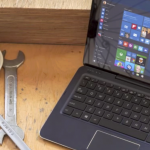
We’ve covered a lot of what you can do with Windows 10 (and also explained how to overcome many of the operating system’s major problems), but if you want more guidance and handy tips and tricks, Microsoft has just released a collection of short How to videos for its new OS.
The guides cover everything from using Cortana and Windows Hello, to linking your Xbox to your Windows 10 PC. There are also videos explaining how to use Microsoft Edge, the Windows Store, OneDrive, and Surface Hub Touchback. And if you want tips to boost your productivity, and do more with the Start menu, there are videos covering those areas as well.
Start10 brings the Windows 7 Start menu back to Windows 10

Windows 10 may have restored the Start menu, but its Windows 8-style redesign isn’t to everyone’s taste.
If you’re not happy with the new look then Stardock’s Start10 gives you some stylish and configurable alternatives.
ASUS VivoStick is a $129 miniature Windows 10 PC rivaling Intel's Compute Stick

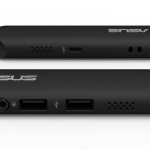
ASUS is following in Intel's footsteps by unveiling a miniature Windows 10 PC, that is not much larger than a USB flash drive. Unveiled at IFA 2015, VivoStick is designed to be connected to an HDMI-enabled monitor, quickly turning it into a fully-fledged PC.
VivoStick is not all that different to Compute Stick in this regard, but the former is a better option in terms of hardware specifications and price, being advertised to cost just $129 when it goes on sale.
© 1998-2026 BetaNews, Inc. All Rights Reserved. Privacy Policy - Cookie Policy.