What do you like about Windows 10?


Wow. What a wicked week it is for Microsoft platforms. As May closed, Insider Preview Build 10130 dropped, followed by a preorder page for OEM versions. Then came the big reveal just five days ago: Windows 10 will be available on July 29th. System requirements are out now, though. On June 3rd, the company showed off devices designed for the operating system. A day later, Office 2016 Preview updated with new features, many tapping cloud services. Yesterday, Build 10135 release notes leaked.
Fitting with the "beta" in BetaNews, it's time to pose the big question for those of you daring enough to grab Windows 10 now ahead of next's month's big release. Most of the BN writing team runs the operating system. I'm late to the upgrade party but will join the gang later today or tomorrow. Meanwhile, I ask: What do you like about Windows 10? If you must: What don't you like -- and, related, what do you still want?
How to install Windows 10 Insider Preview on Oracle VirtualBox [Updated]

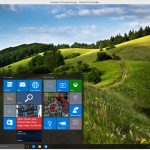
Microsoft has just released ISO files for Windows 10 Insider Preview Build 10130. This build is currently only available to Insiders on the Fast ring due to the presence of a couple of major bugs that Microsoft is looking to squash before making the release available to testers on the Slow ring. The ISOs have been released to allow people who are having problems upgrading through the usual Windows Update route to install the build.
As with the previous releases, Build 10130 is still an early version of the OS, so you wouldn’t be advised to run it as your main operating system, especially with those unresolved bugs, and while you could set it to dual boot, running it in a virtualized environment is a much more sensible idea.
Microsoft releases Windows 10 Insider Preview Build 10130 ISOs -- too buggy for Slow Ring


As we move closer and closer to July 29, Windows 10 is shaping up to be a very solid operating system. Unfortunately, it is not yet perfect. I have been testing Build 10130 and while it is markedly improved over past releases, it still has bugs. The most frustrating of which is the occasional non-functioning Start Menu. For whatever reason, it stops working sometimes, requiring me to reboot to resolve.
Because of bugs, Microsoft has decided to hold this Build back from Slow Ring users -- for now, at least. In a strange move, however, the company releases the ISO images anyway.
Leaked Windows 10 Build 10135 release notes herald Microsoft Edge and more

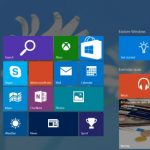
Another set of release notes for Windows 10 have been leaked online by Wzor -- this time for build 10135. Despite being just five increments up from the build that's currently publicly available, there are still a few changes of note, including the official arrival of Microsoft Edge in place of Project Spartan.
As well as the name change for Microsoft's latest browser, the Snipping Tool also receives an update introducing a delayed screen capture option. Skype is now brought front and center thanks to preinstallation on the desktop, and there are all manner of bug fixes.
Microsoft introduces Music section in Windows Store as it continues to unify the shopping portal


Over the past couple of months, Microsoft has been aggressively trying to merge many of its digital stores into one convenient hub. The company is taking a major step in that direction today. Microsoft announces that it is introducing a Music section in Windows Store.
If you’re on the latest Windows 10 dev preview build dubbed 10130, and have the version 3.6.1068.0 of Music app installed on it, starting today you'll see a Music section in Windows Store. Upon clicking on which, you will be able to browse through new albums and top songs, as well as purchase them.
Windows 10 Insider Preview Build 10130 headed for Slow ring soon
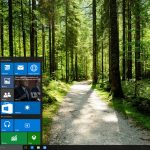
Windows Insiders on the Fast ring were able to update to Build 10130 last Friday, and in my experience it’s a solid, and reliable release. Microsoft is mostly focusing on tweaking and stabilizing the OS now, but the new build comes with some noteworthy improvements, including new icons, new taskbar animations, and other general UI enhancements.
The Build is good, and stable enough that Microsoft is getting ready to release it to the Slow ring. This will be the first release there since Build 10074 back at the end of April, and its arrival on that ring will also herald the release of new ISO files.
Microsoft reveals some impressive numbers at Computex 2015

As well as showing off a load of new Windows 10 compatible hardware during its keynote at Computex 2015, Microsoft also revealed some interesting numbers relating to the new OS, and the PC market in general.
While PC shipments and sales have definitely fallen a lot over the past few years, it’s far from game over for Windows powered devices, and things have started looking up.
Microsoft reveals new Windows 10 devices

Windows 10 is now less than two months away, and today at Computex 2015 Microsoft unveiled the latest range of devices designed with the operating system in mind. Taking to the stage in Taipai, Microsoft's Nick Parker revealed a collection of desktops, laptops, and tablets that will run Windows 10.
The latest version of Microsoft's operating system aims to be all things to all people, and this is something that is reflected in the diversity of devices on show today. In addition to traditional PCs, the 2-in-1 convertible range continues to grow, and there are tablets from a number of Microsoft partners. There's hardware from lots of familiar names, but also from lesser-known companies.
FoxConn Kangaroo is an ultra-portable Windows 10 PC
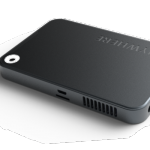
Tiny, portable Windows 10 PCs seem to be all the rage at the moment. During a Computex 2015 keynote, Microsoft’s Nick Parker revealed not only the Quanta Compute Plug, a mini-PC in a power adapter, but also FoxConn’s Kangaroo.
This is a petite, battery-powered PC in a box that boasts the latest Intel Cherry Trail processor and connects to your TV or monitor via HDMI.
Quanta Compute Plug is a mini Windows 10 PC in a power adapter

Computex 2015 is well underway, and at a keynote earlier today at the Taipei International Convention Center, Nick Parker, corporate vice president of Microsoft's OEM Division, talked up the benefits of Windows 10, and also introduced various new devices designed specifically with the new operating system in mind.
One of the most interesting was the Quanta Compute Plug. This is a mini-PC housed not in a stick, but inside a power adapter.
Microsoft: You can perform a clean Windows 10 install after upgrading

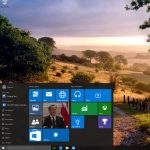
Microsoft announced earlier this week that Windows 10 will be available on July 29. In less than two months, those who are using Windows 7 or Windows 8.1 will be able to upgrade for free to the upcoming operating system, in the first year after launch. Some have already reserved their free upgrade.
The upgrade will be delivered through Windows Update. Microsoft is making the whole process so easy that it claims that even a 10 year-old could do it. After it is done, those who may want -- or need, at least at some point -- to make a clean install will be able to do so as well.
Upgrading a laptop to Windows 10 is so easy a 10 year-old could do it

Microsoft wants you to use Windows 10. I mean, really, really, really wants you to use it. To this end it is pulling out all the stops, and removing as many barriers to adoption as possible.
The OS will be free to users of Windows 7 and 8.1 in the first year (check out the requirements here), but the process of upgrading has also been made as easy as possible. You just need to click the icon that pops up in the system tray to reserve your upgrade. But if you’re still unsure how simple upgrading will be, Microsoft has put together a video in which a bunch of 10 year-olds explain the process.
Will your PC or tablet run Windows 10? Check out the official system requirements

Microsoft has started advertising Windows 10 to Windows 7 and 8.1 users, and has revealed that the OS will be available free from July 29, but that’s not the only information that has come to light today.
While the process of reserving your free Windows 10 upgrade is as simple as clicking the Windows icon that appears in the system tray, you’ll want to make sure your device is capable of running the new OS before you do anything. Fortunately, Microsoft has revealed the system requirements for Windows 10 today, and also explained which edition of the OS users can expect to receive. There are different versions of Windows 10, and Microsoft will keep upgraders on like-for-like editions. So if, for example, you are running Windows 7 Home Premium, you’ll receive Windows 10 Home.
Windows 10 upgrades: Microsoft gives with one hand and takes with the other
We now know that there are less than two months to wait until Windows 10 is launched. If you have been working your way through the preview builds, you'll already have a pretty good idea of what to expect in terms of new features -- Cortana, Start menu, notification center, virtual desktops, Continuum, cross-device experience, Microsoft Edge and so on -- but what about the things you're going to lose when upgrading from Windows 7 or Windows 8.1?
The delivery of Windows 10 is not just about bringing new features and tools to desktop, tablets, and laptops; there are also a number of things that are simply going to disappear. Not all of this will matter to everyone, but the stripping out of certain features will come as a blow to some, and it's best to be prepared ahead of time.
ASUS announces Transformer Book T100HA Windows 10 tablet, and $299 Chromebook competitor
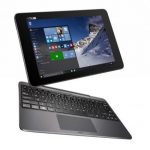
With Windows 10 becoming available to consumers as early as July 29, manufacturers are rushing to announce their first products powered by Microsoft's upcoming operating system. Lenovo unveiled its business-oriented ThinkPad 10 slate last week, and now it is ASUS' turn to join the Windows 10 bandwagon.
The Taiwanese maker has announced Transformer Book T100HA, a Windows 10 tablet that is designed to double as a small laptop replacement with the addition of a dedicated keyboard. So far, Transformer Book T100HA looks like the closest competitor that Microsoft's Surface 3 has.
© 1998-2026 BetaNews, Inc. All Rights Reserved. Privacy Policy - Cookie Policy.