Free up space in Windows 10 with the new Disk Cleanup System Compression feature

Windows 10 Technical Preview is very much an early work in progress. Microsoft is releasing new builds on a fairly regular basis (although the next one isn’t expected until the New Year), and implementing changes based on user feedback. Personally I’m liking what I’m seeing so far.
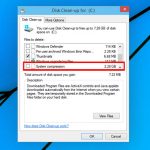
Although Microsoft discusses the major new features and changes in each build, there’s still some hidden functionality that you may not be aware of. Case in point is the little known System Compression option tucked away in Disk Cleanup.
How to enable Continuum in Windows 10 Technical Preview build 9879

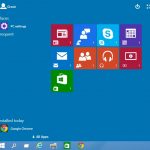
We're now on the third public build of Windows 10 Technical Preview. Build 9879 addresses some of the concerns people had with build 9860 -- including the ability to kill the infuriating Search and Task View buttons without the need for hackery. One of the biggest changes (or at least the most obvious) in Windows 10 is the reappearance of the Start menu, although the Start Screen is still there as an option.
In presentations, Microsoft has made reference to Continuum (a new version of the Start menu), but we're yet to get hands on with it. This changes in Windows 10 Technical Preview build 9879 as it is possible to enable an embryonic (no, rudimentary -- I referred to Windows 10 itself as being embryonic) version of Continuum. Want to take a look at a new Start screen? Here’s what you need to do.
Windows 10 Technical Preview Build 9879 arrives -- here's what's new
If you’re using/testing the preview version of Microsoft’s operating system as one of the million+ "Windows Insiders", get ready for a big update. Build 9879 is arriving today and will be with you shortly, if it isn’t already.
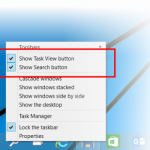
Microsoft's Gabe Aul has provided a handy run through detailing all of the major changes, but one of the big additions is the ability to hide the Search and Task View buttons on the taskbar. That will please my colleague Mark Wilson who hates them. You’ll be able to toggle those off just by right-clicking the taskbar and disabling them in the context menu.
Microsoft thanks Windows 10 Preview testers with three (very) little surprises

Don't get too excited. Actually, don’t get excited at all. To say thanks for taking the trouble to download a multi-gigabyte image, going to the hassle of setting up a virtual machine or installing a new operating system on a spare computer, for providing feedback on the embryonic Windows 10 Technical Preview, Microsoft has a gift for members of the Windows Insider Program. Three wallpapers.
Yes, you did read that correctly. Three. Wallpapers. Available at resolutions from 1280×1024 all the way up to 4K, the theme linking each of the images is the construction of Windows 10. Microsoft seems to think that a Windows Insider might want to "show your pride about helping us build Windows 10", so the wallpapers give a chance to herald your Insider status to passers-by.
10 clever ways Microsoft could improve Windows 10
Aurélio "Baboo" knows what he wants to see in Microsoft’s next operating system, and has put together his own vision of Windows 10 "build 9928", spending over 50 hours on creating images in Photoshop that show the changes he thinks Microsoft should implement.
Top of his list, and that of many Windows users, is the return of Aero. Flat might be where it’s at right now, but there’s no question that adding some transparency effects to windows looks good, and I’d be happy to see Microsoft include this option in Windows 10. "I’m honestly not worried about the extra cents in energy consumption Aero that costs me when I’m using my desktop or laptop, because Windows is much more enjoyable with it", Baboo says.
Windows 10 will offer Mac-like trackpad gestures


Anyone who has ever used a modern-day Mac will tell you that Apple gets its trackpads right. Sure, they look nice and feel great to the touch, but, most importantly, they are also properly supported in OS X. It offers myriad gestures to help users navigate as efficiently as if they were using a mouse. In fact, the trackpad is designed to feel like an integral part of the system, not as a bolt-on, as there are lots of things that can be done faster with it, like locating a window or opening the notifications panel.
The same cannot be said about Windows PC trackpads. They truly feel like bolt-ons. And it is not because they are poorly put together, but rather because the drivers never seem to be good enough to reveal the trackpads' true potential. Microsoft, however, wants to change that in Windows 10, as the upcoming operating system will support Mac-like trackpad gestures. Finally.
Hungary proposes taxing internet usage -- will other countries follow suit?

You might think that you've already paid enough to get online. You bought your computer (or phone, tablet, whatever...), you pay line rental to your phone provider, you pay your monthly broadband charges, you pay the bill for electricity all of this requires. How does the idea of an extra charge on top of this sound? No? That's the general feeling in Hungary where an "internet tax" has been proposed by Viktor Orban's right wing government.
The Prime Minister proposes taxing internet usage in a similar way to mobile phone companies -- by tracking traffic levels. How much could this end up costing? Well, it could very quickly add up. The draft law suggests a fee of 150 forints (around $0.60) per gigabyte. To put that in perspective, it would cost more than $2 to download the Windows 10 Technical Preview, and around the same amount to upgrade to the latest build 9860.
How to make Windows 10's Search and Task View buttons die, die, die!
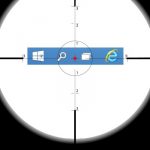
There's a lot to like about Windows 10, particularly if you're already a fan of Windows 8.x -- there isn’t all that much that's new at this stage. It's not all good news however, and there's also quite a lot to dislike. One thing that has cropped up time and time again in user feedback is the fact that the Search and Task View buttons that appear in the taskbar cannot be removed.
At least, there is no built in option to remove them. Where there's a will, there's a way and some enterprising users of the Technical Preview have found ways to banish the buttons that are seen by many as being pointless.
Windows 10 to include built-in two-factor authentication

We've looked at the two public builds of the Windows 10 Technical Preview -- the initial, disappointing, embryonic build 9841, and the very slightly less disappointing build 9860 -- but of course the best is still to come. There are many features we expect to find their way into the final build, such as Cortana, and there are sure to be many surprises. One interesting inclusion is built-in two-factor authentication.
The presence of this valuable security feature is revealed by Jim Alkove in a post on the Windows blog in which he talks about the importance of identity protection and general security. He explains that Windows 10 will start to move users away from single factor authentication -- the humble password -- in favor of more secure options.
Here's what's new in Windows 10 Technical Preview build 9860
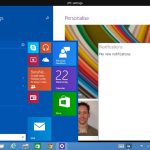
Development of Windows has been criticized in the past for being slow. With the Technical Preview of Windows 10, it's just not possible to level the same complaint at Microsoft. It's only a couple of weeks since we got our grubby little hands on the embryonic build 9841 and tens of thousands of users have provided feedback. Now it's upgrade time. Build 9860 has been pushed out -- through Windows Update, no less... none of this messy ISO malarkey this time around -- so it's time to take a look at the work Microsoft has done.
When build 9841 was released, there was disappointment from many quarters -- including here -- at just how little had changed since Windows 8.1. Jumping up 19 build numbers might not seem like much, but there are now a couple of features that were talked about at the launch of the Technical Preview that were not available in the first release -- but still no Cortana.
Download Windows 10 Technical Preview build 9860 now!
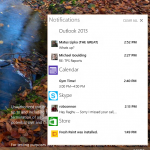
Windows 10 Technical Preview has just been updated. We've been working with build 9841 for a little while, and now it's time for an upgrade.
Today, Microsoft releases build 9860 to people signed up to the Windows Insider Program, and there are a number of key additions. There's the Action Center to handle notifications, new animations, and improved multi-monitor handling.
Want the Windows 10 look? Install the Windows 10 UX Pack or Windows 10 Transformation Pack


WindowsX has released the Windows 10 UX Pack 1.0 and Windows 10 Transformation Pack 1.0, tools that skin Windows and -- in the case of the Transformation Pack -- patch system files to provide a look and feel that’s close to the current preview version of Windows 10.
Of the two, the UX Pack is the preferred choice for those running Windows 7 or later, as it makes changes without patching system files; however, the Transformation Pack does work with Vista and XP as well as later versions of Windows.
1 million people are trying Windows 10 Technical Preview, and a new build is on its way
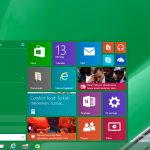
Microsoft released the Windows 10 Technical Preview a fortnight ago, inviting testers to participate in the Windows Insider Program and help the company build a better operating system.
In two weeks, over a million people have apparently signed up to try out the new OS, and according to Microsoft, the tech giant has received over 200,000 pieces of user-initiated feedback to date via the built-in Windows Feedback app. You can see a rough breakdown of the top feedback received so far here. Microsoft also revealed some genuinely interesting information regarding how people are running the OS.
Windows 10: How to quickly switch between the Start menu and Start screen
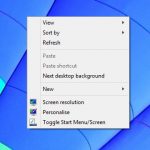
The main highlight in the Windows 10 Technical Preview is unquestionably the new Start menu. It is the perfect blend of the old and the new, mixing the Windows 7 Start menu with Windows 8's tiled Start screen.
If, however, you’re a Windows 8.x user who has become accustomed to working in the Start screen, you may not want to take the 'backward step' of returning to a Start menu. (My colleague Mark Wilson certainly feels your pain). The good news is Windows 10 lets you choose between the Start menu and Start screen, although switching backwards and forwards between the two modes is rather cumbersome. Fortunately, there’s a simple solution.
Windows 10 Technical Preview feedback: what users want to change
Microsoft is encouraging people who have downloaded the Windows 10 Technical Preview to provide feedback on the embryonic operating system. The Start menu is something that users have been begging for, and changes to the Command Prompt have been a very long time coming, but just what do testers think of Windows 10 so far? There's still quite some time to go until Windows 10 is released giving Microsoft lots of opportunity to respond to user feedback. This is what Microsoft is all about these days after all.
With help from one of the readers of his Supersite for Windows, Paul Thurrott has pulled together a list of the top ten requests that have been received so far. The methodology may not be entirely scientific, but it does give an interesting insight into how Windows 10 has been received and what people would like to see changed.
© 1998-2026 BetaNews, Inc. All Rights Reserved. Privacy Policy - Cookie Policy.