Microsoft: Surface is here to stay


In a post on the Surface blog, Microsoft has moved to assure businesses that the Surface line is here to stay. We've already heard that the Surface Pro 3 is a success -- although there are no figures to back up this claim -- but Microsoft's failure to launch a third generation RT-based version of the Surface, as well as the disappearance of the long-rumored Surface Mini, raised fears that the line of tablets may not be long for this world. Microsoft is keen to allay these concerns, pointing out not only that Surface is here to stay, but also that it is particularly suitable for businesses.
The post points out that the Surface Pro 3 is a device that's "great for getting things done". There's almost an air of desperation to the blog post in which Microsoft extols the virtue Surface and confirms its commitment to the brand. The selling point is still that the device is a laptop and tablet in one, and post author Brian Hall, General Manager for Surface, is quick to mention a number of big names who have adopted Surface Pro 3.
How to enable the notifications center in Windows 10 Technical Preview

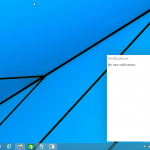
When Microsoft took the lid off Windows 10 in late-September, the software giant showcased some of the new features that its new tiled operating system offers in the Technical Preview build. Chief among them was the revival of the Start menu, but virtual desktops, a beefed-up Command Prompt, and Task View were also demoed during the presentation. However, even though it has been an oft-requested addition, there was no mention of a notifications center being baked-into Windows 10.
That was a major disappointment in my book, as a notifications center is a must-have feature for any modern operating system, let alone one that is supposed to run on desktops, laptops, tablets and smartphones (perhaps, even wearables). But, rest assured, Windows 10 does come with a notifications center. Microsoft may not yet want us to see it, but it can be enabled. And here is how.
Untwist your panties -- Windows 10's 'keylogger' is nothing to worry about

As we all know, Windows 10 Technical Preview is out there and ready for anyone with the time and inclination to try out. Much has been made of the return of the Start menu as well as the new features such as virtual desktops, but over the last couple of days the rumor grapevine has been working overtime.
The big news is that Windows 10 includes a keylogger so that Microsoft can spy on your every action, tracking your every keystroke as you enter usernames, passwords, and bank details. Well, that's not strictly true... despite what some sites would have you believe. So, what then? Windows 10 doesn't include a keylogger? It's not quite that simple.
The curmudgeon's guide to Microsoft's embryonic Windows 10
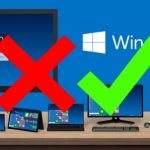
It's only a matter of days since Microsoft officially revealed the Windows 10 Technical Preview. This was a revelation with a lot riding on it but it was really something of a tease -- Microsoft didn’t give too much away. We rushed to grab the download, and Wayne showed how to get it up and running in VirtualBox (interestingly, I had to opt for VMware Player, as VirtualBox refused to install the 64-bit version of Windows 10 on my Surface Pro. It ran away from the ISO as though it was infected with ebola). I've had a few days to play about with this release -- I've stuck with a virtual machine for now rather than going all-in with dual-boot -- and I've already had a chance to write a little about the Start menu and the command prompt, but now it's time to delve a little deeper and see what else there is to discover.
Spoiler alert: despite the headline, and indeed my reputation, I don’t hate Windows 10. It just about goes without saying that I'm not head-over-heels in love with it, and there's a great deal I dislike about it, but it does feel... well, just 'nice' really. It's comfortable, familiar, and feels a bit snappier than Windows 8 -- even when running in a virtual machine.
Keyboard aficionados gain a smattering of new shortcuts in Windows 10

While Windows 8 tried to switch the focus to touch input, Windows 10 Technical Preview finds Microsoft seeing sense and realizing that most people still labor away with a mouse and keyboard. Diehard keyboard fans are always keen to learn the latest shortcuts, and the same will be true of Windows 10. We've already seen how Ctrl+C and Ctrl+V can be used to copy and paste at the Command Prompt, but there are a few other new shortcuts to learn. These are largely limited to the new features of Windows 10, and as these are slightly thin on the ground, it's little wonder that there aren’t all that many new keyboard shortcuts to add to your repertoire.
In a post on the Windows blog, Microsoft's Senior Marketing Communications Manager and Chief Windows blogger, Brandon LeBlanc reveals a small number of new shortcuts. While there are -- at this stage at least, very few new keyboard shortcuts, many of them are repurposed from previous versions of Windows anyway, while some are reinstated having been lost in Windows 8.
Windows 10: Command Prompt's experimental new features are genuinely useful
With the release of Windows 10 Technical Preview you would think that the time would be to look forward rather than backwards. It's a time to embrace the new and exciting, but it's hard not to look back and draw comparisons.
With Windows 10, initial impressions suggest that there may not really have been a need to skip over Windows 9 -- there are no massive surprises to be found. But there are some interesting changes to be discovered in the most surprising of places. In looking backwards, it's hard not to bring MS-DOS to mind, along with its slightly more modern version, the Command Prompt. Forget the redesigned Start menu, virtual desktops and everything else, the Command Prompt is where it's all happening, kids!
Kill the Start menu and get the Start screen back in Windows 10
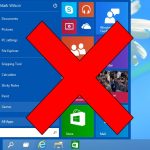
Since the arrival of Windows 8 there has been a lot of huffing and puffing about the Start screen. Some people love it, but a lot of people yearn for the return of the Start menu. With Windows 10, this is now a reality. If you grab yourself a copy of the Technical Preview you can experience the all-new Start menu for yourself, but you may find that it's not for you.
If you find that you actually miss the Start screen from Windows 8, it's very easy to get it back -- you just need to know where to look.
Windows 10 Technical Preview for ARM tablets, smartphones will only come next year
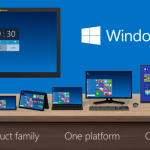
When Microsoft took the wraps off Windows 10, the software giant informed us that its latest operating system, which officially launches next year, will run on all sorts of devices, including PCs, smartphones and tablets, and feature a unified app store. Both are firsts, as, so far, there was a Windows to suit everything: one for ARM tablets, one for PCs, one for embedded devices, one for smartphones and so on. Of course, the Server editions will not go away, but that's to be expected.
As a Windows Phone user and watcher, I am particularly interested in seeing Windows 10 in action on smartphones. Microsoft has talked quite a lot about what the new operating system brings on PCs and tablets -- it even released a Technical Preview build for x86 devices -- but kept quiet about its plans for smartphones. Well, that has changed, thanks to Joe Belfiore, the software giant's Operating Systems Group corporate vice president (better known as the head of Windows Phone).
How to use virtual desktops in Windows 10

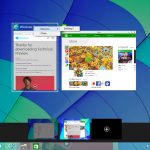
While most people will be talking about the return of the Start menu in the next version of Microsoft’s operating system -- and with good reason -- it’s not the only big change in Windows 10.
Windows 8 proved to be something of a productivity killer for many people, but Microsoft is once again catering to the needs of power users, and has finally introduced a feature that has been offered in Linux for many years -- the virtual desktop.
How to create a bootable Windows 10 Technical Preview USB drive

Microsoft has released Windows 10 Technical Preview, giving early adopters like you and me the opportunity to experience some of the lovely new features that the operating system will bring to the table when it officially launches next year. The highlight is, of course, the new Start menu, but the other changes add up to give us what could very well be the sleek and modern Windows we have all been waiting for: touch-friendly, yet still great with a keyboard and mouse.
This all sounds very intriguing indeed, especially if you have been holding off on upgrades so far. If you want to take the plunge and test Windows 10 Technical Preview directly on your PC, without taking the virtualization route, then you already know that your best install option is a bootable USB drive. Luckily, you came to the right place -- here is everything you need to do.
Everything you need to know about the Windows 10 Start menu
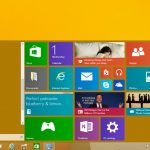
I switched from Windows 7 to Windows 8 from day one, and although I’ve dabbled with Start buttons, Classic Shell being the preferred choice, I learned to live with the Start screen, something that became easier once Microsoft released Windows 8.1 and 8.1 Update. But now that Windows 10 Technical Preview is here, it’s time to once again embrace the Start menu.
Windows 10’s Start menu is the perfect blend of Windows 7 and Windows 8.x. Click the Start button and the menu appears, displaying icons on the left and tiles on the right.
Windows 10 Technical Preview is live -- download it now
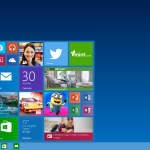
Microsoft surprised everyone yesterday by announcing that the next version of Windows would not be Windows 9, as was widely expected, but Windows 10. The new name makes little sense really, but that doesn't matter because the new operating system looks good, and should please current users of both Windows 7 and 8.x.
Before it launched Windows 8, Microsoft released preview versions of the OS, allowing people to test what was a radically different UI. With Windows 9, the tech giant is taking the same approach, but with one fundamental difference -- it promises to listen to what users think of the OS, and this feedback will help shape the direction of Windows 10. If the company had done that with Windows 8 there's a very good chance things might have worked out differently for the tiled OS. If you're keen to get your hands on the technical preview, the good news is the wait is over and it's now available.
Watch the Windows 10 presentation
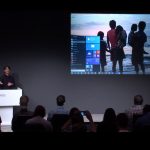
Microsoft disappointed a lot of people yesterday by not livestreaming its Windows 10 reveal. It was a strange move considering that most tech companies offer a stream these days (and even a bad livestream, as Apple gave us for the iPhone 6 launch, is better than none at all).
The reason why Microsoft didn’t offer a stream is that it wasn’t a product launch as such, or even a presentation aimed at consumers. The company revealed the name -- Windows 10! -- talked about the benefits for the enterprise, and then quickly ran through an early build of the product. But while there was no livestream, the event was recorded, and it’s now available to watch.
Sorry Linux fans, Windows 10 will continue Microsoft's desktop domination


I'll admit, when Windows 8 was first announced, I hated it. Even though I am open-minded about UI changes, the Start Screen rubbed me the wrong way. At the time, I was strictly a keyboard and mouse user, who enjoyed doing things on a large monitor. After months of trying to convince myself that I would eventually like the changes, I gave up and went to Linux full time. I was already a casual user of operating systems based on the open-source kernel, but now I was jumping in head first.
Initially, life was great and I hopped from distribution to distribution trying Ubuntu, Mint, Fedora and many more. What was cool about these Linux-based desktop operating systems, was that I could choose the environment of my liking. In other words, if I didn't like the UI, I could easily switch. This was in stark contrast to Windows, which has a take it or leave it approach. Ultimately, I decided on Fedora and the GNOME 3 environment. This surprised me, because as a lifelong Windows user, I expected to gravitate towards KDE. Over time though, something strange happened -- I went back to Windows 8.
With Windows 10, Microsoft leaves lots of questions unanswered

So… we now know that Windows 9 is by far the least successful version of Windows ever, grossing Microsoft a total of $0. But Microsoft is as keen as ever to look to the future, and it's pinning its hopes on the newly revealed Windows 10. At the unveiling in San Francisco we learned quite a lot about the upcoming version of the successor to Windows 8.1 (yep... it's going to sound weird for a long time), but there were also a lot of unanswered questions. It was interesting to see that the demonstration used build 9841 which we have already seen in leak, and in this regard there were few surprises. Between the release of Windows 10 Technical Preview Microsoft still has a lot of work to do, and a lot of people to convince to upgrade.
What do we not yet know? We don’t have a release date, at least nothing that has been pinned down. We know it will be some time in the second half of 2015 -- if everything goes to plan -- but that's quite a big Window. We also don’t know what costs, if any, might be associated with the operating system. It has been suggested that Microsoft would make Windows 10 available free of charge, but nothing official has been said on this front. We have no idea what sort of upgrade path may be available -- would this be Microsoft's opportunity to usher everyone away from Windows XP once and for all? Simply offer a free upgrade to an operating system that addresses the issues users have raised and the security problems associated with an ancient version of Windows should diminish.
© 1998-2026 BetaNews, Inc. All Rights Reserved. Privacy Policy - Cookie Policy.