

Windows users, need to take a screenshot? Try SnapCrab


If you’re a software reviewer or a blogger, a gamer or just looking for an easy way to take screenshots, there are plenty of tools to choose from. For anyone keen on sticking with what Windows has to offer, there’s the Snipping Tool but there are numerous other tools available if you like the idea of something a little more advanced. One of the leading commercial tools is SnagIt, but for many people this is restrictively priced. SnapCrab is a free screen capture tool that offers much of SnagIt’s feature set in a well-rounded package.
As you would expect, this is an app that is hotkey driven, and you can create keyboard shortcuts to grab the active window, the entire desktop, or just a selection. You can opt to have the cursor included or ignored and there are extensive options that allow for the automatic naming of files based on the date, time, program being used and numerous other variables. By default your images are saved as PNGs but there are other formats to choose from.
FileMind is the brain Windows Explorer lacks

If you find that Windows Explorer does not meet your requirements for browsing and managing your files, you have no doubt taken a look at some of the many replacement utilities that exist. Many such tools improve on the idea of Explorer but few offer anything particularly new. The sane accusation cannot be leveled at FileMind which provides a traditional means of accessing files and folders as well as something a little more interesting.
A cursory glance reveals nothing especially out of the ordinary, but spend a few minutes investigating and you’ll find that there’s plenty o get excited about. FileMind is not dissimilar to a web browser, and tags the idea of hyperlinks and tag clouds in a new direction. To make it easier to access the files you access most frequently, an enlarging of label and color coding make such files easier to identify.
Ashampoo Snap 6 adds video capture

There are many circumstances in which you may need to capture an image of what is happening on your screen at any given moment. Hitting Prt Scr will do the job, but apart from the option of pressing Alt at the same time to capture just a single window, there are few options available to you. Ashampoo Snap has been updated to make image capturing easier and more flexible than ever before, even introducing video capture as a new feature.
The latest version of the app includes a new minimalistic capture bar that resides at the top of your screen at all times. If you’re the sort of person who does not get on with keyboard shortcuts, although these are still available, this bar provides you with access to all of the various capturing modes supported by Snap 6, ranging from simple full screen captures and individual windows to scrolling windows and freeform shapes.
New Evernote supports Windows 8 Modern UI
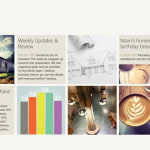
Evernote for Windows 8, a dedicated app designed to take advantage of the new Windows 8 Modern UI, is now available. It’s completely separate from Evernote for Windows Desktop 4.5.9, the traditional desktop app that has also been updated today.
Both apps were joined by the first dedicated Windows build of related Evernote app, Skitch, which release influenced the major new features in Evernote for Windows Desktop 4.5.9.
Before buying Windows 8, use Upgrade Assistant

It is here. After months of waiting, beta releases and consumer previews, Windows 8 has finally hit the shelves and download servers. If you’re considering upgrading the next thing you need to consider is whether your computer is up to the task, whether all of your hardware is going to be compatible and how many of your applications are going to need to be upgraded. These are all questions that can be answered by the Windows 8 Upgrade Assistant.
As Windows 8 is the first version of Windows to be made available as a download, it should come as no surprise that once you have run through the Upgrade Assistant you will be invited to purchase the latest version of the operating system. Compared to previous versions of the assistant, the Windows 8 specific release seems to take rather more time over system analysis during which all of your hardware and software will be checked.
Use Clover to add tabs to Windows Explorer

The introduction of tabs to web browsers is arguably one of the most useful innovations that have been made. Advances in security and performance are all great, but tabs make a real difference to the usability of browsers, making multi-tasking a great deal easier. Clover is a free Windows add-ons that enables you to take advantage of this very same feature in Explorer so you can navigate between your folders in tabs rather than having to have multiple windows open.
The addition of tabs to Explorer may seem like a fairly minor change, but it is amazing just how much of a difference it can make. If you’re a fan of the way tabs work in Firefox, Chrome, et al, you’ll love the similar way in which Clover works. All of the shortcuts you have become used to can be used here -- Ctrl+T to open a new tab, Ctrl+W to close it, Ctrl+Tab to move the next tab etc.
IOBit Advanced SystemCare 6 Pro review

Tweaking performance is something that virtually every Windows user is interested in. There are various degrees to which performance tweaks can be applied, starting with simple things such as ensuring that there are not too many programs configured to start when Windows launches, to more advanced options such as tinkering with services and the registry.
Whether you are a newcomers to system tweaking or a more seasoned user, turning to a third party-tool -- rather than doing all of the legwork yourself -- not only helps to save a good deal of time, but also helps to reduce the risk of making mistakes that could have disastrous consequences; edit the registry incorrectly and you could find that you have an unbootable system on your hands.
Use WinMetro to bring Modern UI to older Windows
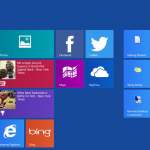
Microsoft may have changed the name of the interface formerly known as Metro to Modern Interface, but that does little, if anything, to stop consumers and software publisher from continuing to use the original moniker. As such, one of the apps that brings the look of Windows 8 to older versions bears the name WinMetro.
Regardless of the technical appropriateness of the name, WinMetro is a handy utility for anyone impressed with the aesthetics of Windows 8 but who is not looking to make the jump from the current operating system. While the tool is not a replacement for the Start menu in the strictest sense of the word -- it is not possible to remap the Windows key to bring it into view for instance --- the application is a neat overlay that brings you the look and feel of Windows 8 at no cost.
Start Screen Pinner does for Windows 8 what the name implies
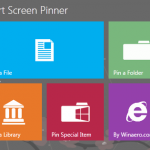
The release of Windows day is mere days away and the release rate for tools geared up for the latest version of Microsoft’s operating system is accelerating. One of the most controversial aspects of Windows 8 is the new Start Screen, and this is a feature that many tweaking tools concentrate on. This is certainly the case with Start Screen Pinner which, as the name suggests, makes it easy to pin almost anything to the Start Screen.
Start Menu tweakers are tools that crop up fairly frequently, and there are plenty of utilities that have been designed to make the Start Screen of Windows 8 easier to use by reinstating the Start button. Start Screen Planner is slightly different in that it provides you with a way of adding new shortcuts to the Start Screen rather than changing the way it work or the way in which you access it.
Google Calendar releases as separate Android app -- get it NOW!

Android users running Ice Cream Sandwich and Jelly Bean can now take advantage of a new standalone version of Google Calendar. The move brings the product/service more in line with Gmail, Google Play and others that have been separate apps for some time now, and the split sees the introduction of some interesting new options that could well be enough to persuade users away from other calendar apps.
The calendar app previously was limited to a number of devices, notably Nexus, but now it is available to anyone running the right version of Google mobile operating system. While the standalone app is nothing groundbreaking, there are a few noteworthy tweaks, starting with the fact that there is now a snooze function for those occasions when you are busy with something else but still want to be reminded of an upcoming appointment.
Uniblue PowerSuite 2013 build 4.1.4.0 adds startup manager and resource optimizer
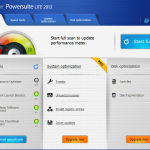
Looking to tweak Windows? There are plenty of tools to choose form if you don’t fancy the idea of editing the registry, but you have to sort the wheat from the chaff in order to find something half decent. The world of tweaking tools is divided into two camps: utilities that are free and those that are not. Paying for a program is not necessarily an indication of quality, and with PowerSuite Lite 2013 you have the option of sticking with the free version or paying a bit for a range of extra tools.
Whichever route you decide to go down, the latest build 4.1.4.0 introduces two important new enhancements -- a PC startup manager and PC Resource Optimizer. The free, lite version of the program features the PC Resource Optimizer component and, when enabled, this component of the suite aims to improve the performance and responsiveness of your system by balancing processor and disk resources so demand is never too high at any given time.
Need to restore your PC? Try Windows Post-Install Wizard

The prospect of reinstalling Windows is not one that many people relish, particularly if it is something that needs to be done on a regular basis, to numerous machines, or both. Part of the problem is that getting everything set up how you want it to be is that once Windows itself is up and running, there is still a great deal to do in terms of configuring the operating system to your liking as well as installing the applications you need.
Whether you are someone who frequently wipes the hard drive to start afresh, or you are an admin looking after several computers that need to be refreshed from time to time, Windows Post-Install Wizard is a tool that exists to help make your life easier. The seemingly simple task of cleaning up a system by installing the operating system from scratch can very easily turn into a chore that takes up and entire day -- until your create your own custom installation disc that is.
SnapPea manages your Android device from Windows

Looking for a way to better manage the contents of your Android phone or tablet? SnapPea is a free tool, currently in beta, that could meet your needs. Regardless of whether your device was provided with its own management software, which is found wanting in the vast majority of cases, you can use the program to connect to your device to perform backups, transfer data and browse through images and other files.
You’ve probably found that keeping on top of your contacts on your phone can be a pain – with SnapPea you can take advantage of your computer’s mouse and keyboard to make changes, additions and backup more quickly and easily than ever before. Similarly, the program can also be used to browse through your text messages in a simple yet sleek interface, but more importantly it gives you the ability to send text messages from within Windows.
Save big on these October software treats

September was crazy month for new software. Whether this was the rush to get new products on-sale before the Windows 8 launch or the traditional Q3 pre-Christmas release schedule, or a combination of both, you may have missed one of these important releases.
Creating PDF files used to be an incredibly expensive operation but this is no longer the case. Nitro Pro 8 is an advanced PDF creation and editing tool which is available at a 20-percent discount -- just $95.99. For a limited period of time, you can get the previous Nitro Pro 7 for only $59.99, saving 50 percent from MSRP. There are also multi-user versions of Nitro Pro 8, so you can buy for your business and save further.
Whoa, noozy studio 3 brings Zune-like UI to your Android music
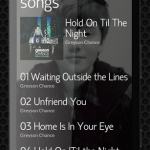
Music players are not exactly thin on the ground on the Android platform, and the battleground on which users are gained and lost is the user interface; noozy studio is a music app, which features a somewhat minimalistic look and feel, and bears more than something of a resemblance to Microsoft Zune. The interface is largely text driven, which helps to give the app a clean, modern look.
This is an app that can be used to listen to both locally stored and online content, and enables users to discover new music by browsing through what others have been listening to. Listening to music stored on your Android device is much as you would expect, with album art being displayed at the same time as playback controls. If you’re a music fan, the sound quality of what you listen to is going to be important – there are a number of processor effects included with the app that can be used to improve sound in various ways.
Sofia Elizabella's Bio
Sofia Wyciślik-Wilson is a queer, transgender journalist based in Poland. She has been writing about technology for more than two decades, and after years working for magazines, her writing moved online. She is fueled by literature, music, nature, and vegetables. You can find her on Bluesky and Mastodon. If you like what you read, you can Buy her a Coffee!
© 1998-2026 BetaNews, Inc. All Rights Reserved. Privacy Policy - Cookie Policy.