

TweetDeck 2.0.1 makeover mimics Twitter website


Twitter may be accessible through a website, but many users turn to a dedicated app to keep abreast of what the people they follow have to say and to share their thoughts with followers. One of the most popular Twitter clients, TweetDeck, has received a major upgrade that brings a redesigned interface, choice of new themes and much more.
The most noticeable change in this latest release is the new look, which is more in keeping with the Twitter website and other official Twitter apps. Anyone using the service can enjoy a more uniform experience moving between platforms as things now look much more similar whether the web is used or an app for iOS, Android, Mac or PC. There has been a great focus on usability, and screen elements have been improved o make them easier to read.
Turn your tablet or phone into a second monitor

If you use, or have ever used, a multi-monitor computer, you’ll know just how useful a setup it can be. Have the extra space afforded you by double the usual number of monitor enables you to see more at once, work more quickly and be more productive -- but it can also be expensive and requires you to have a desk large enough to hold two monitors comfortably. If you have a mobile device, however, you can use iDisplay to gain an extra monitor from your existing hardware.
The name of the software might imply that this is something that will only be of interest to Apple hardware owners, but in fact it can be used in conjunction with an iOS or Android phone or tablet. Your mobile device does no need to be physically connected to your computer -- the desktop version of the client software is available for both Mac and PC -- which opens up new opportunities.
LibreOffice 3.6.2 stomps bugs dead

With more and more computer users counting the pennies, the move to lower cost and free software gains momentum. Microsoft Office may still be the world’s most popular office suite, but there is a growing user base that has turned to one of the free alternatives that have been gathering strength in recent years. LibreOffice is one such suite, and the latest version addresses a series of known bugs and helps to improve stability.
Although there are no major new features or options to be found in LibreOffice 3.6.2 – this crown was taken by the 3.6 release -- there have been improvements in a number of areas which increase the overall stability of the program and make it a piece of software that more businesses are likely to look to as a free office suite. 3.6.2 includes bug fixes for both the Windows and OS X versions of the suite.
Dropbox 1.5.34 experimental previews new menu, Retina Display support

The desktop client for the ever-popular cloud storage service Dropbox has been updated with a new experimental build. There are a number of new features to explore in this latest release, but the most obvious is the newly redesigned menu. This is a neater affair than in previous versions, providing an overview of the latest activity as well as access to additional options.
These extra features include pausing files transfers, as well as sharing and restoring files. The new menu is only available to OS X and Windows users -- anyone running Linux misses out for the time being -- and Mac users also benefit from new Retina Display support as well as a new batch of great-looking icons.
BullGuard Internet Security 2013 gets new look, improves detection

BullGuard Internet Security 2013, the latest version of its online security suite, is now available. Comprising antivirus, firewall, spam filter, parental controls and more, the suite aims to cover more than most other comparable tools and the latest version features a dramatically redesigned interface which is cleaner and sharper than in previous versions, making it easier focus on the task in hand.
Virus detection rates are improved with the addition of Behavioural Detection, which helps to identify unknown threats by monitoring activity and helps to bolster the regular signature based scanning. Security is further enhanced by the inclusion of a firewall and spam filter, but this is a security suite that bills itself as a tool that not only makes your PC impenetrable, but also provides a number of associated utilities.
HDClone 4.2 Free supports Windows 8

The release of a new operating system often means that there is renewed interest in migration and backup tools and this is certainly the case with the imminent release of Windows 8. Hard drive cloning tool HDClone 4.2 Free is the latest app to be updated with support for the latest version of Microsoft’s OS, and there are a number of other improvements that have been made to this utility.
While the free version of the program is more limited than its big brothers -- there are also Basic, Standard, Professional and Enterprise editions available for anyone whose needs are a little more demanding -- there’s still enough here to cater for most people’s requirements.
Ashampoo UnInstaller 5 cleans better than ever

Removing unwanted software from your hard drive should be easy, but there are countless reasons why the process may prove problematic -- even if this just boils down to a badly written uninstaller. This is the very reason there are so many dedicated software uninstaller tools available, and one of the biggest names in the field is Ashampoo. The company has just released Ashampoo UnInstaller 5, which expands on its predecessor by improving the removal of apps that are no longer required.
While the program can be used to uninstall any program on your hard drive, it works best when used to remove those that have been installed after Ashampoo UnInstaller 5 itself. The latest version of the software includes an improved installation monitor which checks precisely what changes an installed program makes to your computer so they can be easily reversed when the time comes to remove it.
Emsisoft Anti-Malware 7 boasts two scanning engines

The threat from viruses and malware is one that not only continues, but shows no signs of slowly down. The need for protective software has not gone away, and what could be better than install an anti-malware tool to help keep yourself safe? How about a security tool that boasts not one but two scanning engines? Take a look at Emsisoft Anti-Malware 7 -- in addition to Emsisoft’s own malware scanner, there is now a new second scanning engine from BitDefender.
There is a strong focus on performance with this release. Emsisoft has optimized its own scanning engine, and new settings have been added that enable users to configure how the software should make use of processors. What this amounts to is being able to choose how many cores should be used to run the scanner as well as increasing or decreasing the number of active threads, increasing program priority and making use of advanced caching techniques to help speed things up.
Make September a time to remember with these software sales

Everyone loves to save a little money here and there, but when the timely bargains result in an alliteratively name month -- September savings -- so much the better!
Brand new to the store this month is the much-anticipated TuneUp Utilities 2013. You can save 50 percent from TuneUp Utilities 2013 [3-PC], ideal for installing on three home computers. If you have a single PC, save even more with TuneUp Utilities 2013 [1-PC]. There is also TuneUp Utilities 2013 [UPGRADE] designed to enable previous users to upgrade, at a discount. Finally, a TuneUp Utilities 2013 + AVG Internet Security 2013 [1-PC] bundle will safeguard and maintain a single computer.
MAGIX Music Maker 2013 mini-review

Programs that aim to simplify complex processes are often doomed to failure. You would think that any software designed to bring music making to the masses -- music making being something that people dedicate their lives to -- would fall at the first hurdle. But MAGIX is a company that has produced accessible software for many years, and the Music Maker range is one of its flagship products.
MAGIX Music Maker 2013 picks up form where its predecessor left off, but whether you are someone who has used a previous version of the program or you are new to the range, there is a lot to explore in this surprisingly power music creation software. The latest incarnation of the program is very much an evolution of an established product, and while it has little major in the way of new features, it feels like a natural progression.
Oracle VirtualBox 4.2 improves VM management

Oracle has released a major update to VirtualBox taking it up to version 4.2. The virtualization software is available for Windows, Linux and OS X, and now includes a new VM Group features that makes it easier to manage related virtual machines by organizing them together in groups. Users are able to utilize several virtual machines simultaneously either through the GUI, using various APIs or through command line tools.
VirtualBox 4.2 has a number of improvements to networking components, starting with increasingly the maximum supported number of network cards for a virtual machine from eight to 36. This is not the only improvement that has been made to networking as it is now also possible to place limits on network usage by any virtual machine. If a network is being used for other things, this traffic shaping is a valuable way to prevent unwanted slow-down in other areas.
Opera 12 beta RC supports Retina Display
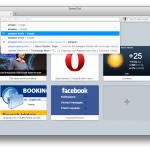
Retina Display support continues to be added to more and more applications as they are updated, and the latest update is for Opera 12.10 beta. This is one of the headline features of the latest build, but there are also a range of bug fixes as well as an update core – although it should be noted that this is a beta release.
The addition of Retina Display support helps to improve the appearance of web pages, particularly for text. Graphics, on the other hand, will appear slightly blurry unless the page administrator has taken the step of using double resolution images. The interface of the browser has also be updated with a new skin which includes new higher resolution icons.
ViStart 8 gives back what Microsoft took from Windows
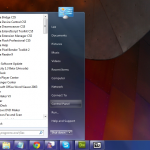
If you have tried out any of the preview releases of Windows 8, you may well have joined the thousands of users who are mourning the loss of the Start menu. Microsoft’s decision to drop this staple element of Windows has caused frustration, confusion and disbelief in equal measure, but with the help of ViStart 8, you can bring back an old favorite to Windows 8, but there’s also a lot to look forward to if you have an older version of Windows.
One of ViStart 8 key selling points -- although the app is actually free -- is that it supports skins. These provide you with a quick and easy way to completely transform the look of the Start menu. You may think that the program has done very little when you first install and run it in Windows XP, Vista or 7, but as you explore the range of skins that are available, you’ll discover that there are varying layouts to choose from.
Get Aero on Windows 8
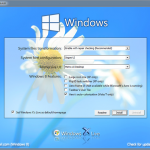
Hot on the heels of the RTM version of Windows 8, a swathe of tools that can be used to either emulate the appearance and features of the latest version of the operating system, or tweak Windows 8, have emerged. Windows 8 Transformation Pack 6.0 and Windows 8 UX Pack 6.0 both fall into the former camp. Something that has annoyed many long-term users: Microsoft dropped Aero from the latest release -- with these tools you can regain it.
Now that the final release version of Windows 8 has been unveiled, many of the changes that have been are fairly minor updates that bring this duo of tweaking tools in line with the very latest code. In the Transformation Pack this means that wallpapers from the RTM version of Windows 8 are now available, and changes have been made to the use of the Segoe font family for better compatibility. Elsewehere you’ll find the very latest icons, buttons, boot screen and more, so you can get the full Windows 8 look.
Tweak your PC with Puran Utilities

Just how involved would you like to be with the process of cleaning up and maintaining your computer? If you’re reading this, there’s a fairly high chance that you like to get pretty hands on, but there will still be occasions when time is short and you need a quick-and-easily solution to get the job done quickly. Puran Utilities is a free utility suite that has both bases covered with an impressive selection of more than 20 tools that you can use individual or in combination with each other.
These tools cover everything from check your hard drives and registry for problems, removing unnecessary software, rendering deleted files unrecoverable and much more. Many of the optoins available may sound like tools that are already built into Windows, but this is not the case for all of them. Windows has lacked a file wiping tool for years, and a registry cleaner is similarly noticeable by its absence, but even if you view Puran Utilities as a repository of simple tools, it is useful to have everything available in one place.
Sofia Elizabella's Bio
Sofia Wyciślik-Wilson is a queer, transgender journalist based in Poland. She has been writing about technology for more than two decades, and after years working for magazines, her writing moved online. She is fueled by literature, music, nature, and vegetables. You can find her on Bluesky and Mastodon. If you like what you read, you can Buy her a Coffee!
© 1998-2026 BetaNews, Inc. All Rights Reserved. Privacy Policy - Cookie Policy.