

BBC iPlayer for iOS now downloads TV shows


iPhone, iPod and iPad users who take advantage of the streaming capabilities the BBC’s iPlayer app now have a new feature to play with -- the ability to download programs and store them on your phone or tablet for up to a month. This is a move that will be welcomed by travellers as it opens up the chance of downloading a batch of programs at home over a Wi-Fi connection to avoid racking up expensive data usage bills while away from home.
There is promise of an Android version of the updated app in the pipeline, but for the time being this is something that can only be enjoyed by iOS users. The newly added offline mode is a great addition to the app, which had already been updated to allow for programs to be streamed over a data connections as well as when connected to Wi-Fi. While the change is undoubtedly beneficial, it does come with limitations.
Three tools to tame Windows 8

Users of Windows are known not only for their love of tweaking, but also for their love of knocking the product they use -- how many people who use nothing but Windows do nothing but complain about the way it looks or works? The release of a new version might be seen as a time for Microsoft to address the issues and annoyances that have plagued their customers, but for many upgraders, the switch to Windows 8 brings a new batch of things to get irritated about.
While some of the new irritants are fairly major, such as the relegation of the Start menu, other more cosmetic issues are something that can be more easily addressed through the use of third party tools. Winaero produces a collection of tools designed with tweakers in mind, specifically those who are running Windows 8. If you’re the kind of person who tires of their desktop wallpapers quickly, Desktop Background Tuner provides you with a means of customizing the rotation of a series of images to help keep things interesting.
Troubleshoot your PC with Power Eraser 3.1 and Bootable Recovery Tool 5.1

With effective antivirus software installed, you can protect yourself against a range of online threats such as viruses, spyware and other malware. But there are some forms of malicious software that manage to evade detection by even the newest and completely updated protection tools. In this situation, you may feel as though there is nothing left to do but to format your hard drive and start from scratch, but Norton Power Eraser 3.1 and Norton Bootable Recovery Tool 5.1, both updated yesterday, prove otherwise.
You may have noticed popup windows that you do not seem to be able to eliminate, but there could be countless other symptoms indicating that something is wrong with your computer. But before you reach for the installation disc for Windows, grab yourself a copy of the latest version of Norton Power Eraser, which can be used to scour your hard drive for instances of malware that may not otherwise be detected.
LinuxLive USB creator now supports Peppermint OS Three, ArchLinux and Slitaz
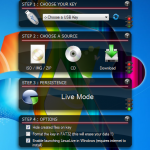
Linux is no longer the geeky OS it used to be. Well, that might not be entirely true, but the operating system certainly has become more accessible in recent years. User friendly distributions such as Ubuntu have increased the popularity of Linux, but making the switch from Windows is still rather a daunting task for most people. If you don’t fancy the idea of wiping out Windows completely, or even going down the dual-boot route, LinuxLive USB Creator lets you make a portable version that can be run from a USB drive.
The very latest version of the program has added support for Peppermint OS Three, ArchLinux and Slitaz, but there are countless other distributions that can be used. Turning your USB drive into a portable Linux drive could hardly be simpler. If you have already download a Linux image, or you already have a distro burned to disc, you can select either of these as a source. However, you are also able to download many different varieties of Linux from within the app.
Postbox 3.0.5 supports Mountain Lion, Retina Display

Now that development of Thunderbird has ground to a halt, the market for alternative email clients to replace OS X mail is wide open again. One app that has proved incredibly, and increasingly, popular over the years is Postbox, which benefits from a refined interface and a fabulous turn of speed that makes it easier than ever to manage your inbox. Version 3.0.5 brings about some important updates for Mac users.
Although Postbox is available for both Mac and Windows, this time around it is Mac users who can reap the benefits of the update. The release of Mountain Lion and new ranges of Macs with Retina Displays means that there is now a flurry of activity as more and more apps are updated to take advantage of the latest display technology.
Go back to school with one of these 25 downloads

After a brief vacation, it’s time for another software roundup to catch up on the biggest and best releases from the last week. We’ll start by taking a look at some of the apps that have been release for mobile device.
Facebook for iOS 5.0 is a release largely concerned with improving the performance of the app with news load times being improved and a new tappable banner making it possible to load new posts without the need to refresh. Android users have Facebook for Android 1.9.8, which now includes the ability to create events and allows for faster sharing of photos.
MAGIX Music Maker 2013 tones your tunes

Music creation is now easier than ever, and while teenagers still gather together to practice in the basement, computer-based music from the bedroom continues to grow in strength. The idea behind MAGIX Music Maker 2013 is nothing new -- there are endless programs that let you use loops, samples in addition to your own recordings to create your own musical masterpieces -- but the latest version of the application gives you more tools and a better workflow than ever before.
Anyone who has used a previous version of the program will notice the redesigned interface, which can now be better customized to suit your workflow, and performance has also been improved so you can get things finished faster than ever. These changes are welcome, but the tools and options available are what really matter. The 2013 version of the program lets you work with up to 99 tracks and the sample selection has been expanded to the extent that a new search tool has been added.
AVG Secure Search offers website safety ratings

The Internet can be a dangerous place, and there are countless websites just waiting to serve up a dose of malware. Everyone knows the importance of having antivirus and anti-malware software installed, but simply browsing the Internet can direct you straight to web pages that could wreak untold damage to your computer. AVG Secure Search is a security tool that is constantly on the lookout for you, showing you safety rating for any sites you search for.
This browser plugin can be used with Internet Explorer, Firefox and Chrome, and it uses a custom Google search to let you know whether sites that appear in your search results are safe, risky or dangerous. You are not prevented from visiting sites that have been flagged up as being dangerous -- mistakes do happen, after all, and there will inevitably be times when you need to access a site from the dark side – but warnings are displayed to strongly discourage you from going through with it.
Chrome for iOS adds Facebook, Google+ sharing

Just like Firefox, Chrome rockets through version numbers as though it is going out of fashion. Although Google’s foray into the world of web browsers for iPhone and iPad is fairly recent, Chrome for iOS already is version 21. The latest release is a relatively minor one, but there is still one feature that brings the browser in line with other more socially aware apps.
The big news in this release: addition of new sharing options. Found a website that you think your friends will love? There is no need to copy and paste the URL into an email as there are now new sharing options built directly into the app. A new popup menu lets you share pages through Google+, Facebook, Twitter or via email.
Benchmarking tool AIDA64 now supports Windows 8

Want to know the specifications of a computer? You could look at the manufacturer’s website, but you’ll probably find that there is a limit to the level of detail provided. Similarly, if you want to know how fast your machine is, there is little point relying on figures quoted by the manufacturer, if you want to know how it performs in the scenarios you are using it in. AIDA64 is one of the most advanced benchmarking and diagnostic tools available and the release of version 2.60 sees the addition of support for Windows 8 as well as the latest hardware.
Benchmarks are a great way to see how one system compares to another, and they also provide a means of checking exactly what difference, if any, tweaks and hardware upgrades make to the performance of your computer. There is support for a massive range of hardware, so whether you are using an aging machine, or something more cutting edge, you should be able to find out everything you need to know.
Norton Mobile Utilities Lite for Android packs premium, paid upgrade

Symantec is a company with many strings to its bow but is most often associated with security software. Those with long memories will remember Norton Utilities, a tweaking tool for Windows that Symantec bought. The Norton name lives on and Norton Mobile Utilities revives the Utilities genre for Android users. The tool is designed to help your Android device more efficiently, and the release of version 2.0 of the app sees it splitting into two branches -- free, and paid-for premium versions.
The free version of the app, now referred to as Norton Mobile Utilities Lite, gives users greater control over memory usage, making it easy to terminate apps to free up resources. There are a number of informational components to the app, and these will tell you everything from how much battery life you have left, details of the hardware you are using and how much storage space you have available.
Sizester gets photos just right for sharing

Before you share images via email, Facebook, or some other online means, the chances are that you have to spend time resizing them. This may be to overcome size restrictions (in the case of email attachments) or to reduce upload time (when you are sharing via social networks). Sizester is a great low-cost tool that lets you resize and share from the same place, helping you to get your images online faster than ever.
This is a small app that loads and operates incredibly quickly, making it a far cry from slow and cumbersome image editors that you may be used to. While it’s not free of charge, the asking price is very low and the ease with which it enables you to get your images online more than makes it worthwhile. It includes just the features you need to get the job done so you are not overwhelmed with unnecessary options.
Sky+ 4 turns your iPad into a TV remote

When you’re watching TV the remote control seems to have a life of its own, often resulting in it disappearing when you decide you want to switch channels. Being somewhat larger than a standard Sky remote, your iPad is far less likely to go missing, so wouldn’t it be great if you could use the tablet you’re using to check emails while you watch TV to control your Sky+HD box? The release of Sky+ 4.0 means that this is exactly what you can now do.
Getting up and running is very simple -- just make sure that your Sky+HYD box and your iPad ate connected to the same network and you’re ready to go. While the app itself is not new, many of its existing features have been updated and there are plenty of new options that have been added as well. The big new feature is remote control. Using gestures you can control the playback of whatever you’re watching, tapping to play and pause, and swiping to skip back and forth.
RealPlayer for Android exits beta

Remember RealPlayer? The media player that was once, quite some time ago, one of the go-to media players for online media disappeared into relative obscurity, shouldered out of the limelight by the likes of Silverlight and HTML5 video. For desktop platforms, RealPlayer has all but vanished, but it is trying to make headway into the mobile market. RealPlayer for Android is out of beta and officially released.
Rather than just audio and video, RealPlayer for Android can also be used to play slideshows of photos, but movies and music are really where it’s all at. There is support for playlists so you can create mood music for every occasion and access it with ease. Aside from RealVideo and RealAudio, support for which can be added through and in-app purchase, the app can playback any file that is supported by your phone or tablet.
Mountain Growl gets more from OS X 10.8 notifications

Growl is an excellent notification system for OS X that makes it easy to keep an eye on the status of a range of different applications without the need to switch between apps. But there is one problem, particularly for anyone who is keen to jump on the latest version of OS X -- there is currently no support for Mountain Lion and its new Notification Center. Mountain Growl can help here.
The Notification Center is in line with the same feature that is found in iOS and is the latest in a series of changes to OS X that blurs the lines between the mobile and desktop versions of Apple’s operating system. If you have been a Growl user, you’ll have noticed that when you upgraded to Mountain Lion that you have to endure Growl notifications alongside those from the Notification Center.
Sofia Elizabella's Bio
Sofia Wyciślik-Wilson is a queer, transgender journalist based in Poland. She has been writing about technology for more than two decades, and after years working for magazines, her writing moved online. She is fueled by literature, music, nature, and vegetables. You can find her on Bluesky and Mastodon. If you like what you read, you can Buy her a Coffee!
© 1998-2026 BetaNews, Inc. All Rights Reserved. Privacy Policy - Cookie Policy.