

Mission Control / Expose Clone brings some of OS X's best UI features to Windows

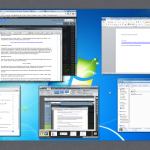
When it comes to subtly, Mission Control / Expose Clone will win no prizes for its name -- however, it may well impress in its ability to bring a great feature of OS X to Windows users. Ordinarily, Windows allows you to navigate between open windows and program using the task bar or by pressing the Win + Tab or Alt + Tab keyboard shortcuts. With Mission Control / Expose Clone installed, you can add Ctrl + Tab to your shortcut collection to access this great utility.
The program brings you some of the features of Exposé and Mission Control, enabling you to quickly access and overview of all running programs and open windows on a single desktop. Just as well your Alt + Tab between programs you can see a live preview of open windows, but things are kept beautifully neat thanks to the way the screen is arranged. Just like Mission Control, the program will automatically create stacks of windows from the same program -- so all of your Word documents are grouped together.
36 software downloads you shouldn't miss this week

This has been another action-packed week for software releases, but it is one dominated by one name -- Microsoft Office 2013 Consumer Preview. The latest version of Microsoft’s office suite has received a public preview, meaning that anyone keen to get a glimpse of the Windows 8-friendly, metro-interface suite can do so right now.
Olympic fever is starting to take hold and two new mobile apps BBC Olympics 1.0.0 (UK ONLY) and London 2012: Official Join In App for the Olympic and Paralympic Games 2.0 have been released to help you to keep up to date with the latest news and events, whether you are attending or not.
Thunderbird 15 Beta 1 debuts Australis UI

After the furore surrounding Mozilla’s recent announcement that it’s to place its email client, Thunderbird, into an “extended support release”, the launch of Thunderbird 15.0 Beta 1 was always bound to attract attention. And it’s certainly turning heads, thanks to the official debut of a redesigned user interface.
Thunderbird 15 Beta 1 also debuts two noticeable new features in addition to the revamped user interface, extending the global search tool to cover the Chat module, plus implementing the “do not track” feature that debuted in Firefox last year.
Access OS X and Windows partitions with Paragon NTFS & HFS+ Beta

Owners of Android devices who work with both Macs and PCs should take a look at NTFS & HFS+ Beta. This newly unveiled app from software developer Paragon helps to overcome compatibility issues that you may have experiences with your cell or tablets and PC and Mac. Despite the fact that this is an early beta, it is an interesting tool.
If you are an Android owner with a Mac, you may well have formatted a memory card as an HFS+ drive. This is not ordinarily a problem, until the time comes when you want to access the files on a PC. Similarly, if you are a PC users, formatting a drive using NTFS could lead to problem with your Mac.
Manage all your social networks in one place with AVG MultiMi

Social networks are great tools, but there are now so many of them it can be something of a nightmarish task keeping on top of all of them. Using the likes of Facebook, Twitter and LinkedIn should be fun and rewarding, but if you use more than three or four networks things can quickly spiral out of control and become unmanageable. AVG MultiMi has now left beta and enables you to manage all of your social networking needs from one place.
With support for Facebook, Twitter, LinkedIn, Flickr, YouTube and countless email services, whatever your online life includes, there’s a high chance that it’s supported by MultiMi. If you have used the beta version, you’ll notice that there has been something of an interface overhaul but there are also a range of new options. There is now support for Google Reader although there is also a built in RSS reader, and if you are a Read It Later user who has migrated to Pocket, there’s support for this service too.
Keep your PC healthy with IObit Advanced SystemCare v6 Beta
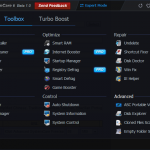
System optimization and maintenance tools are not exactly thin on the ground, but there are some names that are far more worthy of attention than others. One such name is IOBit, and their newly released Advanced SystemCare v6 Beta is the latest in a line of tools designed to help make it easier to look after your computer. If you’ve used the program before you’ll immediately notice that the beta boasts a new look, but there is far more to explore besides the aesthetics.
This is a tool that has all of the bases covered, from simple things such as deleting invalid shortcuts and cleaning up junk files, to defragmenting drives and the registry and even offering protection against malware and online threats. There are various components that can be called on whenever you need them, but one of the key advantages of using Advanced SystemCare v6 Beta over other similar tools is the fact that there is on-going monitoring and maintenance carried out for you.
Move apps among virtual desktops with Dexpot 1.6
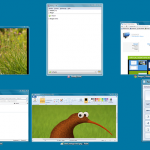
Virtual desktops are a great alternative to having multiple monitors installed to gain more space to work with. Dexpot is a virtual desktop management tool and it has just been updated to include and impressive new interactive preview screen that can be used to move windows and program between desktops, and even perform more advanced options such as creating copies of windows. There’s also a portable edition of the same version of the app available Dexpot Portable.
The preview window also features support for mouse and keyboard controlled zooming, but one of the most intriguing new features is the Window catalog. This displays all of the windows that are included on a desktop as a series of tiles and if you start dragging windows around Dexpot will automatically switch to full screen preview mode. Old favorites such as the desktop manager and desktop preview have also been redesigned.
Panda Cloud Antivirus 2.0: Security gain, without PC resource pain

Virus protection is a must for all computer users and in addition to the level of security that such software provides, it is also important to bear in mind the impact that such protection programs can have on your system. It is all well and good having a program that protects you from every known virus, but there is little point in it if running the software causes your computer to slow to a crawl. Panda Cloud Antivirus Free 2.0 takes the strain off your computer by ensuring that all of the hard work is done for you in the cloud.
This in itself is nothing new, but version 2.0 of the program, available in both free and paid for varieties, brings a number of changes, additions and enhancements that make this worth a second look if you have previously dismissed it. Probably the biggest change in this particular release sees the inclusion of the behavioral analysis engine that was previously only available to Pro users in the free edition of the software as well.
Grab 34 exciting software downloads released this week

The second week of releases for July is a little different from other weeks in that there has been a greater number of Mac releases than usual. TRIM Enabler 2.2 is a great free tool that helps to improve the life of SSDs, and the latest version of the app includes support for a wider range of drives. Lion is proving to be the most popular version of OS X yet, and Lion Tweaks 2.0.1 is a free tweaking tool that can be used to customize the operating system and eliminate irritations, while CrystalClear Interface 2.7.4 enables you to completely change the appearance of OS X through the use of skins. If you want to be sure of a secure web connection whether you are at home or out and about with a laptop, Hotspot Shield 2.61 is a free proxy tool that protects your privacy and enables access to blocked web sites.
No week would be complete without its fair share of browser updates, and this week is no different in that respect. Chrome 21.1.1180.41 Beta is an interesting peak into the future of Google’s browser, and there is also a portable version of the software available in the form of Google Chrome Portable 21.1.1180.15 Beta. If you're keen to see what the future holds for Chrome, there is also Chrome 22.0.1201.0 Dev and again there is a portable version available -- Chrome Portable 22.0.1201.0 Dev.
SkyDrive's big, new feature is a Windows 8-style logo

Almost every software update that gets released, particularly those that involve only minor version number increases, addresses bugs that have been found and performance issues. This is the case with the latest release of Microsoft’s cloud storage app SkyDrive but there is also a little more to be found in this seemingly minor update (16.4.6003). Perhaps the most immediately obvious change is the new logo which is very much in keeping with the look and feel of Windows 8.
The imminent release of Windows 8 means that improve support for this new operating system was to be expected. The new logo mimics the look of the Windows 8 logo -- albeit in a more rounded form -- and the update is due to roll out to other platforms in the coming weeks to give a more uniform look to the service. But there is more to the latest release than a new logo.
Make it Christmas in July with one of these software specials

We kick off this month’s selection of special offers with a world exclusive -- CyberLink Media Suite 10 Ultra, which can be yours for just $99.95 (a saving of 23 percent off the MSRP) and includes a free copy of PowerDirector 10 Ultra. You can also buy CyberLink PowerDirector 10 Ultra separately and this includes not only 30-percent savings plus free $89 software. For even less outlay, you can invest in PowerDirector 9 Ultra64 -- this previous version is reduced to clear at $29.95 or 70 percent off the MSRP. If you’re looking for disc software, you can save 80 percent off the MSRP of Roxio Creator 2011 when you buy it for just $19.99 -- Roxio Creator 2011 Pro is also available at a savings of 81 percent for just $24.95.
There are also great savings on a wide range of security tools, starting off with PC Tools Spyware Doctor with Antivirus 2012, which could be yours for just $7.95 -- a staggering saving of 80 percent off the MSRP. From the same company comes PC Tools Internet Security 2012, which features a similarly huge saving and is available for just $9.95.
OneClick for Chrome downloads torrents direct

Torrents come in for a great deal of bad press due to the fact that they have become associated with piracy, but from the point of view of both the downloader and the provider of the download, things work out well in terms of improved download speeds and reduced bandwidth requirements. Downloading files in this way is easy enough, but by installing OneClick for Chrome you can make things even easier.
Once you have this Chrome extension installed, there is no need to use a torrent client to handle you downloads, and the torrents you choose to download are treated in much the same way as regular downloads. Using the extension means that Chrome can be used to handle your torrents, and there is no need to use a third party torrent client. This helps to keep things simple and speeds up the whole downloading process.
Disconnect for Chrome lets YOU track advertisers

There are some websites for which it makes sense to use cookies. Online stores use them to keep your basket up to date and many sites use cookies to store usernames and password to help speed up logging in. but there are also plenty of sites that use cookies and other tracking methods to deliver personalized advertisement to you as well as tracking your route across the internet. This is something that Disconnect for Chrome can help with.
This is a simple browser extension for Google Chrome, but the effect that it could have on your browsing experience is quite dramatic. Once you have Disconnect installed, you are placed firmly in control over which web sites you share information with, and you can block any you would rather were not able to track you.
Get organized -- EssentialPIM 5.0 comes to Android, iOS

Everyone needs to keep their life organized and any tool that can help with this is welcome. One such piece of software is EssentialPIM, which has just been updated to version 5.0. The headline new feature: synchronization with both iOS and Android devices; a companion Android app is available for download from Google Play, while an iOS app is expected in the App Store in the near future. But this is not the only new feature in this handy PIM which bears quite a resemblance to Microsoft Outlook.
The app can be used to manage your contacts, calendars, email accounts, notes, passwords and much more. Available in Free, Portable and Pro varieties, the program has been updated to include support for multiple SMTP servers as well as the ability to configure an unlimited number of identities in the mail component.
Keep your PC healthy with Uniblue Powersuite 2013

System optimization tools are ten-a-penny, but those that are worthy of note are few and far between. One tool that falls into the noteworthy camp is Uniblue Powersuite, which has just been updated to version 2013. This comprehensive suite of optimization tools has received a major facelift that makes its various components easier than ever to navigate and provides you with helpful information about the health of your system.
The redesigned interface finds the suite’s tools divided up into three main sections -- speed tools, system optimization and disk optimization -- but there is also a general Overview section that gives you a quick insight into the state of your computer. The Speed Tools section covers all of the basics such as CPU management to better balance CPU load as well as improveing the launch times of various programs by caching the resources they use. There’s also a proactive thumbnail generator that eliminates the need to Windows to create image thumbnails on the fly.
Sofia Elizabella's Bio
Sofia Wyciślik-Wilson is a queer, transgender journalist based in Poland. She has been writing about technology for more than two decades, and after years working for magazines, her writing moved online. She is fueled by literature, music, nature, and vegetables. You can find her on Bluesky and Mastodon. If you like what you read, you can Buy her a Coffee!
© 1998-2026 BetaNews, Inc. All Rights Reserved. Privacy Policy - Cookie Policy.