

Celebrate July with one of these 19 software downloads


The halfway point of the year has come and gone, and as we slide our way through the calendar, there are more and more software releases to keep track of. If you’ve been busy through the first week of July, here are some of the highlights that you may have missed.
Starting off this week’s selection of titles are a number of tools with a connection to the Internet. Connectify Lite 3.5 is a great free tool that can be used to turn your laptop onto a WiFi hotspot that can be used by other laptops or mobile phones. If you want to use the Internet as a platform for your photography, jAlbum 10.8 can be used to share your photos online. ShareMeNot is a browser extension that can be used to prevent social networking buttons from tracking you line -- it is available as ShareMeNot for Firefox 2.0.1 and ShareMeNot for Chrome 1.0.
Get a dark menu bar that matches OS X's cosmic desktop
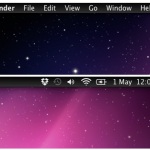
Unlike Windows computers, Macs tend to have something of a uniform look to them. Sure, you can move the dock around the screen and choose a new background image, but there just isn’t the same tweaking and customization community that exists for Windows. MenuBarFilter is a free tool that brings basic, if much welcome, customization of the menu bar to OSX.
This is a tiny utility that you need simply unzip, copy to your Applications folder and then add to your list of login Items. Once this has been done, the menu bar will no longer be silvery grey with black text, but the exact opposite. The light text on a dark background look is not only somewhat classier than the default colors, it is also in keeping with how things are in iOS.
USB Safeguard password-protects your stick

Data security is of the utmost importance, but it is usually the files stored on our hard drives or transmitted over the Internet that we are primarily concerned with. It’s likely that you have at least one USB drive that you use o move files from one computer to another, perhaps transporting files between home and office. If you were to lose the drive, there is not only the irritation of not having access to the files you need, there is also the concern that whomever finds the drive will be able to vie your private data -- this is something that USB Safeguard can help with.
As you’ve probably guessed from the name and the scenario we have set up, this is a program that can be used to protect the files you have chosen to store on a USB drive. This is a tiny portable app, weighing in at less than 100KB, but it is none the less powerful. While there is a paid version of the app available that can be used to protect drives of up to 16TB in size, there is also a free version that can be used on drives up to 2GB.
ShareMeNot protects your privacy from prying social networks

Most people who have used the Internet for any length of time are only too aware that websites are able to track their online activities by using cookies. This information is incredibly useful to advertisers, but there are steps you can take to help protect yourself. With the ever increasing popularity of social networks there is a new breed of tracking in the form of Like buttons -- and this is something that ShareMeNot can tackle.
There are very few Internet users who do not have a Facebook account, but there are numerous other social networks such as Google+, LinkedIn and many more. Many of these have their own site integration buttons that you have no doubt seen adorning the pages of many sites you visit -- they will give visitors the options of "Liking the current page on Facebook, or sharing it via some other means.
IObit Advanced SystemCare with Antivirus 2013 mini-review
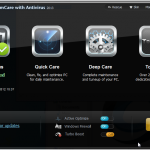
Security is a key concern for all users of Windows, but coming a close second is a desire to get the best possible performance. IObit Advanced SystemCare with Antivirus 2013 is an all-in-one suite that has both the security and performance bases covered along with a fair smattering of maintenance thrown in for good measure. The program is divided up into five main sections and in all there are dozens of tools on hand to help you to take care of your computer.
The antivirus component of the suite offers real-time protection against all manner of threats, but you also have the option of running manual scans, both quick and full, whenever you feel the need. Any files you receive via email are automatically scanned for signs of infection as are any files you download while browsing the Internet. Everything you would expect to find in an AV tool is available here -- scanning whenever you need it, quarantined of suspicious files, automatic updates and whitelisting of trusted files.
Celebrate the half-year with one of these 24 software downloads

We’ve reached the beginning of July but shouldn't forget June, which ended with a swatch of updates and releases.
Security is always a priority like these: avast! Free Antivirus 7.0.1451 is the free version of the AV tool, with avast! Pro Antivirus 7.0.1451 also featuring the same new Emergency Updater and improvements to sandboxing. Also available is avast! Internet Security 7.0.1451 which includes not only virus protection, but also a firewall, web filtering and more. Another free firewall is available in the form of the newly updated ZoneAlarm Free 10.2.64.0 and if you want virus protection as well, you might want to take a look at ZoneAalarm Free Antivirus + Firewall 10.2.
VLC 2.0.2 now supports MacBook Pro Retina Display
Popular media player VLC has been updated to version 2.0.2 and despite the minor version number increase, the changes should be immediately noticeable. The big news here is addition of support for Retina display so if you have invested in a new MacBook Pro, this is one app that will enable you to take full advantage of the enhanced screen.
Retina display support means that not only can video itself be seen in much better quality, but also that subtitles and any other overlays for a particular file can be displayed at a much higher resolution. This is clearly a release that will be of most interest to OS X users, and in addition to the new display option, a number of known problems have also been addressed. Blu-ray playback has been improved and issues that users had experienced with rotating, cropping and zooming with video have also been fixed.
Take control of MacBook Pro graphics with gfxCardStatus
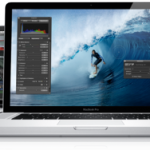
Got a MacBook Pro with a dual GPU? gfxCardStatus is a free tool that enables you to not only see whether your system is currently using the integrated or discrete GPU, but also gives you the chance to manually switch whenever you want -- all without the need to log out of your account or restart OS X. The latest version of the app adds support for the Retina displays sported by the newest additions to the MacBook Pro range.
A simple menu bar makes it easy to choose which of your GPUs should be used, or to remain in dynamic mode so all of this is taken care of for you. There are various reasons why you might want to override the automatic settings. If you find that a particular app caused your discrete GPU to be used, you can get some extra life from your battery by opting to use the integrated GPU instead.
Save big on these June software deals

We’ve made it to June -- the year just seems to be flying by! -- and with each passing month there are more and more great offers in the Downloadcrew Software Store. In fact, there are so many great offers to be found that we thought that we had better collect together some of the highlights to make things a little easier for you.
Starting things off are two disc burning tools from Roxio.Roxio Creator 2011 is available for just $19.99 (a saving of 80 percent off the MSRP) while its big brother Roxio Creator 2011 Pro could be yours for just $24.99, instead of $105. These immensely powerful media suites include everything you need to create CDS, DVDS and Blu-rays containing video, audio and data.
Rev up this week's 20 exciting software downloads

There are a number of worthy highlights this week, including the long awaited Opera 12 release, iTunes support for iOS 6 devices and a relatively major update to Skype for Windows and Mac.
The major release this week must be Opera 12. After months of beta-testing, the browser is finally available, along with an interesting twist, in the form of the first native 64-bit build. Whether a 64-bit version of a web browser makes a huge difference is another matter entirely. Opera 12 ships with numerous speed improvements, including basic support for hardware acceleration. It’s not all good news though as gone are the widgets and other features such as Opera Voice. Download Opera 12, Opera 12 (64-bit) and the separate Opera Portable 12, which you can take on the road.
O&O DiskImage 6.8 supports Windows 8

Berlin-based O&O Software has announced a major update to its Windows back-up and restore tool. O&O DiskImage 6.8.1 Professional, also available in 64-bit, boasts full Windows 8 support, plus promises faster performance in key areas.
Version 6.8.1 also takes into account third-party power settings, ensuring it stays on for the whole backup process, plus streamlines and simplifies key parts of the program in response to customer and partner feedback.
Uh-oh, Windows blue screened and you don't know why? WhoCrashed answers

When Windows dies it’s not always easy to determine just what caused the problem. Sometimes you may be lucky and find that you are shown a helpful error message that singles out the culprit, but for most BSoDs and crashes you’ll end up with an error code that is all but impossible to interpret. In many cases you will find that Windows simply restarts, giving you no opportunity to find out what has caused the problem. Install WhoCrashed and you should be able to learn so much more.
After or during crashing, Windows will generate a crash dump file that could help you to find out just what the problem is. However, finding, reading and understanding these dump files can be a problem on its own. WhoCrashed Home Edition is a free program that will automatically scan your hard drive for the presence of crash dump files and let you know which drivers are likely to be responsible.
The spotlight shines on these 27 software downloads

As we move through June, there are more and more software titles being released. The past week has been pretty busy, particularly on the web browser front, but there have also been a number of other programs worthy of note.
If you still use physical CDs and DVDs, ISO Workshop 3.0 is worth taking a look at as it enables you to work with virtual drives to save having to keep switching discs. Diskeeper 12 Home is a great tool for anyone looking to ensure that their hard drive is completely defragged, and Diskeeper 12 Pro includes support for drives exceeding 1TB. Another interesting tool for maintaining your system is GhostBuster 1.0.1.0, a free utility that remove references in the registry to hardware you no longer use. There’s also a portable version available – GhostBuster Portable 1.0.1.0.
Take those online videos to go with Wondershare vDownloader

There are countless websites that feature hours of streaming video that you can watch whenever you have an Internet connection. But what about those times when you are not able to get online? If you are going on a trip and want to ensure that the children have something to watch on a laptop or tablet, Wondershare vDownloader is a tool that can be used to grab a load of videos in advance and load them onto the device of your choosing.
Saving videos from some websites is easy enough -- just right click a link and save the target file to your hard drive. With other sites things are a little more tricky, you may need to examine source code and determine the link needed to download a file. And then there are some sites that make it all but impossible to save a copy of a video you have come across. Whether you’re looking to make it quicker and easier to download videos, or you want to be able to save copies of those videos that are hard to get, Wondershare vDownloader is a valuable, and free, tool.
Start off June with one of these 23 software downloads

By far the biggest releases of the past week come from Microsoft. The up-coming Windows 8 is now really not too far away and you can check to see whether your computer is going to be able to run it by downloading yourself a copy of Microsoft Windows 8 Release Preview Setup. This simple little tool can also be used to obtain a product key that can be used to install Microsoft Windows 8 Release Preview (32-bit) or Microsoft Windows 8 Release Preview (64-bit).
Whether you are using the very latest version of Windows or a slightly older one, security is of the utmost importance, and ZoneAlarm Free 10.2.47.0 is a free firewall that helps to protect your internet connection, while IObit Advanced SystemCare 5.3.0.246 is a complete security suite with added optimization options. From the same stables, there is also IObit Advanced SystemCare with Antivirus 2012 (v5.5.2) Beta 2 add virus protection in this preview release.
Sofia Elizabella's Bio
Sofia Wyciślik-Wilson is a queer, transgender journalist based in Poland. She has been writing about technology for more than two decades, and after years working for magazines, her writing moved online. She is fueled by literature, music, nature, and vegetables. You can find her on Bluesky and Mastodon. If you like what you read, you can Buy her a Coffee!
© 1998-2026 BetaNews, Inc. All Rights Reserved. Privacy Policy - Cookie Policy.