

Say goodbye to April with one of these 36 downloads


Cloud was the big news this past week, and there were exciting developments in the world of online storage. After what seems like years of waiting, Google Drive 1.0 finally released, extending the idea of Docs and providing users with the opportunity to store any files they want online and keept them synched with their computers. There’s also a mobile version of the app available, Google Drive for Android 1.0.77, that enables access toyour files on the move.
Ubuntu One 2.0.3 has nothing whatsoever to do with the operating system of the same name, but provides you with 5GB of free space for storage and backups. Cloud storage stalwart Dropbox 1.4.0 has been updated and finally becomes stable, as well as adding batch uploading and importing of photos Meanwhile, Microsoft released Microsoft SkyDrive 2012 v16.4 and Microsoft SkyDrive 2.0 iOS with reduced storage levels.
Cobian Backup 11 exits beta, adds new features

Looking for a backup tool? There is plenty of choice for even the pickiest of software connoisseurs. Aside from the irritating aspect of having to actually get a backup job set up, one thing that puts many people off safeguarding their valuable data by backing it up is the cost of the necessary software. Cobian Backup 11 is one of a number of free backup tools vying for users’ attention and it boasts an impressive array of features.
If you have followed the app's development, the move to version 11 introduces a number of new features as well as tweaks to existing favorites. There is now support for AES encryption, better remote management and the ability to use tasks within groups. The important thing to remember with any backup regime is that your files are only truly safe if you back them up regularly. Rather than relying on memory, it is better to have an automatic schedule in place, and this is definitely something that Cobian Backup can help you out with.
LinkedIn 5.0 for iOS supports iPad -- finally

Social networking news is not limited to the latest acquisitions by the likes of Facebook; LinkedIn, the social network for professionals, still generates headlines. The big news for iOS users: the app has moved to version 5.0 and heralds, amongst other things, the arrival of the universal version of the app; so with LinkedIn 5.0, iPad users finally get an app that enables them to tae advantage of their Retina display.
The iPhone version of the app had already come in for some praise, and the move to welcoming iPad owners to the folder looks set to head down the same path thanks to the great design that is prevalent through the interface. With tablet devices becoming increasingly common in the business world as tools of the trade, it’s good to see that apps are evolving to take this into account.
Delete something accidentally? Try Wise Data Recovery

How many times have you done it? After deciding to spring clean your computer you empty the Recycle Bin only to realize that it contained some files that you meant to copy out. Or you may be browsing through files over the network and delete some files on another machine, bypassing the Recycle Bin altogether. We have all found ourselves needing to restore files that have been deleted in haste, and this is something that Wise Data Recovery can help with.
The name of the program is about as descriptive as you could hope for, and this is an example of an app that does precisely what you would expect it to. There are no fancy extra features to be found here, but what this free recovery tool does, it does well and makes everything as simple as possible. Scans of hard drives are performed surprisingly quickly and you can tell at a glance what chance you have of restoring the data thought you might have lost.
Norton Identity Safe secures Android, iOS, OS X and Windows passwords

You’ve no doubt noticed that a huge number of websites require you to log into an account before you can do anything useful. This could be your banking site, a forum, a social network, or almost anything else imaginable and in all likelihood you have a huge number of passwords to remember. Some people simply use the same password for everything, but this has obvious security implications. Norton Identity Safe is one possible solution that rivals tools such as KeePass and 1Password as it stores all of you log in details in a secure database.
The app is available for Windows as well as iOS and Android and, providing you make sure you download the software before 1 October 2012, it is completely free of charge. Although there is a regular program installation to run through, the app is really a browser plugin for users of Windows and OS X, and it is compatible with Internet Explorer, Chrome, Firefox, Safari and Opera. As all of your password are stored in one place, you will obviously need to create a strong password to keep everything secure, and there is a two-step approach to this.
Google Drive arrives -- and what a shock, it's really an upgrade for Docs

One of the most eagerly anticipated online storage services -- and one of the worst kept secrets in computing -- has finally seen the light of day. Google Drive has, at long last, been unveiled after years of rumors and speculation, working in much the same way as the likes of Dropbox and providing users with 5GB of cloud storage free of charge.
In many ways, the release of Google Drive can be seen as more of an update to Google Docs, and this is clear for Android users who will find that their Google Docs app will update and become Google Drive.
Minor update adds more languages to jAlbum 10.6

Web album creator jAlbum has been updated to version 10.6 with a range of bug fixes and feature enhancements. Mac users can now take advantage of a native file chooser that can be used to add folders and images to an album, but there are also numerous tweaks and updates to the Windows and Linux versions of the app to take a look at.
One of the great things about jAlbum is that skins can used to create a completely unique look for your online albums, helping to avoid the risk of looking like everyone else's. This minor update includes an updated version of the Turtle skin, but most of the changes are under the hood. Translators have been hard at work providing updated text in Brazilian Portuguese, German, English, Swedish, French, Spanish, Finnish, Slovak, Polish, Slovenian, Romanian and Korean, and language information is now added to published albums.
Opera 12 gets opt-in hardware acceleration

It is only a week since Opera 12 added support for cameras, and since then two new builds have been released that push the development of the browser even further. Performance is of utmost importance for every computer user, and the latest builds of Opera Next have been improved with the implementation of hardware acceleration. Interestingly, hardware acceleration is an opt-in feature.
A new DirectX backend is available instead of OpenGL and the hardware acceleration is used to not only improve the rendering time for pages, but also boosts the speed of the user interface. In addition to the performance gains that come from the implementation of this new feature, overall performance of the browser has also been tweaked and stability problems arising from the use of plugins have been addressed.
Celebrate Earth Day with one of these 21 downloads

As April's end approaches, there is much software to thrill over. During the past week, the number of exciting releases covered seemingly every category imaginable. Whether you want to keep your computer running smoothly or have photos you want to edit, there’s something here for everyone.
Hard drive maintenance is an essential part of computer ownership and TweakNow HD-Analyzer 1.0 is a handy tool that can be used to free up disk space by identifying large files and folders. Once you have deleted unnecessary files, O&O Defrag 15.5 32-bit is on hand to help you to keep your hard drive defragmented, including remote computers on your network. There is also a 64-bit version of the program available, O&O Defrag 15.5 64-bit.
TweakNow HD-Analyzer reclaims hard drive space

Have you ever wondered where all of the space of your multi-gigabyte, or even terabyte, drive has disappeared to? The voluminous hard drive you installed a year ago seemed like it would last you forever filled up all too quickly. While there’s nothing to stop you from manually working your way through the contents to determine what could be removed to free up space, TweakNow HD-Analyzer is a free tool that could make the decision-making a little easier.
If you are running short of space, perhaps before starting a video editing project or something else similarly space-hungry, it makes sense to home in on the files and programs that are currently occupying the most space. This is something that TweakNow HD-Analyzer can help you with, performing and in-depth analysis of your hard drive and highlighting the largest files and folders so you can easy delete them or move them to an alternate location.
Bypass cumbersome iOS settings with Bluetooth OnOff
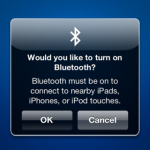
Something that irritates many iOS users, and drives a large number of them to go as far as jailbreaking their phones and tablets, is the fact that Apple is so strict about what apps are able to do. The guidelines for getting into the App Store mean that it is not possible for any app to replicate an existing feature of iOS, nor access system settings in any way that Apple deems inappropriate. Despite this, Bluetooth OnOff has found its way in to the App Store, providing easy access to Bluetooth settings.
Due to battery draining, it is not a good idea to leave Bluetooth enabled when it is not being used. With this in mind, it is strange to find that in order to switch Bluetooth off, Apple makes users jump through a series of hoops in a process that takes several taps. Bluetooth OnOff is a simple little utility that reduces this to a one or two tap process so if you need to enable Bluetooth for a quick gaming session, you can do so in around a second.
So long Read It Later, Hello Pocket

Do you find that you never have time to read the articles you discover online? In the past you may have turned to Read It Later to bookmark a site so that you can refer back to it later, but now there is a new analogy to work with. Read It Later has been re-launched as Pocket, so you can now ‘pocket’ those stories you don’t have time to read right now and save them to your online account ready for when you have more spare time.
The rebranding is more than just a change of name; there are also new features that you can take advantage of as well as a redesigned interface. Whether you are surfing the web in your preferred browser, or you discover an interesting link on Twitter or Facebook, Pocket enables you to quickly and effectively bookmark pages, images and videos so you can easily access them later. Content can be saved using a browser extension or using the dedicated iOS or Android apps.
Smile for the camera, Opera Next is watching you

Things continue to develop apace in the world of Opera, with the latest snapshot of Opera Next showcasing camera support. The latest addition to the browser means that developers will now be able to use JavaScript to access webcams, which opens up new levels of interactivity with web pages -- everything from using your webcam as a color picker to simplifying the process of uploading a picture of yourself.
There are obvious privacy concerns when web pages are allowed to access webcams, but Opera Next ensures that users are kept informed about what is going on and are given the chance to block or permit connection as they see fit. Whenever a page attempts to access your camera you are warned by the appearance of a popup that gives you the opportunity to block or allow the site on a permanent or one-off basis.
WinZip 16.5 gets Office-like ribbon, AMD speed boost

Stalwart of the file compression world WinZip has received a major upgrade that sees the introduction of a number of new features along with other enhancements and performance improvements. WinZip 16.5 has a strong focus on performance with a completely upgraded 64-bit engine as well as improved performance when used in conjunction with AMD processors.
Anyone with AMD Fusion processors and AMD Radeon GPUs will see the speed, but the overall performance of the app as a whole feels snappier. There is also a new look for the program, and the facelift helps to breathe new life into an archiving tool that many people have been using for a decade or more. The ribbon-style toolbar takes inspiration from the likes of Microsoft Office and gives a more streamlined feel while providing access to a huge range of features and options.
Get more from open windows with eXtra Buttons
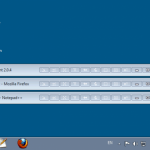
As standard, Windows gives you very little control over windows that you may have open. The title bar is usually home to just three buttons to close, maximize and minimize the current window. You can have more -- eXtra Buttons is a great, free tool that can be used to add a host more controls. This affords you a far greater level of power when it comes to managing your windows and enables you to perform a number of handy options with just a click of the mouse.
Unlike other similar tools that provide you with extra title bar buttons for programs and windows, eXtra Buttons feels like a natural part of Windows. In fact you’re likely to find that when you have used the app for a little while, moving to a computer that does not have it installed will feel like something is missing. In total there are thirteen different buttons that you can add to your title bars, and you can pick and choose which you would like to have active.
Sofia Elizabella's Bio
Sofia Wyciślik-Wilson is a queer, transgender journalist based in Poland. She has been writing about technology for more than two decades, and after years working for magazines, her writing moved online. She is fueled by literature, music, nature, and vegetables. You can find her on Bluesky and Mastodon. If you like what you read, you can Buy her a Coffee!
© 1998-2026 BetaNews, Inc. All Rights Reserved. Privacy Policy - Cookie Policy.