

Microsoft drops Windows Security Essentials 4 beta -- pick it up now!


Microsoft has released a public beta version of its Windows Security Essentials package, giving users a sneak glimpse of what to expect from future releases. There are not a huge number of changes to speak of, but the release is an important advancement for a home-user friendly security suite that has gained a large following since it debuted. Windows Security Essentials 4 beta is available right now to anyone with a Windows Live ID.
There are some minor interface tweaks to be seen in the application, but it is the improvements to performance and the detection process that are most interesting. One of the concerns with running any security software is the potential for it to impact on system performance -- and this is one reason why many people simply do not bother installing security software. Performance tweaks help to reduce the strain on your system while it is protected.
Got iPhone and administer a network? You need iPRTG 3

If you maintain a server or network, you understand the importance of being able to monitor it around the clock. There are a number of tools available that can be used to keep an eye on your network whilst on that network, but there will be numerous occasions when you are away from the office but still need to check that things are running smoothly. PRTG Network Monitor is one such network monitoring tool, but for when you are out and about you can turn to iPRTG 3 to use your iPhone or iPad to remotely monitor your network.
iPRTG enables you to view information about the state of your network and while the interface has been optimized for viewing on the screen of iOS devices, iPad users undoubtedly get a better deal, with the larger screen making it far easier to work with data. Depending on the size of your network you may choose to navigate through the app in different ways. It is possible to use network sensors as jump points, so you can, for example, quickly navigate to the device with the lowest uptime or the most free disk space.
Tweak your PC with Ultimate Windows Customizer
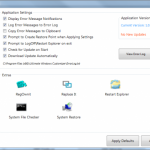
The number of tools that can be used to tweak and customize Windows does nothing but increase, and the claims made by many of these utilities can be difficult to believe. So a program that claims to be the Ultimate Windows Customizer gives itself a lot to live up to. But the title is well-deserved, as the tool perfectly balances the tweaks that make a difference to system performance with those that allow you to stamp your mark on the operating system.
Tasks such as editing the context menu or tweaking the shortcuts that appear in the navigation pane of Explorer have long been possible by editing the registry, but this is not something that everyone is comfortable with. Ultimate Windows Customizer eliminates the need to delve into the darker recesses of your OS if you are uncomfortable in doing so, but this does not mean that you must compromise on features and options.
We give thanks to these 25 app downloads
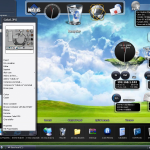
If you live in the United States, a four-day holiday weekend of feasting and shopping soon ends. Thanksgiving didn't stop developers from pumping out new wares this week. We pick 25 worth your attention, if not some warm thanks.
For many people, the Start menu is one of the most visited aspects of Windows, but if you’re looking for an alternative program launcher, Winstep Nexus 11.10 is a great option. This free tool is not only a great time-saving dock style launcher that can be used to access your programs, it is also an extremely attractive widget manager that can be used to monitor everything from CPU usage to the weather.
Don't miss one of this week's exciting 18 downloads
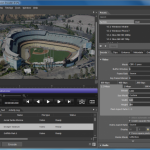
Another busy week software releases has passed, and chances are you missed something. Fear not, we have collected together some of the highlights of the past seven day in another handy roundup so you can catch up.
VMWare released a series of updates to it virtualization software, starting with VMware Workstation 8.0.1. The app can be used to run virtual copies of Windows and Linux and the latest version includes graphics performance improvements as well as support for Ubuntu 11. VMware Player 4.0.1 is the free version of the virtualization tool for Windows while VMware Fusion 4.1 is more a major upgrade for Mac users, which supports full screen mode in Lion, improves performance of virtual machines and much more.
New Skype betas add Facebook video chat
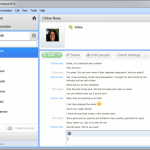
Skype’s integration with Facebook is nothing new, but the latest beta version of the cross-platform chat and VoIP tool takes this to a new level. Skype for Windows 5.7 Beta and Skype for Mac 5.4 Beta bring further advantages to connecting your Facebook account with your Skype one. Now, as well as being able to make use of Facebook chat from within the app, it is now also possible to conduct Facebook video chats.
This can all be carried out from within Skype itself without the need to visit the Facebook web site -- just as it has been possible to conduct text-based chats with your Facebook contacts, the same is now possible with face-to-face VoIP calls. Improvements have been made to Skype’s video rendering, which helps to give a smoother overall experience, and there are a number of other new features to explore.
Adobe apps turn Android into artist's canvas

Adobe is a name associated with design tools, and it has long been associated with desktop software that can be used to create everything from websites and product designs to page layouts and perfect photos. But in recent years there has been a huge interest in mobile devices, and while handheld devices are a little limited when it comes to being used as design tools, the same cannot be said of tablets. The larger screens found on tablets have been put to great use in Adobe’s latest Android apps -- Adobe Photoshop Touch, Adobe Proto and Adobe Debut.
Adobe Photoshop Touch is, perhaps unsurprisingly, a touchscreen compatible version of the company’s flagship image editing tool. The selection tool has been redesigned to make it easier to control with just a fingertip, and the usual raft of filters and effects can be found here to help enhance images on the move. For most people, this app will be the one that appeals most from Adobe’s new range of Touch Apps.
Tick Tock, here's a new Windows clock

Finding out what time it is need not mean relying on Windows’ built in clock, which is functional, but ultimately pretty ugly. Horloger, on the other hand, is a beautiful flip clock that will look great on any desktop. The look may appear familiar to mobile owners as widgets with a similar style are also available for the likes of Android, but this is a take on the genre that has been designed with Windows users in mind.
The stylish clock feels simultaneously old-fashioned and ultra-modern, and there are small and large versions available -- you can also choose from a few other skins, but the default is probably the best looking. Rather than being forced to keep your clock tethered to the lower right hand corner of the screen, Horloger can be placed anywhere on your desktop.
Hamster Free Burning Studio: Make discs without hassle
It’s fair to say that a disc burning tool is one thing hardly in short supply, so it would be natural to wonder why another might be needed. While there are all manner of advanced burning suite available, anyone starting out in disc burning for the first time tends to get forgotten. This is something that Hamster Free Burning Studio aims to address, bringing the option to create and copy discs to everyone.
The interface is the first thing you will notice about the app -- it is far from being the complex and often confusing beast that Nero has become; Hamster Fre is just delightfully simple. Despite this apparent simplicity, you can use the program to create CDs, DVDs and Blu-rays using your own files or ISO images, or you can create direct copies of discs.
Apple releases iTunes Match to US subscribers
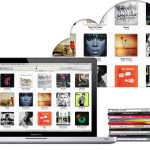
Apple has pushed out the latest version of its media player and management software -- iTunes 10.5.1. The latest version of the app is not big news in itself, but the release coincides with the much anticipated launch of iTunes Match, in the US market at least. The service has been expected for some time, but a series of delays pushed the release date back slightly. Now, at long last, iTunes Match is here.
The subscription service will set you back $25 per year and enables you to access your entire music collection in the cloud. The latest version of iOS has seen Apple expressing a greater interest than ever before in life in the cloud and this foray means that it will now be possible for those willing to stump up the annual fee to access their music collection from any internet connected device without the need for manually copying of files.
You need this week's 32 downloads
The nights are drawing in, but the pace of software release shows no sign of slowing down. It has been another busy week in the app world with a number of important releases including Uniblue PowerSuite 2012. This handy suite of tools includes everything you need to boost the performance of your computer, and if you don’t feel the need for quite such an extensive selection of utilities, you can pick and choose which you would like to use as there are also individual releases available. Uniblue RegistryBooster 2012 takes care of optimizing the registry, while Uniblue DriverScanner 2012 ensures that all of your drivers are up to date and Uniblue SpeedUpMyPC 2012 includes a huge range of options for boosting the performance of Windows.
If you like to get hands on with your computer, creating partitions is a great way to help keep different types of data separate from each other, and this is something that Parted Magic 11.11.11 can help with. This bootable Linux-based disc can be used to create and manage partitions in a range of file systems, and could be used to configure a dual boot system. Going down this route is not something that suites everyone though, and if you’d like to try out some of the new features of Windows 8, the Windows 8 Simulator Beta 1.0 enables you to do so without having to install a new operating system. You may prefer to simply get the look of Windows 8 without having to go to too much trouble, and this is something that you can do with Pulmon 2.0. This transformation pack gives you a take on the Metro interface of Windows 8. Should you decide that you would prefer to actually install the developer version of Windows 8, you will need to burn the image file to disc, and this can be achieved with the updated BurnAware Free 4.1.1.
Make iTunes work better for you

iTunes is a piece of software that is loved and hated in equal measure. There is no getting away from the fact that it is a powerful and impressive media management program, but it is also slow to use and has something of a space-hungry interface. This is something that iTuner aims to address, enabling you to take advantage of the power of iTunes without actually having to battle with the interface.
The tool is a small system tray utility that not only provides access to basic playback controls but also to manage your media library. Keyboard shortcuts can be used to start and stop playback, skip between tracks and adjust volume, as well as show lyrics and jumping in the main iTunes application for those occasions when it simply cannot be avoided.
Get more from Windows with Uniblue's 2012 tools
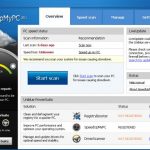
We’re approaching the end of 2011, so it should come as no surprise that developers are pushing out their 2012 products. Uniblue is a company synonymous with system utilities, and the newly announced 2012 product lines bring a number of important updates to all of the key programs. SpeedUpMyPC 2012,DriverScanner and RegistryBooster are all available as individual tools, but there is also the money saving PowerSuite 2012 which incorporates each of these utilities into a single suite.
As the name hints at fairly strongly, SpeedUpMyPC is concerned with boosting the performance of Windows. This is achieved by optimizing network and hard drive settings, amongst other things, and you are guided through the whole optimization process. Additional performance boosts can be achieved by turning to Uniblue RegistryBooster 2012 which can be used to defragment, trim and optimize the registry. There’s also DriverScanner which automates the process of keeping your system’s drivers up to date.
Clean up iTunes with Real Networks Rinse
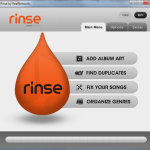
Apple’s iTunes may not be everyone’s favorite music player or media management tool, but for millions of iPod, iPad and iPhone owners it is the software they use to work with their music collection. We have all experienced problems with MP3s to one degree or another -- a library littered with duplicate tracks, albums that have no ID3 tags, tracks with misspelt name to name but a few -- and this is something that Real Networks’ Rinse can help with.
This is an Adobe Air application that can be used to analyze and fix your music library, comparing the information attached to your files with an extensive online database. If you are the sort of person who likes to remain in control of what is happening with your computer, you may want to work through your music collection one track at a time, confirming any suggested changes that Rinse comes up with.
Can't wait for Windows 8? Get Office Ribbon for Explorer now
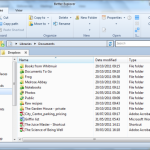
Explorer has gradually changed and developed over many years. The current versions somewhat lacks in the toolbar buttons department, and this is something that Better Explorer aims to address. The app features a Ribbon-style interface that is not dissimilar from Microsoft Office and the more recent preview versions of Windows 8 and the tabbed method of working with multiple windows that has become standard practice in web browser is also present here.
Should you decide that the Ribbon is a little intrusive to have on display at all times -- or you are working on a smaller screened laptop where space is at a premium -- it can be quickly hidden when needed, but it is never far away when you need to access it. When activated, the toolbar provides access to a number of useful options including copying the path of the currently selected item and the ability to invert the current selection. The tabbed interface is a joy to work with and the overall look of the program is impressive.
Sofia Elizabella's Bio
Sofia Wyciślik-Wilson is a queer, transgender journalist based in Poland. She has been writing about technology for more than two decades, and after years working for magazines, her writing moved online. She is fueled by literature, music, nature, and vegetables. You can find her on Bluesky and Mastodon. If you like what you read, you can Buy her a Coffee!
© 1998-2026 BetaNews, Inc. All Rights Reserved. Privacy Policy - Cookie Policy.