


Happy Birthday, Rainmeter: Version 2.0 released


Rainmeter 2.0, an open-source desktop widget tool for Windows, has been released. Version 2.0 was originally developed as version 1.4, but the developers decided to make it a major release due to the changes implemented, plus to celebrate the second anniversary of the project's "re-birth."
Rainmeter 2.0 has been repackaged so that a single installation file covers both 32- and 64-bit Windows builds as well as an optional portable installer option. The installer has also been shrunk considerably by removing the two default "theme" packages from Rainmeter and distributing them separately. Instead, Rainmeter now comes bundled with a simple starter theme called Illustro.
Sumatra PDF 1.3 improves performance, navigation and usability

Install Sumatra PDF 1.3, the latest version of the popular open-source PDF reader, and at first glance it'll look much as it always did. (Yellow, mainly.) But don't be fooled. The new build has plenty of worthwhile improvements and tweaks just beneath the surface.
The package now uses the libjpeg-turbo library instead of libjpeg, for instance, which means that non-greyscale embedded JPEGs will typically be decompressed two to four times faster than in the previous version.
Tip: Troubleshoot Mac problems with atPurpose Monitor

If you're looking to monitor your Mac's system resources, then your first thought will be to access the built-in Activity Monitor tool. It'll list all running processes, plus reveals the state of play with key hardware components, namely CPU, memory, disk activity and usage, and network traffic. That's fine and dandy for the average user, but what if you need more information -- or want more control over those running processes? The solution lies in the free system monitoring tool, atPurpose Monitor.
atPurpose Monitor lists everything Apple's own Activity Monitor does, but it does it better: processes are split off from hardware monitoring into their own dedicated window, while the Activity Viewer, which can sit in the menu bar or float on-screen, displays all of the key hardware information you need without having to switch tabs to view it all. It also displays the three most demanding system processes, letting you see which programs are currently hogging system resources, and it can be configured to display both CPU and GPU temperature too. Roll the mouse over the RAM entry, and you can flush the disk caches and reclaim physical RAM -- choose Purge RAM to do so.
HyperDock 1.0 brings Windows 7 desktop features to Snow Leopard

Are you looking to combine the best bits of Windows 7's desktop with your Snow Leopard-powered Mac? HyperDock 1.0 aims to fill in the gaps by bringing two of Windows 7's best features -- pop-up thumbnail previews of open windows and programs, and the ability to quickly and easily snap two windows side-by-side on-screen -- to the Mac desktop.
Once installed, the program adds itself to the System Preferences pane, making it possible to bring order back to a cluttered collection of windows simply by rolling your mouse over a program and window icons in the dock. A small pop-up window displays thumbnails of all open windows; select a window to view it full-screen or close it directly from the pop-up.
Tip: Save money with Google Shopper

If you're looking to save money or want to check out reviews of a product before making a purchase, Google Shopper may just be the app you've been looking for. Previously available for the Android platform, the app is now available for iPhone and iPod touch, making it possible to check prices and product details when on the high street.
The app takes full advantage of the iPhone and iPod touch camera, as it can be used to scan barcodes to speed up the process of performing searches. Once a product has been found it can be added to an ever-growing wishlist that can be shared with others -- great for when your birthday is imminent.
Identify edited images with JPEGSnoop
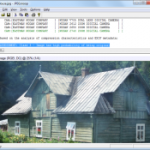
Are you looking at a digital photo in its raw, original state -- or has it been edited? Under normal circumstances this can be very hard to determine. But if you really need to know JPEGSnoop may be able to help. Just open your image and the program will examine its compression characteristics, compare these against a database of thousands of cameras and photo editors, and deliver its verdict.
So if your image matches the signature of a camera, it's probably an original shot; if it matches a photo editor, it probably has been edited, or at least saved in an editor; and if the signature isn't recognized then JPEGSnoop won't be able to say (though you can add signatures to the database manually to improve its accuracy).
Ancestory 2.0 app brings broader generational view to iPad

Ancestry.com has released version 2.0 of its mobile app for iPhone, iPad and iPod Touch users. Ancestry 2.0 features a major redesign of its user interface, which has been optimised for iPad users to make browsing your online Ancestry.com tree much easier than previously. The app also adds new options for accessing records and source citations linked to individuals in your tree. It also extends access to shared trees.
The Ancestry app is designed to give family historians access to any family trees they've stored online at Ancestry.com. Not only can users browse their own trees, they can also edit selected information, upload photos and even add new family members from scratch while away from a computer and web browser, making the app much more than a simple browsing tool.
Defraggler 2.02 improves Windows defragmentation
Piriform Software has released a new monthly build of its free defragging tool. Defraggler 2.02 includes a number of enhancements to increase performance, such as improvements to the speed and accuracy of the program's search algorithm, and a redesigned NTFS process for optimising both performance and memory.
Defraggler is a fully functional defragmentation tool for Windows users that has evolved from a program that originally defragmented selected files and folders only. Version 2, which was released late last year, featured a new tool for defragging system files at boot time along with a redesigned interface.
Asia's Influence rises over global PC market

As the balance of power in many domains shifts from the United States to China, computer makers are also refocusing their strategies to include a larger China component. China is key both as a market and a supply base. And Asian vendors, from both mainland China and Taiwan, have become contenders rivaling the top US firms.
For years, the large PC brands were American and the big makers were Taiwanese. China was at best a low-cost production site. Now, several of the former Taiwanese makers have become international brands, and mainland China has risen to become a full player as both a market and a supplier. The Chinese national champion, Lenovo, is the fourth largest PC vendor in the world. The third largest is the Taiwanese firm Acer.
Stop Internet Explorer from bleeding Windows memory

If you abandoned Internet Explorer long ago then the news that it can waste a great deal of RAM probably won't come as much of a surprise. But if you still use the browser, even only occasionally, then it's worth checking your current configuration, because it could be using three times as much memory as is actually necessary.
To be fair, this isn't entirely the fault of Internet Explorer itself. The problem lies more with its add-ons. You may only have installed one or two yourself, but other applications may have added more, sometimes without telling you, and these can have a significant effect on your PC.
Tip: Take Windows back in time without System Restore

System Restore is good when you're in a tight spot, allowing you to roll back your computer's key programs and system files to earlier versions in an attempt to fix a problem. But it's not foolproof, and because it doesn't roll back everything, it can't be relied on to always solve your problems.
Comodo Time Machine offers a free, all-encompassing alternative: instead of just rolling back certain files, it allows you to roll back all the files on your Windows drive, sending you almost literally back in time to the point where your chosen snapshot was taken. It's not just good for fixing problems (and we include virus infections in that), it's also great for those who have to install lots of software on their PC for testing purposes, helping keep the PC running without the need for a regular Windows reinstall every six months or so.
Splashtop Remote Desktop for iPad offers basic control of your PC
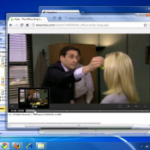
Last week, we looked at LogMeIn Ignition, just one of an increasing number of remote access tools available for iOS. Another remote access app that has received a great deal of attention recently is Splashtop Remote Desktop for iPad; we thought we would take a look at the app to see how the two compare. Just as with LogMeIn Ignition, Splashtop Remote Desktop for iPad can be used to control your PC or Mac from your iPad once the necessary desktop software has been installed.
From a functionality point of view, there is little difference between the two apps. Configuration is kept to a minimum thanks to the fact that computers that are on the same network as an iPad running Splashtop Remote Desktop are automatically detected. Providing the desktop software is installed, you need simply enter the password that was configured during the initial setup and a connection can be immediately established.
Jalbum 9.0 gets low-key release

An application's move to a whole new version number is normally accompanied by much publicity, as the authors boast about the many exciting new features they've included. Popular photo sharing package Jalbum 9.0 appears to be a rare exception, though, with the release slipping out so quietly that it didn't even rate a mention on the company blog.
That's a pity, because while this isn't as nearly as revolutionary an update as the move to Jalbum 8.0, the latest version does include some useful enhancements that will make a real difference to anyone who uses the program.
Tip: Clone or rescue your hard drive with HDClone 4 Free Edition

Here's the rub: you want to upgrade your hard drive to a bigger model, but you don't want to go through the rigmarole of setting everything up from scratch on your new drive. Or maybe you've suddenly found that Windows has badly corrupted and will no longer load -- your data is safe on the drive, but inaccessible. What you need to do is back up the drive somewhere safe, then restore Windows before recovering your precious data.
In both scenarios, there are plenty of tools, many of them free like Macrium Reflect Free, for disk cloning and backup purposes. Unfortunately, they all work from within Windows, so what to do? Thankfully, there's a free solution that can be run directly from a bootable CD in the form of HDClone 4 Free Edition.
avast! Free 6 beta adds features from commercial version

Free antivirus tools can occasionally be short on features, a little lacking in comparison to their commercial brothers. Avast! has always been an exception, though, and the first public beta of avast! Free 6 extends the program even further with a host of useful capabilities.
The new AutoSandbox, for instance, can automatically detect a suspicious program as it's launched, and execute it in the avast! sandbox, an isolated environment where there's little chance that it can infect or damage your PC.
© 1998-2026 BetaNews, Inc. All Rights Reserved. Privacy Policy - Cookie Policy.