Windows 10 doubles its usage share in a couple of days


NetMarketShare has released its monthly desktop operating system usage share figures, showing the fluctuations of the various iterations of Windows. All versions of Microsoft’s operating system registered drops in July, except of course Windows 10 which was launched at the tail end of the month.
Only being available for a few days meant the new OS was never going to shift the needle significantly, but there were enough upgraders (Microsoft says 14 million in the first 24 hours) to double the operating system’s share.
Should we all be as pissed as Mozilla about Edge taking over in Windows 10?


Microsoft is no stranger to controversy when it comes to web browsers. Internet Explorer has been the butt of jokes for many years, and the company also found itself in trouble in Europe as part of an antitrust case. With the release of Windows 10, history could be about to repeat itself.
Mozilla CEO Chris Beard penned a letter to Microsoft the other day expressing his disappointment that people upgrading to Windows 10 have their default browser choice overridden and changed to Microsoft Edge. While some may feel that Mozilla is whining, it could be argued that the company is right to be pissed -- and Windows 10 users should be just as pissed at the liberties Microsoft is taking.
Windows 10 is out, but when will you get it?

You won’t have missed the fact that Windows 10 is now out in the wild. The wait is over! Or is it? This is something of a soft launch this time around; not everyone will be getting the upgrade at the same time as it is being staggered.
Microsoft is sending out emails to people who reserved their copy of Windows 10 reminding them that they might have something of a wait on their hands. The email starts by posing the question: "When will my free upgrade arrive?" The fact of the matter is that you might want to stick a pot of coffee on to brew and put your feet up.
The real price of Windows 10 is your privacy

Windows 10 is a free upgrade, right? Well, surely you know by now that there's no such thing as a free lunch. We're only 48 hours on from the launch of Windows 10 and already the complaining and criticism is underway. One thing that has been brought under the spotlight is privacy under the latest version of Microsoft's operating system.
Some people have been surprised to learn that Microsoft is utilizing the internet connections of Windows 10 users to deliver Windows Updates to others. But this is far from being the end of it. Cortana also gives cause for concern, and then there is the issue of Microsoft Edge, and ads in apps. Is this a price you're willing to pay?
The essential collection of Windows 10 guides -- everything you need to get started, fix annoyances, and more

Here on BetaNews we’ve posted a wealth of how-to guides designed to help you master Windows 10. While the new OS isn’t difficult to get to grips with, certain elements are far from intuitive.
With all the news that’s been happening, you may have missed some of these guides -- especially ones from before Windows 10 launched -- so we've put together this one-stop shop for all the helpful information posted so far. Below you'll find out how to download Windows 10, get the ISO, create installation media, install Windows 10 on Mac or in a virtual environment, change the default browser or the default search engine, block automatic updates, and much, much more. As new guides are added, so this article will be expanded to include the latest content.
Stop Windows 10 using your internet connection to share updates to other people
A lot of things have changed in Windows 10, not least the way in which updates are delivered. Now that Windows 10 has been officially released and is gradually spreading around the globe, more and more people are starting to discover that the latest version of Microsoft's operating system is using more bandwidth than expected.
Windows 10 uses a P2P-style system called Windows Update Delivery Optimization (WUDO) which means that once your computer has downloaded an update it can be shared to not only other computers on your network, but also other people online. While it makes sense to share updates to your own computers, you might well resent giving up your bandwidth to others. Thankfully, it's easy to disable internet-wide WUDO.
Remove 'Quick Access' from File Explorer in Windows 10

When you go into File Explorer in Windows 10 you’ll see a selection of your most frequently accessed folders, and 20 of the most recently opened files.
This is useful if you want quick access to content you’ve been using recently, but if you don’t want all of these links cluttering up File Explorer you can hide the view, or disable it entirely.
Windows 10 Mobile will soon support Xiaomi smartphones


All the news surrounding Windows 10 is focused primarily on desktop and tablet, with little mention of Windows 10 Mobile from any Microsoft executives.
Vice president of Operating Systems Joe Belfiore has finally updated us on Windows 10 Mobile, stating that the Insider program allowing Mi 4 owners to flash the operating system will be open to anyone.
Windows 10 Service Release 1 may launch next week
We know that Windows 10 is the last version of Windows ever -- and this is really another way of saying that Windows will never be finished. Over the coming weeks, months, and years, we can expect to see a near-endless stream of updates to the operating system.
But while a trickle of updates was anticipated, few would have expected that a huge update would be just around the corner. Despite having launched just 24 hours ago, it seems as though the first big update to Windows 10 -- and it's shaping up to be a huge one -- is already looming on the horizon. Windows 10 Service Release 1 (SR1) could be released as early as next week!
How to install Windows 10 on your Mac


Windows 10 is now officially available to PC users across the globe, launching in 190 countries on July 29. But Microsoft's latest operating system can also be experienced on Macs, requiring even less effort to get it up and running on your Apple-branded device. And here is how you can join the Windows 10 bandwagon right now.
Just like on a PC, there are two ways you can install Windows 10 on your Mac. The first is by using virtualization software, like Parallels 10. And the second is through Boot Camp. Here is what you need to know about both options, and which one is best for you.
Windows 10 first-impressions review
The most eagerly awaited new version of Windows since -- well, since the last new version of Windows -- has finally arrived. Windows 10 is rolling out to consumers, and it’s a free upgrade for users of Windows 7 and Windows 8.1. So, what’s it like and has it been worth the wait? Here are our first impressions.
There are four main versions of Windows 10: Home, Pro, Enterprise and Mobile. The differences have been well documented elsewhere so we’ll skip the detail here, but most people will encounter the Home or Pro versions. This review is based on Windows 10 Home.
Microsoft Edge introduces new security risks in Windows 10
The Internet Explorer replacement Microsoft Edge is one of the headline features of Windows 10. With security at the heart of Microsoft's latest operating system, and the general concern about online safety, it makes sense to put the web browser under the microscope to see how it fares against the competition.
This is exactly what security analysts at Trend Labs have done. While the team concedes that Microsoft Edge beats Firefox's security and roughly draws level with Chrome's, the new web browser also introduces new security problems and threat vectors.
The best alternative Start menus for Windows 10
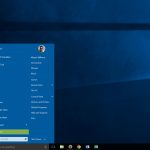
Windows 10 is here, and with it is the Start menu missing from Windows 8.x. The world rejoices. Except not everyone likes the new Start menu which blends the functionality of the Windows 7 menu with the Metro/Modern tiles from Windows 8.
If you’re not a fan of Windows 10’s Start menu (and some people are avoiding the free upgrade purely for this reason), the good news is there are a number of decent replacements available.
Recording Microsoft HoloLens videos: How it's done

I know this is some Iron Man-level stuff, but it is true. Microsoft’s HoloLens allows you to interact with holographic objects that are set in the real world.
If you told me five years ago that I’d be able to wear a futuristic augmented reality headset and do so many tasks, I wouldn’t have believed you. We already saw what HoloLens can do and how it can make us feel like the Iron Man (except the suit). The best thing is, we are barely scratching the surface of the capabilities of this headset. A recent research paper outlines how the headset can be used to grab live video and turn it into a hologram.
PC-to-Xbox One game streaming is in the pipeline for Windows 10

One of the features of Windows 10 that created ripples of excitement is the ability to stream Xbox One games from the console to a PC. But what about doing things the other way round?
If you like the idea of turning your already-powerful Xbox One into a fully upgradable games PC, you'll soon be able to do just that. Microsoft is currently working on PC-to-Xbox One game streaming, and you might not have to wait too long.
© 1998-2026 BetaNews, Inc. All Rights Reserved. Privacy Policy - Cookie Policy.